First, measure the available space, viewing distance and room for a wall bracket, if needed. Then choose a screen on which visitors can read the captions on archive photos from where they’ll be viewing. Before buying, test your own files to check that the photos and videos you want to show work via USB or an external source. A larger screen or commercial display is mainly worth considering if your viewing setup or long display hours make it necessary.
Who is this buying guide for?
Manager of a cramped archive corner
You want to show photos without giving up more shelf space than necessary. So measure the available space and check that the screen is easy to read from the usual viewing distance. The Consumentenbond notes that a greater viewing distance generally calls for a larger screen; also check that captions are readable on it.
Volunteer who updates the collection
You want to play your own photos and videos, so check in advance that your files and preferred controls work with the TV you choose. LG Nederland and Salora describe media playback for specific models, but that doesn’t confirm that every file or presentation method will work.
Organiser of a continuous presentation
You’re comparing a standard TV with a commercial display for an archive that needs to be visible for long periods during opening hours. Samsung Business Nederland also features commercial displays; you’ll need to check the features, dimensions and terms of use for each model.
What should you look for?
Compact TV on a shelf or wall bracket
A good fit when: visitors stand close to the screen and the archive won’t be shown continuously for long periods. Measure the full width and depth of the TV, including its stand.
Bear in mind: small captions may be hard to read from further away. The Consumentenbond’s general viewing-distance guidance isn’t a standard for archive text.
TV with tested USB playback or laptop via HDMI
A good fit when: the collection changes regularly and you can test your own photos and videos in advance. LG Nederland describes photo, music and video playback via USB or a network connection for model 32LQ63006LA.AEU.
Bear in mind: USB doesn’t guarantee that every file format or an automatic slideshow will work. Using a laptop as an external source requires extra space and operation.
Commercial signage display
A good fit when: the archive needs to be visible for long periods and you genuinely need scheduled or managed playback. Samsung Business Nederland features commercial displays, including 32-inch models.
Bear in mind: a commercial product range doesn’t guarantee that a particular model will fit on your shelf. Check the dimensions, mounting, features and permitted operating hours of the exact model.
| What to consider |
What should you check? |
Who is this important for? |
| Placement and readability |
Measure the shelf and the full stand; also check the smallest captions from the usual viewing position. |
I want the TV to fit and visitors to be able to read the photos and captions. Around 36% of consumers put placement and readability first. |
| Your own archive files |
Test representative photos and videos via USB or the intended external source, including your preferred controls. |
If I update the collection, I want to know for sure that my own files work with the playback method I’ve chosen. Around 29% of consumers give file playback top priority. |
| Viewing from different positions |
View a familiar photo from the side and in the location’s usual lighting. |
I want visitors to see the details from different positions, in the lighting conditions they’ll usually encounter. Around 21% of consumers put viewing from multiple positions first. |
| Long periods of use |
Note the planned operating hours and compare the energy information and management features of the exact models. |
If the screen is on for long periods, I want to know what the TV and its controls mean for this setup. Around 14% of consumers put continuous use and energy consumption at the top of their list. |
Common buying mistakes
-
Measuring only the screen diagonal
The stand and overall dimensions determine whether the TV will actually fit on your limited shelf. Viewing distance also matters when choosing a screen size.
Measure the full space available and check the mounting information for the exact model.
You may need a suitable bracket or a different setup if the TV won’t fit on the shelf.
-
Assuming USB guarantees that every file will play
Media support varies by model. A USB port alone doesn’t confirm that every archive file or an automatic presentation will work.
Test representative files and your preferred controls before making a choice.
If the files don’t play directly, you may need an external playback source.
-
Comparing a TV and signage display on purchase price alone
For long presentations, operating hours, controls and energy information may matter, as well as how the screen plays content.
Note your expected opening hours and playback needs, then compare the features and energy labels of the exact models.
For long periods of use, power consumption and any additional equipment may also be part of the setup.
Relevant brands for compact TVs and displays
Salora
For the 32HDB200, Salora describes USB playback of your own multimedia files.
- This gives you the option to test files directly from USB.
- Check file formats and dimensions for the exact model; the features listed don’t automatically apply to other Salora TVs.
LG
For the compact 32LQ63006LA.AEU, LG Nederland describes viewing photos, music and videos via USB or a network connection.
- This gives you specific playback options to test with your own collection.
- The model information doesn’t confirm that every archive file or automatic presentation method will work.
Philips
Philips lists the 32PFS6900/12 as a compact 32-inch Full HD LED TV.
- Full HD resolution is a model specification to consider when assessing archive images.
- Check separately whether it supports specific files and whether it can be wall-mounted.
Samsung
Alongside standard TVs, Samsung Business Nederland features a separate range of commercial displays, including a 32-inch interactive display.
- The commercial range is worth comparing when a presentation needs to remain visible for long periods.
- Dimensions and features vary by model; its commercial positioning alone doesn’t show that a particular display is right for this archive.
TVs at Joybuy for compact archive setups
This selection features compact standard TVs for showing local photos and archive material. Check the placement, screen size and playback option you need for each model.
 Image unavailable
KOORUI K32Q1FFQ-T8 32-inch Full HD QLED Smart TV
Could be a good fit if you’re looking for a 32-inch TV for photos and archive material; measure your available shelf space first.
32 inch; Full HD; QLED; Tizen OS; compact frameless design.
View on Joybuy
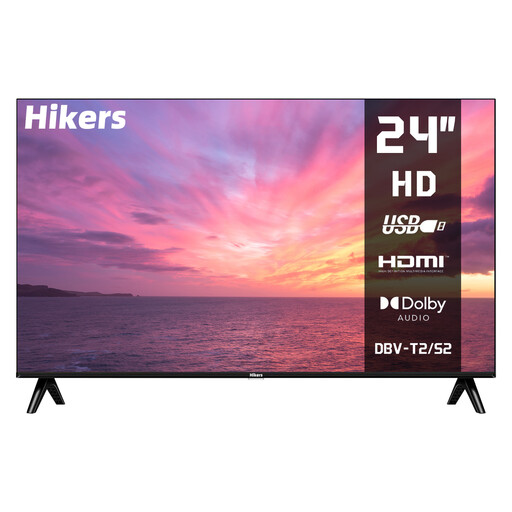 Image unavailable
Hikers HD 24-inch non-smart TV
A 24-inch screen could be an option if a larger TV is difficult to fit in the available space; check readability from where visitors will be viewing.
24 inch (60 cm); HD; non-smart; HDMI and USB; DVB-S2/T2/C; Dolby Audio; HDR.
The interface is displayed in French by default; other European menu languages are listed as an option.
View on Joybuy
 Image unavailable
CHiQ L32QM10E 32-inch QLED Smart Google TV
Could be a good fit if you’re looking for a 32-inch TV with HDMI and USB ports; check the dimensions and test your chosen playback option.
32 inch; QLED; Smart Google TV; frameless metal design; HDR10; Dolby Audio.
View on Joybuy
 Image unavailable
METZ Lifestyle Portable TV 32MQE7100Z 32-inch HD QLED+
Could be a good fit if you sometimes want to move the screen; check that the stated power supply and setup suit the way you plan to use it.
32 inch; HD; QLED+; USB-C power, compatible with a power bank; HDR10; energy efficiency class E.
The title also mentions a built-in handle and Chromecast.
View on Joybuy
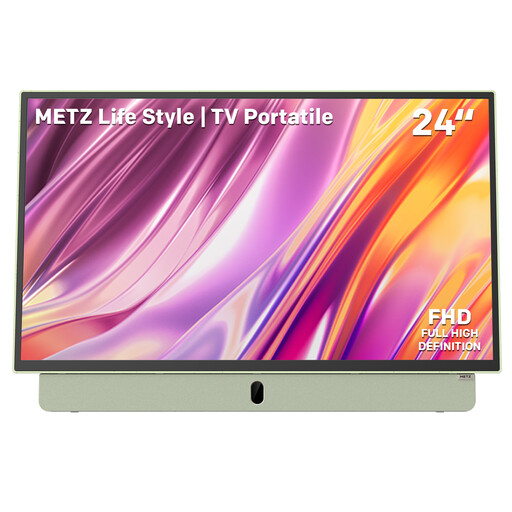 Image unavailable
Metz Portable TV MPE7200Z 24-inch Full HD Smart TV
Could be a good fit if you’re looking for a smaller screen and flexible placement; test the archive images from the usual viewing position.
24 inch; Full HD; built-in battery; anti-glare screen; Google TV; HDMI and USB; Bluetooth; Wi-Fi 5.
The product name also mentions a 12V car charger and power bank.
View on Joybuy
Frequently asked questions
How can I tell whether visitors will be able to read the photo captions?
Test a representative photo with the smallest captions from the actual viewing positions. The Consumentenbond’s general viewing-distance guidance isn’t a specific standard for archive text.
Can I simply play photos and videos from a USB stick?
It depends on the files and the exact model. LG Nederland lists USB or network playback of photos, music and videos for the 32LQ63006LA.AEU; Salora describes USB playback for the 32HDB200. Test your own files and preferred presentation method before choosing a TV.
What should I look for when it comes to energy use and the guarantee?
Compare the EU energy labels for the exact TVs, taking the expected hours of use into account; the European Union’s Your Europe website explains that the label compares energy use with other appliances. For a consumer purchase, the seller must provide a solution if something goes wrong, according to the Rijksoverheid. An additional guarantee is most relevant if its terms offer extra rights; for purchases made on behalf of an organisation, whether consumer rules apply depends on how the purchase is made.
Can a local history archive show identifiable photos of residents?
First, assess which privacy rules apply and the legal basis for each individual photo. According to the Autoriteit Persoonsgegevens, identifiable people in photos count as personal data; an organisation needs a legal basis under the GDPR to process them. The legal basis that applies in a particular case must be established for the intended use.


