Start with the furthest and outermost seats: choose a screen size to suit the viewing distance, and check the picture from an angle as well as straight on. The Dutch Consumers’ Association says OLED TVs generally have a wider viewing angle and can display deeper blacks; in ambient light, compare LCD models too, and check the brightness and reflections of each model. Before buying, check how your own video file will play and whether the audio connection suits your set-up.
Who is this buying guide for?
Host with guests sitting in different places
Wants guests sitting to the side to be able to follow dark scenes, so compares viewing angles, reflections and screen placement. The Dutch Consumers’ Association highlights viewing angles and reflections as things to consider when choosing a TV.
Viewer with a wide seating area
Wants the screen to be easy to watch from the furthest seat, without relying on the inch count alone. The Dutch Consumers’ Association describes how to use viewing distance as a starting point for estimating screen diagonal.
Sharing their own video files
Has the holiday video on a device or storage medium and wants to check in advance how it will play and how to connect the sound. The Dutch Consumers’ Association describes HDMI as a common connection for an external player.
What should you look for?
For a film night featuring your own holiday video, focus on a clear view from different seats, a suitable screen size, a playback option that works and sound everyone can follow.
OLED TV
A good fit if: guests will be sitting in different places and a wide viewing angle or dark scenes are priorities.
Check: reflections, the size of the exact model, and the connections for video and sound.
LCD TV, possibly with MiniLED
Compare this option: if you’ll have the lights on during the film or are looking for a different screen size.
Check: an LCD or MiniLED label doesn’t guarantee a particular viewing angle or sound quality; assess these for each model.
| What to consider |
What should you check? |
Who is this important for? |
| Picture from the side |
Check the viewing angle and reflections from the planned seats, with the lighting you’ll have on during the film. |
If guests won’t be sitting directly in front of the TV, I want the picture to be easy to follow from the outer seats too. Around 31% of consumers prioritise a clear view from those seats. |
| Screen size |
Measure the distance from the seats to the planned screen position and compare nearby screen sizes. |
From the furthest seat, I want to follow the film comfortably without relying on the inch count alone. Around 25% of consumers prioritise a screen size that suits the viewing distance. |
| Playing your own video |
Choose between playback via USB or an external player via HDMI; for USB playback, check which file formats the exact model supports. |
If my holiday video is on my own device or storage medium, I want to know in advance which playback option will work. Around 25% of consumers prioritise playing their own file. |
| Sound for everyone |
Listen to the TV model’s sound and, if you’re using an external sound system, check that both devices have compatible connections. |
When I watch the film with a group, I want the sound to be clear for everyone. Around 19% of consumers prioritise clear speech. |
Common buying mistakes
-
Only judging the picture from directly in front
Guests sitting to the side may see the picture differently from someone in the middle. Looking at the TV only from directly in front won’t give you a complete picture of how it will work in your room.
Check the viewing angle and reflections from the planned seats, with the lighting you’ll use during the film.
-
Assuming 4K will automatically make your video sharper
A higher screen resolution can’t add detail that isn’t in the recording.
Check the resolution and quality of your video file, and assess the TV for viewing angle, screen size and sound too.
-
Assuming a USB port guarantees playback
A USB port doesn’t confirm that your particular video file will play using your preferred method.
Check the manual for the exact model and test the whole film before your get-together. If USB playback isn’t suitable, check whether an external player connected via HDMI will work with your set-up.
Brands to compare
Philips
The 55OLED850/12 and 55MLED810/12 use different screen technologies, making them options to compare for a film night.
- Philips lists OLED and Ambilight for the 55OLED850/12, and QD MiniLED and 60 Hz for the 55MLED810/12.
- These are features of these models, not an independent assessment of picture or sound. Check viewing angles and reflections separately.
LG
The 65QNED82A6B is a 65-inch LCD model to compare if you’re considering a larger screen.
- LG lists 4K and local dimming for this model.
- These specifications don’t determine how guests will see the picture from the side; consider your seating and check the viewing angle for each model.
Samsung
The Crystal UHD U8090F is a 55-inch LCD model to compare with OLED and MiniLED models.
- Samsung lists the model code UE55U8090FUXXN for this model.
- Check the full model code when looking at a specific offer; a similar number in the same series doesn’t automatically mean it’s the same TV.
TVs and a connection accessory at Joybuy
Below are TVs with different screen sizes and picture technologies to compare for a film night, plus an RCA-to-HDMI converter for a compatible playback device.
 No image available
LG OLED65C68LA 65-inch OLED Evo C6 4K Smart TV
An OLED TV may suit you if wide viewing angles and dark scenes are priorities; the Dutch Consumers’ Association says OLED generally offers a wider viewing angle and deeper blacks.
65 inches, OLED Evo and 4K.
View at Joybuy
 No image available
Hisense 65A6S 65-inch 4K UHD TV
This screen size gives you a specific diagonal to compare with your measured viewing distance; the Dutch Consumers’ Association suggests dividing the distance by 2.4 as a starting point for estimating the diagonal in centimetres.
65 inches and 4K UHD.
View at Joybuy
 No image available
Samsung S85F Series GQ55S85FAU 55-inch OLED 4K TV
An OLED TV may suit you if wide viewing angles and dark scenes are priorities; check for reflections and assess the picture from the outer seats in your own set-up.
55 inches, OLED and 4K.
View at Joybuy
 No image available
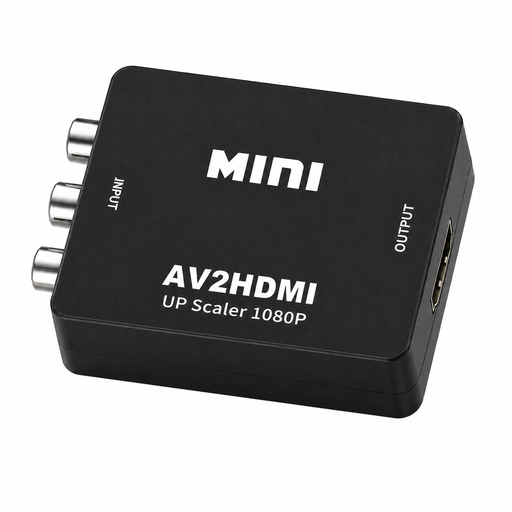
RCA-to-HDMI converter, 1080P Full HD
This is a converter, not a TV. The product name says it can be used with VHS players, DVD players and games consoles; check that your device has an RCA output and your screen has an HDMI input.
1080P Full HD converter.
View at Joybuy
 No image available
Hisense 43A6S 43-inch 4K UHD Smart TV
The 43-inch diagonal gives you a specific size to compare with your viewing distance; use the distance as a starting point, and check the picture from the outer seats too.
43 inches, 4K UHD and 60 Hz.
View at Joybuy
Frequently asked questions
How do I choose a screen size if guests will be sitting at different distances?
Measure the distance from the seats to the TV. According to the Dutch Consumers’ Association, dividing the distance in centimetres by 2.4 gives you a starting point for estimating the picture diagonal in centimetres. Compare nearby screen sizes and check the picture from the outer seats too.
Can I play my holiday video directly from a USB stick?
It depends on the exact TV model and your file. Check the supported playback formats and test the video in advance; playing it via a laptop or player connected with HDMI is another option.
What should I check if I want to use a soundbar?
Check that the TV and soundbar have a compatible HDMI-ARC or HDMI-eARC connection, and that the input will be available for your set-up.
How do I compare TVs’ energy consumption?
Check the energy label and look up the details for the exact model in the European Product Registry for Energy Labelling (EPREL). Don’t compare consumption figures for a different model or screen size as if they applied to the TV you’ve chosen.
Do TVs in the Netherlands always come with exactly two years of legal warranty?
No. The Dutch government states that the Netherlands has no fixed statutory warranty period: you’re entitled to a product that works properly, depending on what you can reasonably expect. If there’s a problem, contact the retailer; a manufacturer’s warranty is separate.


