
Groups with seats beside the sofa
If viewers will also be sitting to the side, compare the viewing angles of individual models. The Consumers’ Association points out that these can vary from one TV to another.


Start with the furthest seat and the one at the most oblique angle: a large screen is not enough if the picture is harder to see from there or spoken commentary is difficult to understand. The Consumers’ Association generally describes OLED TVs as offering wider viewing angles and deeper blacks, while LCD TVs can often deliver higher brightness. So compare the viewing angle and reflections for the specific model, measure the viewing distances, and check the sound and energy consumption too.
If viewers will also be sitting to the side, compare the viewing angles of individual models. The Consumers’ Association points out that these can vary from one TV to another.
If you often watch during the day, you may want to consider reflections and visibility in incoming light. Compare the results for the specific model.
Measure the distance to the furthest seat and check that subtitles and small details in the picture are easy to follow from there. Also make sure spoken commentary is clear from that seat.
First compare the viewing positions and distances in the room. Then consider daylight, speech clarity and the energy consumption of the models that meet your needs.
| What to consider | What to look for | Who is this important for? |
|---|---|---|
| Picture from the side | Compare the model-specific viewing-angle test or watch the same picture from the seats furthest to the sides. | If my group is spread out, I want to know whether everyone can follow the picture from their seat. Around 28% of consumers prioritise viewing angle. |
| Readability at the back of the room | Measure the distance from several seats. The Consumers’ Association uses distance divided by 2.4 as a starting point for the screen diagonal in centimetres, not as a mandatory size. | When people are sitting at the back, I want subtitles and small details to remain readable. For around 22% of consumers, visibility from the furthest seat comes first. |
| Visibility in daylight | Compare visibility in incoming light and reflections for the specific model; also consider viewers sitting at an angle. | If I watch during the day, I want to follow dark scenes and details without reflections getting in the way. Around 22% of consumers prioritise daylight visibility. |
| Clarity of spoken commentary | Listen to spoken clips from the furthest seat and check the connections if you are considering external audio. | When a group is sitting at different distances, I want to hear the commentary clearly, not just turn up the volume. For around 17% of consumers, speech clarity is the main concern. |
| Energy consumption | Compare the EU energy labels for the exact models and screen sizes; keep the SDR and HDR information separate. | If the TV is on regularly, I want to take its energy consumption during use into account when choosing. Around 11% of consumers prioritise running costs. |
The display technology alone does not tell you how a specific screen performs when viewed from the side or in incoming light.
Compare both the viewing angle and visibility in the presence of reflections for each model.
Philips lists Ambilight for the 77OLED810/12, but not as a model specification for the 75MLED810/12. A description of a different model does not necessarily apply to this TV.
If Ambilight is part of your decision, check the full model code and the corresponding manufacturer specifications.
The furthest viewing distance, the available space and how clearly the sound can be heard from the back seat all help determine whether a TV is right for your group.
Measure the room, listen from the furthest seat and decide in advance whether you need installation help or additional audio equipment.
The Dutch models mentioned use different display technologies: OLED in the 77OLED810/12 and mini-LED in the 75MLED810/12.
The QE75QN90FATXXN is a 75-inch Neo QLED mini-LED model worth comparing if you are considering an LCD TV for a bright room.
The 75C7K is a 75-inch QD-mini-LED model to include in a comparison of screen size and LCD characteristics.
These 75- or 85-inch TVs offer a range of screen sizes and display technologies to compare. Make your choice based on viewing distance, seats to the side, the light in the room and how clearly spoken commentary can be heard.
 No image available
The 85-inch screen is an option to compare when viewers will be sitting at different distances. First measure to make sure it suits the room.
The product name lists 4K, 144 Hz, Google TV and Onkyo 2.1 sound. According to the instructions, wall mounting requires a suitable bracket and a load-bearing wall, with at least 10 cm of clearance all around.
 No image available
Compare the 75-inch screen size with your measured viewing distances. Screen size alone does not tell you whether the picture will be easy to follow from the side.
The product description lists 4K, Google TV, HDMI 2.1 and Onkyo 2.1 sound. For wall mounting, the instructions specify a suitable bracket, a load-bearing wall and at least 10 cm of clearance all around.
 No image available
An 85-inch screen is a large size to compare if viewers will be sitting further away. Measure the room and seating positions before choosing a size.
The product name lists 4K, HDR10+ and energy efficiency class E. According to the instructions, at least three people are needed to lift the TV.
 No image available
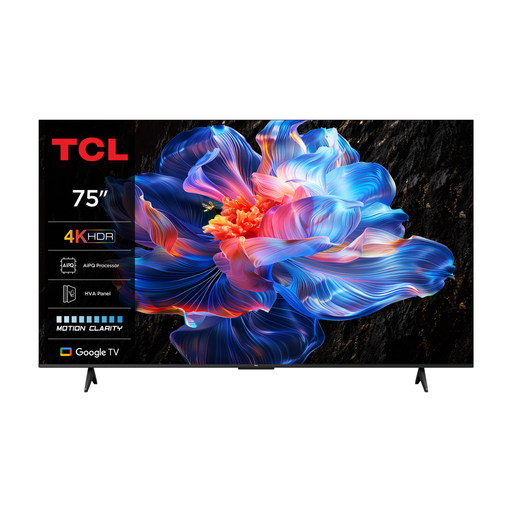
This 75-inch model is an option to compare if you are looking for a large screen. Check how visible the picture is from the seats furthest to the sides.
The product name lists 4K and 60 Hz. The product description mentions an HVA panel and wide viewing angles; compare this with an assessment of the exact model.
 No image available
You can match the 75-inch screen size to your viewing distance. Also check that viewers sitting to the side can follow the picture clearly.
The product description lists 4K, QD-Mini LED, Google TV and 2.1-channel Onkyo sound.
No. First measure the viewing distance from several seats. The Consumers’ Association uses distance divided by 2.4 as a starting point for the screen diagonal in centimetres; also check that the picture remains clearly visible from the side.
Assess the picture under the lighting conditions you usually use. The Consumers’ Association recommends using your usual lighting as a starting point for picture settings. Watch light and dark scenes from different seats.
Compare the EU energy labels for the exact models and screen sizes. The European Commission explains that the label shows energy consumption information for SDR and HDR. To estimate your own costs, you should also take your usage and applicable electricity tariff into account.
No. According to the Dutch government, there is no fixed statutory guarantee period in the Netherlands. You are entitled to a product that meets the expectations you may reasonably have of it. The seller is your point of contact if there is a problem, and a manufacturer’s guarantee is in addition to your statutory rights.
According to the Dutch government, when you buy from a business at a distance, you will usually have a 14-day cooling-off period. Check the applicable terms in advance, including how a large appliance will be collected or returned.