What should you look for when choosing?
First compare viewing angles and the light in the room, then measure the screen size, and finally assess the sound and connections for any external audio equipment.
OLED for seating spread around the room
A good fit if: your guests won’t all be sitting directly in front of the screen and you mainly watch in a room where the light is easy to control.
Trade-off: if the room gets plenty of daylight, compare the brightness of specific LCD models too.
Mini-LED LCD for a bright room
A good fit if: you often watch during the day and brightness is a key consideration.
Trade-off: the picture may change when viewed from the side, so check viewing-angle reviews for the exact model.
The percentages below show which buying concern may take priority in this situation. If your guests are sitting around the room, you’ll also want to assess contrast and colour from the side; around 28% of consumers therefore give viewing angle top priority.
| What to consider |
What to look for when buying |
Who might care more about this? |
| Picture from seats at the side |
Map out the seats furthest to the side and compare independent viewing-angle reviews for the exact model. |
If I’m hosting guests on both sides of the room, I want to know how they’ll see contrast and colour; around 28% of consumers give viewing angle top priority. |
| Music and dialogue |
Compare sound reviews for the exact model. If you’re using external audio, check the ARC or eARC port and compatibility on both devices. |
If everyone needs to hear singing and conversation, I don’t want to judge the sound by an audio format or connection alone; around 22% of consumers give sound quality top priority. |
| Screen size and positioning |
Measure the distance to the furthest seat, the available wall or furniture space, and the TV’s dimensions with its stand or mount. |
When the whole group needs to be able to follow the screen, I want a size that will actually fit in the room; around 22% of consumers give size and positioning top priority. |
| Room lighting and reflections |
Compare screen types and model reviews in lighting conditions similar to those in your living room. |
If I often watch during the day, I want to consider reflections and visibility in daylight; around 17% of consumers give room lighting top priority. |
| Energy use and additional equipment |
Compare the EU energy labels for the exact models, including the information for HDR viewing, and assess audio equipment separately. |
If I’m also keeping an eye on energy use after buying, I want to factor in the TV’s figures and any additional audio equipment; around 11% of consumers give running costs top priority. |
Joybuy products
This selection includes OLED TVs for seating spread around the room and mini-LED TVs to compare for daylight viewing, including a TV and soundbar bundle. Compare viewing angle, room lighting, size and sound for each exact version.
 No image available
LG OLED65C68LA C6 65-inch 4K OLED TV
This OLED version is worth comparing if your guests will be sitting around the room. Check the viewing angle from the seats furthest to the side in your own room.
The product information lists 4K OLED, Dolby Vision, Dolby Atmos and a 40 W, 2.2-channel speaker system.
Joybuy
 No image available
Samsung S85F GQ55S85FAU 55-inch 4K OLED TV
This 55-inch OLED model is worth comparing with larger screens. Measure the viewing distance and available space before choosing a size.
The product information lists a 4K OLED screen and a two-channel speaker system.
Joybuy
 No image available
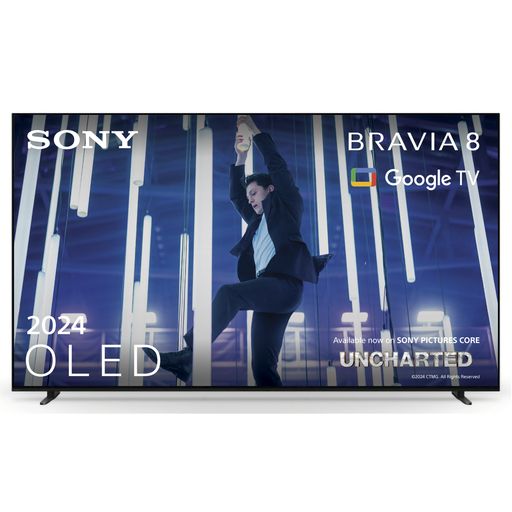
Sony K-65XR80 BRAVIA 8 65-inch 4K OLED TV
This OLED model is worth comparing if visibility from seats around the room matters. Check the viewing angle of the exact version.
The product information lists a 65-inch 4K OLED screen and Acoustic Surface Audio+. This audio feature is no substitute for assessing the sound in your room.
Joybuy
 No image available
TCL T8D 85-inch 4K QD-Mini LED TV
This large mini-LED model is worth comparing if you often watch during the day. Check the viewing angle of this exact model for the seats furthest to the side.
The product information lists 4K, HDR, 144 Hz and an Onkyo 2.1 sound system.
Joybuy
 No image available
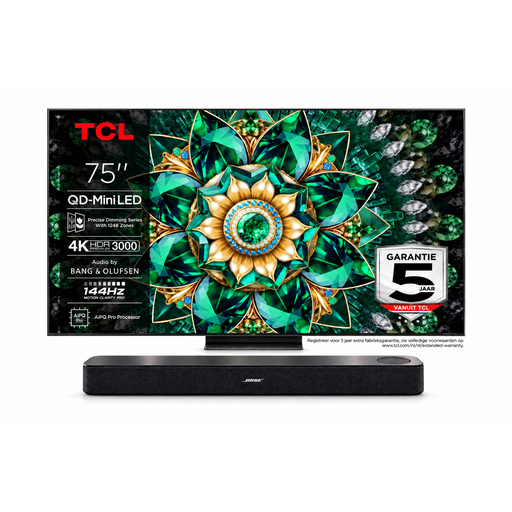
Bose Lifestyle Ultra Soundbar with TCL 75Q7C 75-inch 4K Mini-LED TV
This bundle combines a large screen with a soundbar. Measure the space available for both and assess the sound for your seating arrangement.
The bundle description lists a 75-inch 4K Mini-LED TV, 144 Hz and a soundbar with Dolby Atmos support. Before connecting them, check that both devices support ARC or eARC.
Joybuy
Frequently asked questions
Is OLED or mini-LED better if guests will be sitting at an angle to the TV?
Start by considering OLED if visibility from the side is a key priority. A Tweakers comparison describes OLED as having a wide viewing angle and notes that contrast and colour can change when LCD screens are viewed from the side. Check the exact models and take the lighting in your room into account.
How do you connect a soundbar for music films?
Check that both the TV and soundbar support ARC or eARC, and use the HDMI connections designed for this purpose. Not every HDMI port on a TV supports eARC, so also check which audio formats both devices support.
Do you need to buy an extended warranty for a TV in the Netherlands?
No, you don’t need an extra contract to have statutory warranty rights. ACM ConsuWijzer states that statutory warranty applies even without an additional contract, and that the period depends on what you can reasonably expect from the product. There isn’t one fixed two-year period for every TV.
What energy information can you compare for TVs?
For TVs on the EU market, the energy label provides information to help you compare models, including separate information for HDR viewing. The European Commission explains the rules on energy information; compare specific models on the same basis.
Can you read the annual electricity cost directly from the energy label?
Not without factoring in your own usage and electricity tariff. Use the figures for the exact model, then estimate your personal costs based on how often and how long you watch.


