
A group with seats spread out
If some viewers will be sitting away from the centre, compare colour, contrast and reflections from those seats. The Consumentenbond highlights viewing angle as something to consider when several people watch together.


Start with the seating: measure the viewing distance and check the picture from the seats at either side, too. An OLED TV is worth considering if viewers will be spread out; if the room gets plenty of daylight, compare LCD or Mini LED models as well. Test the film file and sound before the screening, as panel technology alone cannot tell you how a specific model will perform in your room.
If some viewers will be sitting away from the centre, compare colour, contrast and reflections from those seats. The Consumentenbond highlights viewing angle as something to consider when several people watch together.
Do you want people at the back to be able to follow the actions and details, too? Measure the distance to the furthest seats and check that the screen will fit in the space available.
In daylight or under workshop lighting, compare picture brightness and reflections in conditions similar to those in the room where you’ll show the film. The Consumentenbond includes visibility in ambient light in its test criteria.
Start with the furthest and outermost seats. Then decide which combination of screen size, viewing angle, lighting and playback will suit your workshop space.
| What to consider | What should you check? | Who should prioritise this? |
|---|---|---|
| Viewing from different angles | Compare the viewing angle and reflections for the exact model. Check the picture from the outermost seats; the Consumentenbond notes that viewing angles can vary between TVs. | If I’m showing the film to a group with seats away from the centre, I want the action to be easy to follow from the side, too. Around 28% of consumers consider viewing from different angles their top priority. |
| Screen size for the furthest seats | Measure the distance from the seats and check that the screen and stand will fit. The Consumentenbond gives roughly 2.4 times the screen diagonal as a starting point for comfortable viewing, not a guarantee that details will be readable from every seat. | If viewers at the back need to follow small details in the film, I want to choose a size that suits both their distance and the space available. Around 22% of consumers prioritise screen size for the furthest seats. |
| Visibility in daylight or under workshop lighting | Assess brightness and reflections together under similar lighting conditions. A bright LCD TV may be an option, but check visibility from the side, too. | If I’m showing the film during the day or under workshop lighting, I want to make sure that ambient light doesn’t interfere with the picture. Around 22% of consumers put daylight visibility at the top of their list. |
| Playback and clear sound | Try the actual film file in advance. For USB playback, check the supported file format and codec for the exact model; also make sure that people at the back can hear any explanations. | If I’m showing the film with spoken explanations, I want to know in advance whether the file will play and whether the group will be able to hear the commentary. Around 17% of consumers start by checking playback and sound clarity. |
| Running costs and static images | Compare the EU energy label for the exact models. With OLED, bear in mind the effects of prolonged static images; older tests don’t establish a fixed safe usage period for newer models. | If the TV will be on for long periods during workshops or display paused images, I want to take energy information and static image use into account. Around 11% of consumers prioritise these points. |
Colour, brightness and reflections can look different from the outermost seats.
Check the exact model from the furthest viewing positions and under the lighting you’ll use during the workshop.
A USB port alone doesn’t confirm that the TV supports your film’s file format and codec.
Try the actual file well before the workshop. If you’re using a laptop, check that you can connect it via HDMI, too.
The TV and stand need to fit in the space available. The EU energy label also provides information to help you compare the energy use of different models.
Measure the space and check the dimensions including the stand, as well as the energy label for the exact model. The European Commission uses energy label classes A to G for electronic displays.
In an unusually long test lasting a day, the Consumentenbond observed temporary image retention. That result doesn’t establish a fixed safe usage period for modern models.
Compare the picture in your room and bear static images in mind during long pauses. Don’t use that older test to draw general conclusions about every new model.
In the Netherlands, LG lists the OLED evo C6 series, including the 65-inch OLED65C67LA model.
Philips lists models including the 55OLED810/12 and 65PUS8001/12, with OLED and LED technology respectively.
Sony describes BRAVIA 5 as a 4K Mini LED series available in several screen sizes, including 65 inches.
The Dutch Neo QLED range includes models such as the 65-inch QN82H.
These TVs offer a range of screen sizes and panel technologies to weigh up against the seating, lighting and available space for your workshop film.
 No image available
The 65-inch size is a specific option to weigh up against the furthest seat and the space available.
65 inch, 4K UHD, QLED, Tizen OS and Dolby Audio.
 No image available
Compare the 65-inch size with the distance to the back seats and the space where the TV will go.
4K, QD-Mini LED, Google TV, Dolby Vision, HDR10+, 144 Hz VRR and an Onkyo 2.1 sound system.
 No image available
The 55-inch size is an option to compare with the viewing distance and the space available for the screen.
55 inch, 4K OLED and a 2-channel speaker system. The product description lists four HDMI ports.
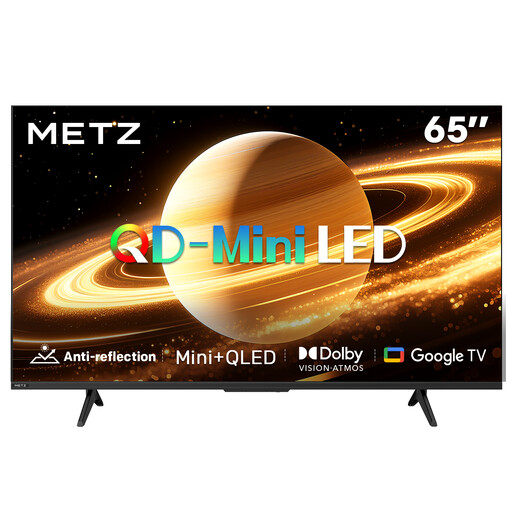 No image available
The 65-inch size and matt screen finish are features to weigh up against the viewing distance, room and lighting.
QD-MiniLED, matt screen, 60 Hz, Dolby Vision, Dolby Atmos and Google TV.
 No image available
Compare the 75-inch size with the furthest seat and measure in advance to check that the screen will fit in your chosen space.
4K Mini-LED, Google TV and 144 Hz. The product description lists Bang & Olufsen audio and Dolby Atmos.
Measure from the eye position at the seats, paying particular attention to the furthest viewing position. The Consumentenbond suggests around 2.4 times the screen diagonal as a starting point for comfortable viewing. Also check that details in the film are visible from the back.
It depends on the TV model and the file. Check which file formats and codecs are supported and try the film in advance; a USB port alone doesn’t confirm that the file will play.
Check the instructions for the exact model, the compatible bracket and the type of wall. LG recommends using a professional technician for wall mounting and advises that the wall and installation environment must be suitable. This is the manufacturer’s advice, not a general legal requirement for installation.
Compare the EU energy labels for the exact models; the European Commission uses classes A to G for electronic displays. If you’re buying as a private consumer, you’re also covered by the statutory guarantee from the seller if a product used normally doesn’t meet the expectations you could reasonably have. According to ACM ConsuWijzer, this statutory guarantee doesn’t have a fixed two-year term.