
Console players on the sofa
You’re looking for an extra controller for your Switch, Switch 2, PS5 or Xbox. Check that both the system and the game support it.


First, choose a controller that works with your console or PC and the co-op game you want to play. Then check whether each player needs a separate Joy-Con or a full controller. On Switch 2, one Joy-Con 2 per player may be enough if the game supports it. For games that require a full gamepad for each player, a compatible Pro Controller or another gamepad may be a better fit. Bear in mind that connection options and features can vary by system and game.
You’re looking for an extra controller for your Switch, Switch 2, PS5 or Xbox. Check that both the system and the game support it.
You want to know whether the controllers that come with the console offer enough controls, or whether each player needs a full gamepad. Nintendo says Joy-Con 2 controllers can be synced individually; the game determines which controls will work.
You play local co-op on a Windows PC and want to check in advance that both the connection and the game support the controller. PlayStation describes USB and Bluetooth support for compatible versions of Windows; additional features depend on the game and connection.
Start with the exact system and game. Then decide how each player will control the game and whether you need a wired or wireless connection.
| What to consider | What to look for | Who should pay extra attention? |
|---|---|---|
| Compatibility | Check the exact system and whether the game supports controller input and local co-op. | If I’m playing on a console or PC connected to the TV, I want to know that both the controller and the game will work. Compatibility is the top priority for around 36% of consumers. |
| Controls for each player | Check how many players the game supports and whether one Joy-Con per player is enough or everyone needs a full controller. | If we’re playing with several people, I want to make sure everyone has enough buttons for the game we’ve chosen. Having enough controls for all players is the top priority for around 29% of consumers. |
| Distance and connection | Measure the cable route to the sofa or check which wireless connections your system supports. | If the TV and sofa aren’t close together, I want to know in advance whether a cable will reach or a wireless connection is possible. Playing distance and connection matter most to around 21% of consumers. |
| Use after purchase | Count the controllers you already own and check how the extra controller is powered and charged. | If I need controllers for several players, I also want to know how many extra controls I need and how to keep them ready to use. Cost and convenience after purchase are top priorities for around 14% of consumers. |
The left and right Joy-Con 2 can be synced individually, but the controls needed vary from game to game.
Before buying, check the game details to see whether one Joy-Con per player will work or whether the game requires a full controller.
The 8BitDo Ultimate 2C Bluetooth and Wireless versions have different platform and connection specifications.
Check the full model name and the platform list for the exact version you’re considering.
A wired controller is only practical if the cable can cover the distance between your TV set-up and where you sit. Some games may also require features that the controller doesn’t have.
Measure the cable route and compare the controller’s features with the game’s requirements.
Nintendo makes Joy-Con 2 controllers and a Pro Controller for Switch 2, offering different ways to play.
DualSense is designed for PS5 and can also be connected to compatible PCs.
The Xbox Wireless Controller is an option for Xbox consoles and Windows PCs.
The Advantage Wired Controller is a wired option for Switch 2 in TV mode.
The Ultimate 2C Bluetooth and Wireless versions are designed for different platforms.
This selection includes wired and wireless controllers for Switch 2, Xbox, Windows PCs and PS5. Check that the controls you choose are supported by each game.
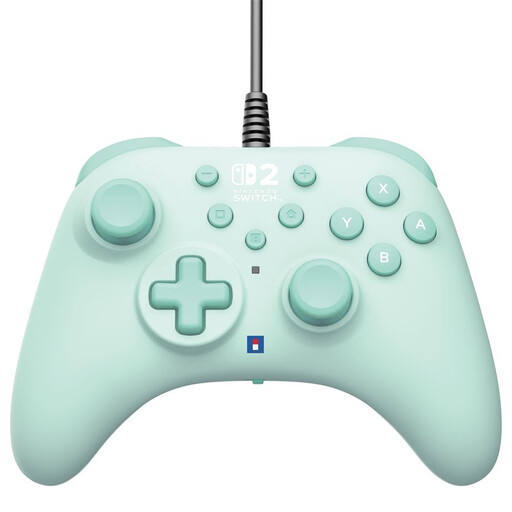 Image unavailable
A wired option for Switch 2, provided the cable reaches where you sit.
USB-A connection with a 3 m cable, programmable buttons and a Turbo function.
 Image unavailable
A full wireless gamepad for Xbox or a Windows PC, provided the game supports the controller.
The product details list Xbox Series X|S, Xbox One and Windows 10/11, with Xbox Wireless and Bluetooth. Two AA batteries are included; the stated battery life is up to 40 hours with AA batteries.
 Image unavailable
A wireless controller for local co-op on PS5.
The product details list haptic feedback and adaptive triggers. On PC, additional features depend on the game and connection; PlayStation lists USB as necessary for supported haptic feedback.
 Image unavailable
A full controller for one player on Switch 2, provided the game supports this type of control.
The product details list a rechargeable battery, HD rumble, motion controls and amiibo functionality. Nintendo says Switch 2 controllers don’t work with the original Switch.
 Image unavailable
A left and right Joy-Con 2 for Switch 2; use one Joy-Con per player only if the game supports this type of control.
The set includes two wrist straps. The product details list wireless use, HD Rumble 2, motion controls and battery life of up to 20 hours.
Only if the specific game supports this type of control. Nintendo says the left and right Joy-Con 2 can be synced individually; a Pro Controller is a single, separate controller.
PlayStation lists USB and Bluetooth support for compatible versions of Windows. Check that the game supports the controller; for game-supported haptic feedback on PC, PlayStation says a USB connection is required.
No. First, check what additional cover a paid warranty provides. According to the Dutch government, you’re entitled to a product that works properly in the Netherlands, and there’s no fixed statutory warranty period.
According to the Dutch government, when you buy from a business online you’ll often have a 14-day cooling-off period; check the terms that apply to your purchase. Used batteries should be taken to a collection point, not put in the bin. You can return an old electrical appliance when you buy a similar new one.