
Console gamer on the sofa
You’ll want to check first whether the controller works with your PS5, Xbox or Nintendo system, then look at its extra features. Microsoft, Sony and Nintendo list the systems compatible with their controllers.


Start with the system your game runs on: PS5, Xbox, Switch, Switch 2 and PC all have different controller requirements. Then check that the connection suits where you sit, whether your game supports any extra features, and which battery or charging option you want.
You’ll want to check first whether the controller works with your PS5, Xbox or Nintendo system, then look at its extra features. Microsoft, Sony and Nintendo list the systems compatible with their controllers.
You play PC games on a big screen and want to check both the connection to your PC and support for each game. Microsoft, PlayStation and 8BitDo list PC compatibility for specific controllers.
You’ll want a control layout that suits you, as well as a battery or charging option that works for longer sessions. The models mentioned here differ in how they’re powered; for example, Xbox specifies AA batteries for its standard controller.
When playing on the sofa, the device running the game determines which controllers are suitable. Then consider the connection, game features and power source.
| What to consider | What to check before buying | Who is this important to? |
|---|---|---|
| Compatibility | Make a note of your exact console or PC operating system, then check the controller and game compatibility. | If I want to play on my own system, I first check that the controller and game work with it. Around 37% of consumers prioritise compatibility with their gaming system and game. |
| Connection from the sofa | Check the connection method for your device and whether any required cable or receiver is included. | I want to be able to play from where I’m sitting without the connection being impractical. Around 27% of consumers prioritise a reliable connection from their seat. |
| Controls and game features | Check whether your game supports features such as haptic feedback, motion controls or customisable buttons. | If I want to use extra feedback or customisable controls, I first check whether my game supports them. Around 18% of consumers focus mainly on controls and supported game features. |
| Power | Check the battery type for the exact model and what batteries or charging accessories you’ll need. | For longer gaming sessions, I want to know how to power the controller and what I’ll need. Around 18% of consumers prioritise battery and charging convenience. |
Nintendo says that the Switch 2 Pro Controller only works with the Switch 2. A controller for the wrong system therefore won’t work with the Switch game you want to play.
Check which Switch model you have and compare it with the controller’s compatibility.
According to PlayStation, both the game and the feature must be supported; haptic feedback in supported PC games requires a USB connection.
Before choosing, check whether your game supports the feature and which connection method it requires.
The standard Xbox Wireless Controller uses AA batteries. Xbox says that rechargeable AA batteries cannot be charged inside the controller.
Check what’s included with the exact model and decide in advance between replaceable batteries and a separate rechargeable option.
ACM ConsuWijzer explains that your statutory guarantee exists alongside any seller’s or manufacturer’s guarantee. Extra cover therefore doesn’t replace your statutory rights.
Read what the extra cover includes and compare it with your existing rights before choosing it.
The Xbox Wireless Controller is designed for Xbox consoles and supported Windows PCs.
DualSense is the PS5 option and can also be used with compatible PC games.
The original Switch Pro Controller can be paired with a Switch or Switch 2; the Switch 2 Pro Controller is for Switch 2 only.
8BitDo lists the Ultimate 2 Bluetooth Controller as compatible with Switch and Windows.
This selection includes controllers for PS4 and PC, models whose product descriptions also mention smart TVs or Switch, and an Xbox controller for Xbox and Windows PC. Check that each option is compatible with your system and game.
 No image available
An option for PS4 or PC gaming if the listed platform compatibility suits your system.
The product description lists a wireless range of up to 10 metres, a touchpad, a 6-axis gyroscope, dual vibration motors and a 3.5 mm jack. It specifies a USB cable for the initial pairing.
 No image available
An option to compare if you’re looking for a controller for one of the devices listed in the product description.
The product name mentions Bluetooth 5.2 and 2.4G; the description lists PC, smart TV, PS3 and Switch among other devices. It also specifies a range of up to 10 metres and a stated play time of up to 8 hours.
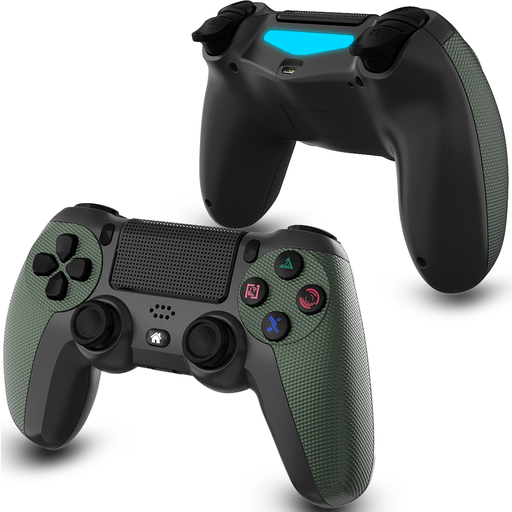 No image available
An option for PS4 gaming if the listed Bluetooth connection and compatibility suit your needs.
The product description lists a 600 mAh rechargeable battery, two vibration motors, analogue sticks and a D-pad with four separate switches. The stated play time is up to 8 hours.
 No image available
An option to compare for Switch or PC gaming; the description also mentions Android.
The product description lists Bluetooth, a 6-axis gyroscope and adjustable dual vibration. It also mentions an anti-slip grip and a stated play time of up to 10 hours per charge.
 No image available
An option for Xbox or a compatible Windows PC if you’re looking for a wireless Xbox controller.
The product description lists Xbox Wireless, Bluetooth and USB-C, plus a hybrid D-pad, customisable buttons and a headset jack. The controller uses AA batteries; the stated battery life is up to 40 hours.
Start with the console or PC running the game. Then check whether the game supports your chosen controller and its features; the size of your screen alone doesn’t determine compatibility.
Nintendo explains that you can pair it using the USB cable connected to the dock, or by pressing the SYNC button in the controller menu, on both Switch and Switch 2. The system must be switched on to pair.
Don’t assume they do: according to PlayStation, the PC game must support the feature, and haptic feedback requires a USB connection.
Choose between replaceable AA batteries and rechargeable AA batteries with a separate charger. Xbox says that rechargeable AA batteries cannot be charged inside the controller.
ACM ConsuWijzer explains that online purchases generally come with a statutory cooling-off period of up to 14 days after delivery, although exceptions apply. Your statutory guarantee is separate from any manufacturer’s guarantee; if a product is faulty despite normal use, the seller must offer an appropriate solution.