
Evening stargazer
You usually watch with the room lights low and want to make out bright points against a dark background. The Consumentenbond describes black levels as an important difference between OLED and LCD.


Start by measuring your viewing distance and the space available. A small living room doesn’t automatically mean you need a particular screen size. The Consumentenbond describes OLED as an option for deep blacks in dark scenes. If you often watch during the day, you can also compare compact LCD models for brightness and reflections. And before weighing up 4K or HDR features, check whether the programmes you watch are actually available in those formats.
You usually watch with the room lights low and want to make out bright points against a dark background. The Consumentenbond describes black levels as an important difference between OLED and LCD.
You want a screen that suits your viewing distance and fits on your stand or wall. The Consumentenbond provides a guideline for the relationship between viewing distance and screen diagonal. You’ll also need to measure the space available for the TV itself.
You often watch with light from windows or lamps falling on the screen, so brightness and reflections are worth considering. The Consumentenbond notes that brightness can be one factor to weigh up when choosing an LCD TV.
Best for: watching mainly in a darkened room, where deep blacks around bright stars matter to you.
Consider: check for reflections in your own room. If you watch for long periods with fixed logos or still images on screen, regularly change what you’re watching.
Best for: watching often during the day, when brightness is a key consideration.
Consider: LCD displays blacks differently from OLED. Compare dark scenes and reflections on the specific model you’re considering.
Best for: finding a suitable size and the connections you need, without making the deepest blacks your top priority.
Consider: QLED doesn’t mean that each pixel lights up individually, as it does with OLED. So check the black levels of the specific TV.
| What to consider | What should you check? | Who should pay particular attention? |
|---|---|---|
| Black levels | Compare dark scenes with small bright points, and, where possible, view them in lighting conditions similar to those at home. | If I mainly want to see stars against a dark background, black levels matter most to me; around 29% of consumers give this their top priority. |
| Screen size and placement | Measure both your viewing distance and the space on your stand or wall. The Consumentenbond’s guideline is to divide the viewing distance in centimetres by 2.4 to get an indicative screen diagonal in centimetres. | I want the screen to suit my seating distance and fit in the chosen spot; around 29% of consumers give this fit the highest priority. |
| Daylight and reflections | Consider where your windows and lamps are, and compare brightness, reflections and dark scenes on the models you’re considering. | If I often watch during the day, I want to keep seeing details without overlooking reflections; around 21% of consumers put daytime viewing first. |
| Source quality and running costs | Check the picture quality available for the programmes you watch, as well as the energy label for the exact version, including information about HDR use. | I want to make the most of the features with the programmes I watch, while also considering energy consumption; around 21% of consumers make this their top buying priority. |
Viewing distance and available space are two different things. A suitable screen diagonal doesn’t automatically mean the TV will fit on your stand with its base attached.
Measure the distance from your seat to the screen, then check the dimensions of the exact version, including its stand.
The Consumentenbond describes QLED as an LCD variant with a backlight. This can make blacks look different from those on an OLED, which matters when you’re watching space imagery in dark scenes.
Compare dark scenes on the specific TVs you’re considering rather than relying on the technology name alone.
A 4K screen won’t turn a programme that isn’t available in 4K into native 4K footage.
Check the picture quality available from your provider and look at the energy label for the exact version. The European Commission says the energy label also shows information about energy consumption when using HDR.
In the Netherlands, your statutory guarantee is separate from any extended warranty you choose to buy. According to the Dutch government, the retailer is your point of contact if a product develops a fault.
Read the terms of an extended warranty and compare them with your existing statutory rights before paying for one.
An extended warranty can cost money without automatically giving you any extra rights.
For the Netherlands, LG lists the 42-inch OLED42C68LA in its C6 range: a compact OLED model to consider for dark scenes.
Samsung lists the QE43QN90FATXXN as a 43-inch QN90F with mini-LED LCD technology: a compact option to compare with OLED.
Philips lists the 42OLED810/12 as a 42-inch OLED TV with Ambilight, for anyone who also wants to consider lighting behind the screen.
According to its Dutch product page, TCL also offers its P7K QLED range in 43 inches: a compact LCD option to compare with other screen technologies.
This selection of Joybuy products includes compact TVs described as OLED, LCD and QLED. Measure your viewing distance and available space, and compare dark scenes on the specific models before choosing.
 No image available
OLED is worth comparing if you watch space imagery in dark scenes and deep blacks around bright points matter to you; this isn’t a picture test of this specific model.
The product name lists 4K Ultra HD, Dolby Vision, HDR10, Dolby Atmos, HDMI 2.1 and webOS.
If you watch for long periods with unchanged logos or still images on screen, regularly change what you’re watching and follow this model’s usage instructions.
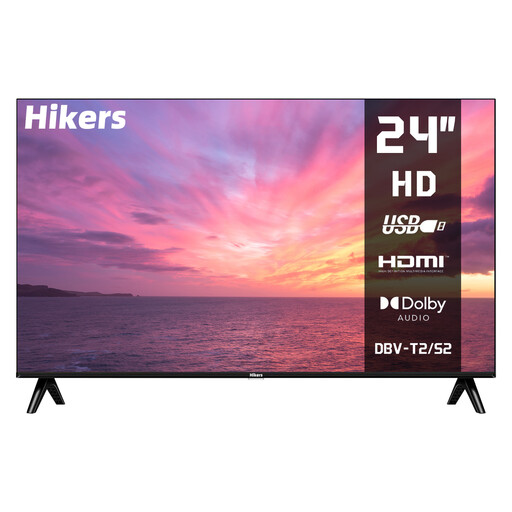 No image available
The 24-inch version could suit you if you’re looking for a small screen diagonal. Check your viewing distance and available space before deciding.
The product name lists HD, non-smart TV, HDMI, USB and support for DVB-S2/T2/C.
The LED label alone doesn’t tell you how this TV displays blacks in space imagery. Compare dark scenes on the specific model.
 No image available
Check whether this 43-inch version suits your viewing distance and the space available on your stand. If dark space imagery matters to you, assess the black levels separately.
The product name lists 4K UHD, HDR10+, Dolby Vision, Google TV and Chromecast Built-in.
QLED isn’t OLED, so check dark scenes on the specific version rather than assuming a particular picture quality from the technology name.
 No image available
This 43-inch version is worth comparing if the size suits your viewing distance and the space you have available.
The product name lists 4K QLED, 120 Hz and Smart TV.
QLED isn’t OLED. If deep blacks matter when watching dark star fields, compare dark scenes on this specific model.
 No image available
Compare this 43-inch version with your viewing distance and available space, and check that its picture quality suits the programmes you watch.
The product name lists Full HD, QLED, 120 Hz and Smart TV.
QLED isn’t OLED. If you watch space imagery in dark scenes, compare the black levels of this specific model.
Measure the distance from your eyes to where the screen will go, and check the TV’s overall dimensions too. The Consumentenbond’s guideline is to divide the viewing distance in centimetres by 2.4 to get an indicative screen diagonal in centimetres. It isn’t a required size.
No. For native 4K detail, the programme must also have been recorded and made available in 4K. Check the picture quality offered by the specific provider.
If you watch for long periods, vary the content on screen and follow the care instructions for your chosen model. An older Consumentenbond test described temporary image retention after extremely long periods with an unchanged picture; that result doesn’t predict the risk for any individual current model.
Compare the energy label for the exact version, including information about HDR use, and read the terms of any extended warranty. According to the Dutch government, your statutory guarantee is separate from an extended warranty package; if there’s a fault, the retailer is your point of contact.
For online purchases from a business, the Dutch government says you generally have 14 days to change your mind. According to its guidance, purchases from private sellers aren’t covered by the same distance-selling rules. Check who the seller is and read the returns information.