For an opera night with guests sitting in different places, OLED is a natural choice in dim lighting, especially for dark scenes. In a bright room, a high-brightness LCD or mini-LED TV may be a better fit. The Dutch Consumers’ Association generally describes OLED as offering deeper blacks and often a wider viewing angle, while LCD TVs can often be brighter. When considering a specific TV, also assess its sound, connections, viewing distance and the playback method you want to use.
Who is this guide for?
The opera fan who prioritises sound
You want voices and the orchestra to sound their best when you’re watching with others. Compare the sound quality of the specific TV you’re considering and check how you can connect your existing audio system. The Dutch Consumers’ Association notes that sound quality varies from one TV to another.
The host with guests sitting in different places
Your guests will be sitting at an angle to the TV, too. So pay attention to the viewing angle, reflections and how easy subtitles are to read from the seats at the edges. The Dutch Consumers’ Association recommends considering differences in viewing angles between TVs when watching as a group.
The viewer of dark recordings
You often watch in dim lighting and want to make out details in dark stage scenes. Compare the picture quality of specific models, and bear in mind the light in the room and the recording itself.
What should you look for in a TV for opera?
Start by considering the seating and lighting in the room. Then compare the picture and sound of specific TVs, and check that your chosen recording or streaming service works on them.
| What to consider |
What should you look for? |
Who is this important for? |
| Voices and music |
Compare the sound of specific TVs. Check whether you can connect your existing soundbar or receiver via HDMI-ARC/eARC or another suitable connection. |
If I want to hear voices and the orchestra clearly, I’ll start by assessing the TV’s sound and my existing audio equipment. Around 28% of consumers give sound reproduction top priority. |
| Viewing angle and reflections |
View the model from the seats at the edges of the room and check for reflections under the lighting you’ll use during the evening. |
If guests are sitting in different places, I want a clear picture and readable subtitles from the side, too. Around 22% of consumers prioritise visibility from multiple seats. |
| Dark scenes and room lighting |
Compare dark and bright clips in similar conditions. OLED generally offers deeper blacks; LCD can often be brighter, but performance varies by model. The Dutch Consumers’ Association describes these general differences. |
When I’m mainly watching dark stage scenes, I pay attention to both black levels and the light in the room. Around 22% of consumers focus most on how dark scenes are displayed. |
| Screen size and viewing distance |
Measure the distance from the seats and the space available. The Dutch Consumers’ Association uses the viewing distance in centimetres divided by 2.4 as a starting point for the screen’s diagonal measurement in centimetres. |
If I’m looking for a TV for different seating positions, I want a screen size that suits both the viewing distance and where the TV will go. Around 17% of consumers prioritise finding the right size. |
| Recording and playback method |
Check whether the service you want works on the TV, or whether you’ll need an external player and a suitable HDMI connection. Also check the resolution of the recordings you actually want to watch. |
If I use a particular opera service or my own player, I want to know in advance whether it works with the TV I’ve chosen. Around 11% of consumers make playback compatibility their top priority. |
Buying pitfalls
-
Choosing based on the OLED or mini-LED label alone
The name of a screen technology doesn’t tell you how a specific TV will perform with your lighting, viewing positions and sound requirements.
Compare models with dark images and from angled seating positions, and assess the sound separately.
-
Assuming a 4K screen guarantees a 4K opera picture
A 4K TV won’t automatically turn a recording offered at a lower resolution into 4K.
Check the resolution and quality of the recordings you actually want to watch.
-
Assuming the built-in speakers will always be good enough
Sound quality varies between TVs, while voices and music are an important part of the experience when watching an opera recording.
Compare the TV’s sound and check whether you can connect an existing audio system.
-
Overlooking connections for extra audio equipment
A soundbar or receiver needs a suitable connection to the TV. Installation or connection cables may also be required.
Before buying, check which connections are available on both the TV and your audio system, such as HDMI-ARC/eARC.
Brands to compare
LG
The Dutch OLED55C56LB from the C5 range is a specific OLED option to compare for dark scenes and group viewing.
- LG lists a 55-inch OLED screen and webOS for this model.
- LG’s picture-enhancement claims are not an independent assessment of opera picture quality or sound. Assess these aspects separately.
Sony
The Dutch BRAVIA 8 K-55XR80 is another OLED option to consider, including for its built-in audio and connections.
- Sony lists Acoustic Surface Audio+, four HDMI inputs and eARC/ARC for this model.
- These features don’t confirm that the TV’s speakers will make a separate audio system unnecessary in your room.
Philips
Philips says the 55OLED810/12 combines OLED with Ambilight, making it worth considering if you’d like to include ambient lighting in your decision.
- Philips lists Dolby Vision, Dolby Atmos and Ambilight for this model.
- The description of an immersive experience is a manufacturer claim. Consider whether Ambilight suits your room, and compare the sound separately.
TCL
The 65C7K is a mini-LED LCD option to compare for a larger seating area or a brighter room.
- TCL lists a 65-inch screen with QD-Mini LED for the C7K.
- TCL’s brightness and dimming-zone figures are manufacturer specifications, not independent assessments of opera scenes or viewing angle.
Samsung
The Dutch 55-inch S90F is another OLED option to assess alongside other specific models.
- Samsung identifies the S90F as a 55-inch OLED model.
- Assess the viewing angle, sound and picture quality for opera on the specific TV.
Joybuy TVs for opera nights
This selection includes OLED models to compare for dark recordings and a 4K Mini RGB LED model. Check the screen size, connections and suitability for your playback method for each TV.
 No image available
OLED77G68LW
An OLED option to compare for dark opera scenes. Assess the viewing angle and sound of this specific model for your seating arrangement.
Before buying, check the exact screen size and the connections you need.
View at Joybuy
 No image available
LG OLED65C68LA, 65 inches
This 65-inch OLED version is worth comparing if dark scenes and the distance from your seats are key considerations.
The product name lists 4K, Dolby Vision and Dolby Atmos. Check that the connections suit your audio system and playback device.
View at Joybuy
 No image available
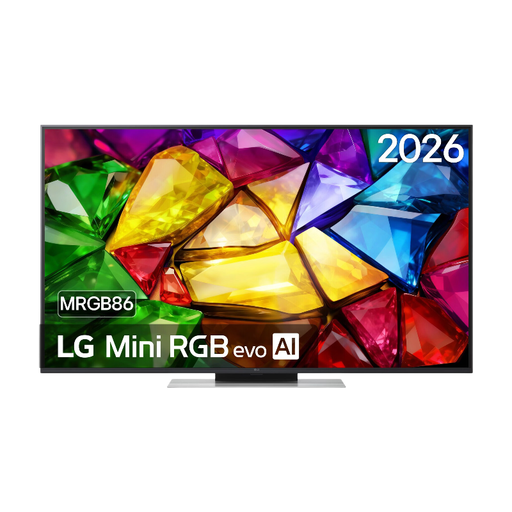
LG 50MRGB8669A, 50 inches
A 50-inch model to compare if the available space and viewing distance determine the screen size you need.
The product name lists 4K and Mini RGB LED. Check the picture quality with the lighting and seating positions in your room.
View at Joybuy
 No image available
Samsung S85F Series GQ55S85FAU, 55 inches
This 55-inch OLED option is worth comparing for dark recordings. Also check how the picture looks from the sides.
The product name lists 4K. If you want to use an external player, check which connections the specific TV offers.
View at Joybuy
 No image available
LG OLED77B68LA, 77 inches
This 77-inch OLED version is worth considering for a larger viewing area. Measure the viewing distance and available space first.
The product name lists 4K, Dolby Vision and Dolby Atmos. Check that the connections you need are compatible with your equipment.
View at Joybuy
Frequently asked questions
How do you choose a screen size to suit the seating for an opera night?
Measure the distance from your eyes to the TV. The Dutch Consumers’ Association uses the viewing distance in centimetres divided by 2.4 as a starting point for the screen’s diagonal measurement in centimetres. Compare nearby screen sizes too, and check the actual dimensions, including the stand.
Can you watch OperaVision directly on your TV?
OperaVision recommends using the YouTube app to watch content on a TV. Check that the app works on the TV you’re considering and that the performance you want is available; productions may only be online for a limited time.
Will any smart TV work with Met Opera on Demand?
No. First check that your TV and playback method are supported. The Metropolitan Opera lists, among other options, the Samsung Smart TV app and viewing via the Apple TV app or Roku Channel. Check support for the exact TV before basing your choice on it.
How do you connect a soundbar or existing player?
A Blu-ray player is usually connected via HDMI. You can use HDMI-ARC/eARC with a compatible soundbar or receiver. Check which connections are available on both the TV and audio system.
What should you know about warranties and energy information in the Netherlands?
According to the Dutch government, when you buy as a consumer you’re entitled to a product that works properly, and if there’s a fault you should generally contact the seller. The Netherlands does not have a fixed statutory warranty period for all products. TVs are among the appliances that require an energy label; compare the stated energy consumption of the specific models.


