Start by measuring the distance to the back row, then check whether people will be sitting at an angle to the screen or if there’s likely to be glare. Next, choose a playback method that suits your presentation source, such as a laptop connected via HDMI or compatible photo files on a USB drive, and test your own slides in the room. The Consumentenbond’s viewing-distance guideline is a starting point for watching TV, not a guarantee that small captions will be readable in a hall.
Who is this choice relevant to?
Organiser of an event in a deep hall
Wants photos, and especially captions, to be clear from the back of the room too. The Consumentenbond describes viewing distance as a starting point for choosing a screen size; you should also test your own slides from the back row.
Organiser with side seating
Wants people sitting away from the centre of the room to be able to see the photos and text. Take the viewing angle and lighting into account, and assess your chosen model from different seats.
Volunteer operating the presentation
Wants to start and control the slideshow without any hassle. Decide in advance whether you’ll be using a laptop or individual photo files; LG warns that supported file types and codecs can vary between TV models.
What should you look for?
First, measure the viewing distances and check the seating layout. Then compare playback options and the practical implications of your chosen screen size.
| Consideration |
What should you check? |
Who should pay particular attention? |
| Readability from the back |
Measure the distance to the back row and view your actual slides from there; use viewing-distance tables only as a starting point. |
If I want people at the back to be able to follow the photos, dates and captions, I’ll test the screen from the actual viewing distance. Around 31% of consumers prioritise readability from the back. |
| Visibility from the sides and in bright conditions |
View the picture from seats at an angle and under lighting similar to that in the hall; pay attention to viewing angles and reflections. |
If the seating spreads out widely or daylight comes in, I’ll want to know whether the slides remain visible from those seats. Around 25% of consumers prioritise visibility from the sides and in ambient light. |
| Connections and photo playback |
First choose between using a laptop and individual photo files; check the connections and file compatibility of the exact model, then test the entire slideshow. |
If I want to run the presentation without unexpected interruptions on the night, I’ll check the source and files in advance. Around 25% of consumers prioritise reliable connections and playback. |
| Use and positioning |
Check that the size will fit in the intended location and look at the energy label for the exact model; also decide whether you’ll need a stand or secure wall mounting. |
If I use the TV regularly for our association, I’ll want to consider the implications of its size, energy consumption and positioning. Around 19% of consumers put use and positioning first. |
The Consumentenbond points out that a larger screen generally uses more energy. So first work out what screen size is right for the room, then compare the energy labels of the models you’re considering.
Common pitfalls
-
Assuming a viewing-distance table proves captions will be readable
The Consumentenbond’s guideline is about a comfortable viewing distance for watching TV, not specifically about small text during a group presentation.
Test representative photos, dates and captions from the back row.
-
Assuming a USB port will play every presentation file
Supported file formats and codecs can vary between TV models. So the presence of a port alone doesn’t tell you whether your slideshow will work.
Check the manual for the exact model and test the full slideshow well before the event.
Brands to consider
Philips
The Dutch product description for the Philips 55PUS8001/12 mentions a 55-inch 4K LED TV with Ambilight and a Moments feature for viewing photos from a phone.
- The Moments feature mentioned could be useful if you’re sharing photos from a phone.
- This description applies to a specific model; check that the method suits your existing presentation and photo source.
Samsung
The Samsung UE55U8070HUXXN is described as a 55-inch Crystal UHD model. The manufacturer describes 4K picture processing for this model.
- The stated 55-inch size gives you a specific screen to compare with your viewing distance.
- A manufacturer’s description of picture processing doesn’t prove that small text will be readable in a hall; test your own slides.
LG
The LG 55QNED86B6B.AEU is described as a 55-inch QNED Mini LED model and an LCD alternative.
- This model is an example of a 55-inch LCD option to assess alongside other screens.
- LG’s claims about colour and contrast don’t give you a measured viewing angle for your hall; also check the connections and playback on the exact version.
Joybuy TVs for presentations
Use these Joybuy TVs as models to assess for your room and presentation source. The right option depends on the seating distance, viewing positions and compatibility with your slides.
 No image available
OLED77G68LW
Compare the stated 77-inch size with the distance to the back row, and test the slides from seats at an angle too.
OLED; 77 inch; 4K.
View at Joybuy
 No image available
50NU800B6LC
Before choosing this version, check the screen size, connections and visibility from the seats in your hall.
View at Joybuy
 No image available
Philips 55PUS8001, 55 inch, 4K
A 55-inch option to assess against your seating distance; check that your presentation source can connect and test the full slideshow in advance.
55 inch; 4K.
View at Joybuy
 No image available
Hisense 55A6S, 55 inch, 4K UHD
Assess the 55-inch version from the back row and check that this model can play the photo files you’ll be using.
55 inch (139 cm); 4K UHD; energy class E.
Media playback may depend on codec settings, bitrate, resolution and file container.
View at Joybuy
 No image available
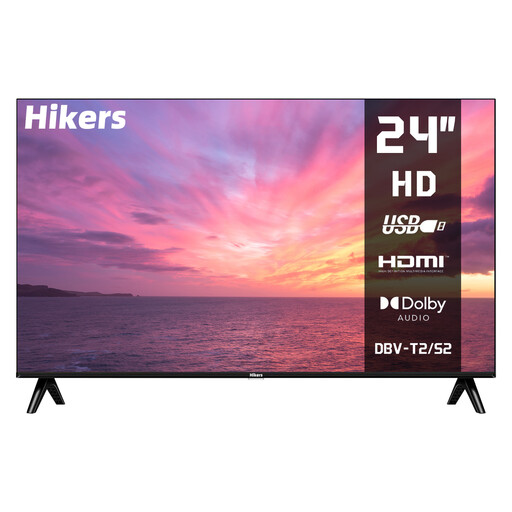
Hikers HD TV, 24 inch, HDMI and USB
Its compact stated size is a reason to take extra care when checking whether photos and captions are visible from the seats you have in mind.
24 inch (60 cm); HD; HDMI; USB.
A USB connection alone doesn’t guarantee that photo files will play; check compatibility for the exact version.
View at Joybuy
Frequently asked questions
Is 55 inches big enough for our hall?
That depends on the seating distances and the size of the captions. For general TV viewing at 300 cm, the Consumentenbond gives a guide range of 43–55 inches; for small text, also check your own slides from the back row.
Can we play the slideshow directly from a USB stick?
That depends on the exact TV model and the files. LG says that supported file types and codecs can vary between models, so check the manual and test the full slideshow in advance.
How can you assess the picture before your association’s event?
Display a familiar photo with both light and dark areas under the usual hall lighting, and view it from several seats. The Consumentenbond recommends assessing picture settings using a still image or photo.
Can we simply show other people’s historical photos?
Not automatically; check the rights for the way your association intends to use the photos. The Dutch Government says that permission from the creator is required to use copyright-protected photos. The private-copy exception doesn’t automatically apply to distribution or making photos available to the public.
What if the photos show identifiable people?
You should also consider the privacy rules that apply to your intended use. According to the Dutch Data Protection Authority, a legal basis under the GDPR is needed to create and publish images in which people are identifiable; consent is a commonly used legal basis. Whether this guidance applies to a particular historical photo and screening depends on the circumstances.


