
Viewer with older recordings
You watch classic comedies from older video sources and don’t want the image stretched or cropped unnecessarily. Compare the picture using your own content.


Start with your old recordings, viewing distance and room lighting. A larger 4K screen won’t automatically make a recording look sharper, and stretching or cropping the image can distort it. According to the Consumentenbond, OLED can be appealing for its deep blacks and viewing from different seats. If you often watch in daylight, compare Mini LED models too, but assess reflections and picture quality on the specific model.
You watch classic comedies from older video sources and don’t want the image stretched or cropped unnecessarily. Compare the picture using your own content.
You watch with the lights dimmed, care about black levels and want the picture to remain enjoyable from seats away from the centre.
You use your home cinema during the day too, and weigh brightness and reflections against black levels.
A good fit if: you often watch with the lights dimmed and deep blacks or a wide seating arrangement matter to you.
Bear in mind: Sony says prolonged or repeated display of static images, such as fixed bars, can contribute to image retention. Follow the instructions for the model you choose.
A good fit if: you often use the TV in a bright room and value brightness more highly than OLED’s black levels.
Bear in mind: the technology name alone doesn’t tell you how a particular model handles reflections, viewing angles or older footage.
Compare screen technology, size and connections with the room and equipment you actually use. The percentages below indicate which buying considerations may matter most to consumers choosing a TV for this type of viewing.
| Buying consideration | What should you check? | Who is this important to? |
|---|---|---|
| Older sources and aspect ratio | Test your own recording using the player you plan to use; check the picture size and zoom settings. | I want to watch an old recording without faces being stretched or parts of the image being cropped. Around 28% of consumers prioritise source playback and aspect ratio. |
| Black levels and seating | Watch dark scenes from your usual seats, including those away from the centre. | When I watch with the lights dimmed, I want dark scenes to look good from several seats. Around 22% of consumers prioritise black levels and viewing angle. |
| Visibility in daylight | Assess brightness and reflections from the windows and lights in your room. | I also watch during the day and want to take reflections into account before choosing a screen; around 22% of consumers prioritise daytime viewing. |
| Size and viewing distance | Measure the distance to your viewing position and check the TV’s width, height and stand. | The screen needs to suit my viewing distance and the space available for it. Around 17% of consumers give the most weight to size and placement. |
| Connecting sources and audio | Compare the outputs on your player and audio system with the connections on the exact TV model. | I want to use my existing player and audio system, and hear dialogue clearly; around 11% of consumers prioritise connections and sound. |
A larger screen won’t restore details that are missing from the original recording.
Before choosing a size, watch a familiar scene from the distance you plan to sit.
Sony warns that prolonged or repeated display of static images, including fixed bars, can contribute to image retention.
Follow the care instructions for the OLED model you choose. Don’t automatically stretch the image to remove the bars.
The balance between black levels, brightness, viewing angle and reflections also depends on the specific screen and room.
Compare models in the lighting conditions you watch in and from your usual seats.
According to the Dutch Government, there is no fixed two-year statutory warranty period in the Netherlands. Paid-for additional cover doesn’t replace your rights.
Check what extra cover a warranty package offers before choosing it.
The Dutch OLED55C68LA from the C6 range is a 55-inch OLED option to compare if you’re looking for OLED contrast.
The Dutch K-55XR8M2 from the BRAVIA 8 II range is a 55-inch OLED option to compare if connections matter to you.
The QE75QN90FATXXN from the QN90F range is a 75-inch Mini LED LCD option to consider if size and use in a bright room matter to you.
The 65OLED810/12 combines a 65-inch OLED screen with Ambilight, making it worth considering if you want ambient lighting as part of your setup.
The C6K range includes QD Mini LED LCD TVs in various sizes, including 55 and 65 inches, to compare for daytime viewing.
These Joybuy product picks include OLED and Mini LED TVs, as well as models in a range of sizes for home use. Compare screen size with your viewing distance, and check the connections and picture settings for your own equipment.
 No image available
A large OLED screen to consider if it suits your viewing distance and available space.
83 inches; 4K; OLED; Filmmaker Mode.
Prolonged or repeated display of static images, such as fixed bars, can cause image retention on OLED TVs; follow the care instructions.
 No image available
A 65-inch OLED option to compare with your viewing distance and the connections on your equipment.
65 inches; 4K; OLED; Filmmaker Mode; four HDMI inputs.
Prolonged or repeated display of static images, such as fixed bars, can cause image retention on OLED TVs; follow the care instructions.
No image available
A 55-inch OLED option to consider for your seating distance and use with multiple HDMI devices.
55 inches; 4K; OLED; Filmmaker Mode; four HDMI inputs.
Prolonged or repeated display of static images, such as fixed bars, can cause image retention on OLED TVs; follow the care instructions.
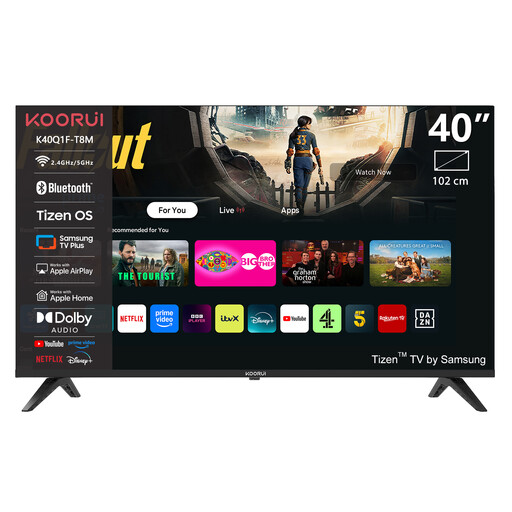 No image available
A 40-inch model to compare if this size suits your viewing distance and setup.
40 inches; Full HD QLED; Tizen OS; Dolby Audio; DVB-T2/C/S2 support.
Check that the connections suit your player and audio system.
 No image available
A Mini LED option to compare if you’re considering a large screen and the size suits your viewing space.
86 inches; 4K; QNED Evo Mini LED; 2,040 dimming zones; Dolby Vision.
Before choosing, check that the screen and 600 × 400 mm VESA size suit your intended setup.
No. A 4K TV can’t automatically reveal details that aren’t in the recording. According to the Consumentenbond, the benefit of 4K partly depends on the resolution of the film or programme you’re watching. Compare the picture using your own recording and player.
Not automatically: a recording may have an aspect ratio that doesn’t fill the screen. Zooming to fill it can stretch or crop the image, so check the aspect ratio settings on both the source and the TV.
Compare the connections on your equipment with the specifications for the exact TV model. According to Sony, the K-55XR8M2 has four HDMI inputs and eARC/ARC, but no composite video input; this doesn’t tell you anything about other models.
The European Commission’s energy label uses energy classes from A to G for TVs and also includes information for HDR use. Compare the figures for the exact models rather than looking at screen technology alone.
You’re entitled to a product that meets reasonable expectations. According to the Dutch Government, there is no fixed statutory warranty period in the Netherlands, and the retailer is your point of contact if something is wrong. For a standard online purchase of a new television, ACM ConsuWijzer says you generally have up to 14 days from delivery to change your mind; check the terms and any exceptions that apply to your purchase.