First, measure the viewing distance and check what the picture looks like from the furthest seats. A bigger TV won’t automatically solve a limited viewing angle or distracting reflections. The Consumers’ Association generally describes OLED TVs as having a wider viewing angle and LCD TVs as often offering greater brightness. Then compare screen size, motion handling, shared costs, and the app or connection you need for the broadcast you want to watch.
Who is this TV-buying guide for?
A home with seating spread out
You watch with several people, both on the sofa and in seats off to the side. So, check the screen from positions that aren’t directly in front of the TV too. The Consumers’ Association highlights viewing angle as something to consider when watching sport with a group.
A home with limited viewing space
You need to fit the TV into an existing space and want to choose a screen size that suits your actual viewing distance and the room available on your stand. The Consumers’ Association gives around 2.4 times the screen diagonal as a starting point for viewing distance, not a fixed rule.
A home with a shared budget
You want to agree in advance on the total cost of the TV and any extra services, so no one automatically pays for features the group doesn’t need.
Which buying considerations matter?
OLED TV
Choose this when: If your housemates sit in different places, compare the viewing angles of specific models. The Consumers’ Association generally describes OLED TVs as having a wider viewing angle and deeper blacks.
Consider: Also check reflections in your room and the brightness of the specific TV.
LCD, QLED or Mini LED
Choose this when: If daylight and brightness are important, compare specific LCD models and check the picture from the furthest seats. The Consumers’ Association says LCD TVs can often be bright, but generally have a more limited viewing angle.
Consider: A stated panel refresh rate alone doesn’t show what the broadcast you’ve chosen will look like.
QLED with the features you want
Choose this when: If the shared budget is the priority and the picture looks good from your seats, compare screen size, reflections, connections and the viewing app you need.
Consider: Ambilight is an extra feature; it doesn’t prove that a TV has a wider viewing angle or that the broadcast is available on its smart TV platform.
| Buying consideration |
What to look for |
Who is this for? |
| Viewing from every seat |
Check the exact model from the furthest seats and look for reflections caused by the room’s lighting. |
If we watch from the sofa and a chair at the side, I want the picture to remain clear from both. Around 22% of consumers put visibility from side seats first. |
| Screen size and space |
Measure the viewing distance and the space available on the stand, including room for the feet. The Consumers’ Association gives around 2.4 times the screen diagonal as a starting point for viewing distance. |
When the TV needs to fit on an existing stand, I want a size that suits both the viewing distance and the space available. Around 22% of consumers put choosing the right screen size first. |
| Shared costs |
Agree on a total budget and check the energy label and any extra services for the model you choose. |
If we’re paying for the purchase together, I want to know in advance which costs the group needs to cover and which options we can skip. Around 22% of consumers put shared costs at the top of their list. |
| Fast-moving sport |
Distinguish the native panel refresh rate from image processing and, if possible, assess sports footage on the exact model. |
For fast-moving play, I want to know what the motion looks like on the TV we choose, not just what number is on the box. Around 17% of consumers make sports motion their top buying priority. |
| Access to the broadcast |
Decide which match and broadcaster you mean, then check the app or connection and test it in advance. |
Before we choose a TV, I want to know how the broadcast will appear on screen and whether the app or connection we need works. Around 17% of consumers put access to their chosen broadcast first. |
Which TV choices could disappoint?
-
Comparing inches alone
A large screen diagonal may be impractical for your viewing distance or the space available, while viewers sitting to the side may still have a poorer view.
Measure the room and check the exact screen from your actual seats. Check for reflections too.
-
Confusing 144 Hz with the broadcast frame rate
The panel refresh rate and the incoming TV signal aren’t the same thing. In its explanation dated 22 May 2026, the Consumers’ Association said that a TV signal is usually 50 Hz. Image processing can also affect how motion looks.
Check the native panel refresh rate and assess sports footage on the exact model, rather than relying only on a promotional demo.
-
Automatically including an extended warranty or installation service
An extended warranty doesn’t replace your statutory rights against the seller, and installation is an optional extra.
Compare the total cost and read what an extra service includes before you split the costs.
Which brands are worth comparing?
LG
The OLED55C5ELB is an OLED option to compare if your housemates watch from different seats.
- LG lists a 55-inch 4K OLED screen and a native panel refresh rate of 120 Hz for the OLED55C5ELB.
- These specifications aren’t an independent test of sports performance. Check for reflections in your room too.
TCL
The 55C6K is a Mini LED option to compare if brightness and motion specifications matter to you.
- TCL lists QLED, an HVA panel, ONKYO 2.1 sound and native 144 Hz for the 55C6K.
- These manufacturer specifications don’t independently establish the viewing angle or sports performance of this specific TV.
Philips
The 55PUS8600/12 is a 55-inch QLED option where Ambilight and the smart TV platform may influence your choice.
- Philips lists 4K QLED, Ambilight and Titan OS for this model.
- Ambilight doesn’t prove that it solves a limited viewing angle. Check whether the broadcast you need is available on the platform.
Joybuy TVs for watching together
These TVs on Joybuy offer a choice of OLED, LCD, Mini LED and QLED options for watching together. Compare screen size with your viewing distance and check how the picture and the viewing app you want will work with your set-up.
 No image available
LG OLED65C68LA 65-inch OLED Evo AI C6 4K Smart TV
Compare the 65-inch size with your viewing distance and the space available. OLED may suit you if visibility from seats to the side is important.
65 inches, 4K OLED and native 120 Hz.
View at Joybuy
 No image available
Hisense 55A6S 55-inch 4K UHD LED Smart TV
A 55-inch model to compare with your viewing distance and the space available in the room.
4K UHD, a stated panel refresh rate of 60 Hz and VIDAA Smart OS. The product listing gives a 178° viewing angle and AI Smooth Motion and MEMC.
View at Joybuy
 No image available
METZ 55MNE8000Z 55-inch QD-Mini LED Google TV
Compare the 55-inch screen size with your viewing distance and assess the motion features listed for this exact TV.
4K, QD-Mini LED and 144 Hz. The product listing also mentions Sports Mode, a 2.1.2 sound system and Google Cast.
View at Joybuy
 No image available
TCL 55T8C 55-inch 4K QLED Smart TV
A 55-inch QLED option to compare with your viewing distance and the features you actually need.
4K QLED and a stated 144 Hz. The product description lists Google TV, built-in Chromecast and an ONKYO 2.1 sound system.
View at Joybuy
 No image available
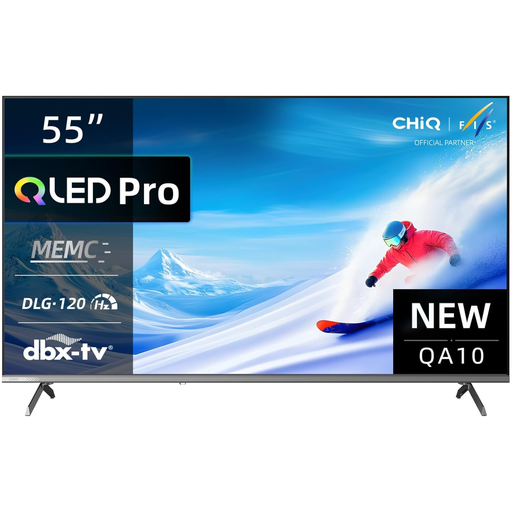
CHiQ U55QM10E 55-inch 4K QLED Smart TV
Compare the 55-inch size with your viewing distance and check whether the listed features suit your viewing set-up.
4K QLED and HDR10. The product description lists MEMC and Google TV.
View at Joybuy
Frequently asked questions
How do you choose a screen size without going for the biggest TV?
Measure the distance from your seats and check how much space you have on your stand. The Consumers’ Association gives around 2.4 times the screen diagonal as a starting point for viewing distance. Look at nearby sizes too, to see what suits your room.
How do you get the TV ready for the match?
First, decide which match and broadcaster you mean, then test the app or connection you need, including picture and sound. NPO describes NPO Start as a TV app for various smart TVs and as a service available via Chromecast or AirPlay. This doesn’t confirm the rights to every final or support on every model.
What does the energy label tell you about power consumption?
The European TV energy label shows, among other things, the energy class and consumption in kWh per 1000 hours. The European Commission describes this as a way to compare TVs on the same basis. Actual consumption also depends on how long and how you use the TV.
What if you’re not happy with a TV bought online, or it develops a fault?
For an eligible online consumer purchase, the Dutch government generally provides a 14-day cooling-off period. The product must also be of satisfactory quality; the Dutch government states that the Netherlands has no fixed statutory guarantee period covering all products. Check the terms of any paid extended warranty separately.
Can you fit a TV bracket in a rented home?
It depends on the work involved and the terms of your tenancy. According to the Dutch government, you don’t need permission for minor changes that can be undone without significant cost. Check your situation before drilling.


