Measure the distance from your eyes to the TV and divide it by 2.4 to get a starting point for the screen diagonal in centimetres, advises the Dutch Consumers’ Association. OLED may suit films watched in a dark room or when viewing from the side; a mini-LED LCD could be worth considering in brighter surroundings. Always compare the exact models, including their handling of reflections, HDR formats, connections and dimensions.
Who is this advice for?
Film fans sitting a long way from the screen
You want to follow landscapes, action and subtitles clearly from the sofa. Measure your viewing distance and check that the TV’s external dimensions will fit your available space. The Dutch Consumers’ Association recommends dividing the viewing distance by 2.4 as a starting point for the diagonal in centimetres.
Evening viewers who enjoy dark scenes
Compare black levels, contrast and viewing angles if you usually watch films in low light or have several people sitting on the sofa. Assess the exact model from your usual viewing positions.
Film fans in a bright living room
You want to compare brightness and reflections in the lighting you usually watch in. The panel name alone won’t tell you how the picture will look in your own room.
What should you look for when choosing?
OLED and LCD involve different trade-offs for dark scenes, viewing angles and brightness. No panel label on its own determines how a TV will perform in your room.
Large OLED TV
Best suited to: frequent viewing in dim light, a love of dark film scenes or regularly sitting at an angle to the screen.
Keep in mind: check reflections, dimensions and connections for the specific model in your setup.
Large mini-LED LCD TV
Best suited to: regular film-watching in daylight and comparing the brightness and light control of specific models.
Keep in mind: LCD screens can be bright, but black levels and viewing angles vary between TVs; mini-LED alone is no guarantee of a better film picture.
Large standard LED LCD TV
Best suited to: weighing up screen size and room layout, while also comparing models without OLED or mini-LED.
Keep in mind: check the individual TV’s black levels, picture uniformity, viewing angle and HDR performance.
| What to consider |
What should you check? |
Who is this important for? |
| Screen size and viewing distance |
Measure the distance from your eyes to the screen. The Dutch Consumers’ Association uses the viewing distance divided by 2.4 as a starting point for the diagonal in centimetres. Also check the exact model’s external dimensions and stand. |
I want to follow action and subtitles clearly from my sofa, but the TV also needs to fit on the wall or unit. That’s why around 36% of consumers prioritise a screen size that fits their space. |
| Contrast and HDR |
Compare dark and bright scenes, and check that both your film source and the exact TV support the HDR formats you want to use. |
I want to follow details in dark scenes and know whether my film source supports the HDR format I’ve chosen. Around 29% of consumers put contrast and HDR first. |
| Visibility and viewing angle |
Assess reflections and brightness in the lighting you usually have at home. Check the picture from seats to either side of the centre, too. |
I often watch during the day or with others sitting in different places on the sofa; the picture needs to be easy to follow in those conditions. Around 21% of consumers prioritise visibility in room lighting. |
| Connections and setup |
Check the HDMI and any ARC/eARC connections, the dimensions needed for your setup, and the separate SDR and HDR figures on the EU energy label. |
My player and audio equipment need to connect to the TV, and it needs to fit in the room. Around 14% of consumers prioritise practical setup and use. |
Common mistakes
-
Choosing based on screen size in inches alone
The stated diagonal isn’t the external width or the width including the stand. The TV may therefore be a different fit from what your unit or wall can accommodate.
Measure your viewing distance and the available space. Then compare the full dimensions and stand details of the exact model.
If the TV won’t fit where you planned to put it, you may need to find a different spot for it.
-
Assuming OLED or mini-LED automatically delivers the best film picture
Black levels, brightness and viewing angles involve different trade-offs and can vary between TVs.
Compare specific models with dark and bright scenes, from your usual viewing positions and in your normal lighting.
-
Assuming an HDR logo means support for every film format
HDR includes several formats, and not every TV supports the same standards.
Before buying, check which HDR formats are supported by both your film source and the exact TV model.
-
Looking only at screen size when planning your setup
The TV also needs to work with your mounting space, player and existing audio equipment.
Check the dimensions, connections and EU energy label for the exact model before you decide.
Brands and models to compare
LG
The OLED77C5ELB is a specific 77-inch 4K OLED model to compare for a spacious film setup.
- LG states that this model offers pixel-level black control.
- Check reflections, dimensions and connections for your room; this specification isn’t an independent comparison with other models.
Samsung
The QE75QN90FATXXN is a 75-inch Neo QLED 4K mini-LED model to compare for rooms with changing light conditions.
- Samsung lists Glare Free and Neo Quantum HDR+ for this model.
- Assess reflections in your own lighting conditions and check whether the TV supports the HDR formats used by your film source.
TCL
The 75C7K is a 75-inch QD mini-LED model to compare for screen size, light control and audio.
- TCL lists dimming control and Bang & Olufsen audio for this model.
- Descriptions of dimming zones and HDR brightness are claims made by TCL; they don’t demonstrate measured performance ahead of other models. Check the specifications for the size you’re considering.
Philips
The 75MLED950/12 combines a 75-inch QD mini-LED TV with Ambilight plus.
- Philips lists Dolby Vision and Atmos support for this model.
- Ambilight is a choice that affects your setup, not proof that the screen itself performs better. Also consider whether you want to leave space for the lighting effects and whether you can connect your audio equipment.
Sony
The K-75XR70, also known as BRAVIA 7, is a 75-inch 4K mini-LED model with published dimensions and connection details.
- Sony specifies four HDMI inputs, eARC/ARC and a VESA size of 30,0 × 30,0 cm for this model.
- These details help you plan your setup, but don’t determine which model has the best picture quality.
Joybuy product picks
These Joybuy picks include large mini-LED and OLED TVs for watching films from a generous viewing distance.
 No image available
TCL T8D 85-inch 4K QD-Mini LED TV
The 85-inch diagonal could be a good option if you sit a long way from the screen; first check that the TV will fit where you plan to put it.
The product name lists 4K, QD-Mini LED, Dolby Vision, HDR10+, HDR10, HLG, 144 Hz and Onkyo 2.1 audio. Check that the HDR formats work with your film source.
View at Joybuy
 No image available
METZ 86MQE8000Z 86-inch QLED Google TV
The large screen diagonal could suit a spacious viewing setup; check the external dimensions before deciding where to put it.
The product name lists 4K, HDR10+, Dolby Vision, Dolby Atmos, an integrated subwoofer and HDMI 2.1. Check which HDR formats your film source uses.
View at Joybuy
 No image available
OLED77G68LW
This is an OLED option for anyone who prioritises dark scenes in films.
Before buying, check the screen size, HDR support and connections for the exact model.
View at Joybuy
 No image available
LG OLED77B68LA 77-inch 4K OLED Smart TV
A 77-inch OLED TV to consider if you enjoy films on a large screen and often focus on dark scenes.
The product name lists 4K, Dolby Vision and Dolby Atmos. Check the connections and dimensions for the exact model.
View at Joybuy
 No image available
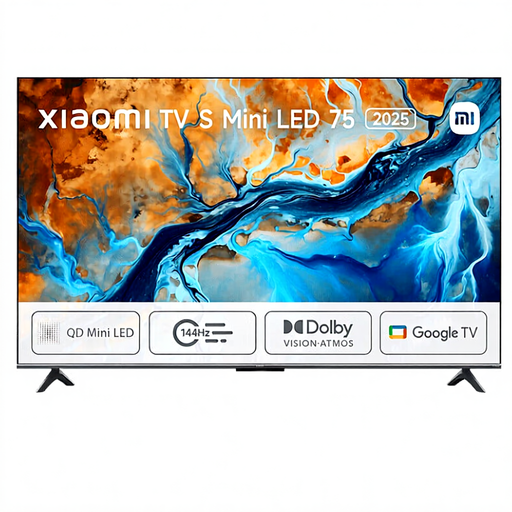
Xiaomi TV S 2025 75-inch 4K Mini LED TV
This 75-inch mini-LED TV is worth comparing if you’re looking for a large screen for films; measure your viewing distance and the space available.
The product name lists HDR, 144 Hz and Dolby Atmos. Check which HDR formats are supported by the exact model and your film source.
View at Joybuy
Frequently asked questions
Do you need a 75-inch TV if you sit a long way from the screen?
No. First measure the distance from your eyes to the screen. The Dutch Consumers’ Association uses that distance divided by 2.4 as a starting point for the diagonal in centimetres and also recommends looking at nearby sizes. For a 4-metre viewing distance, for example, it suggests 55–77 inches; also check that the TV will actually fit.
Do you always need Dolby Vision for adventure films?
No. Not every HDR TV supports the same format, and not every film source offers Dolby Vision. Check the formats supported by your film source and the exact TV model.
How can you tell whether the TV will fit on your unit or wall?
Compare the available space with the exact model’s full width, height and depth, including the stand if you’re placing the TV on a unit. The screen diagonal alone doesn’t tell you the external dimensions.
What should you look for if several people watch from the sofa?
Check the viewing angle of the specific model and assess the picture from the seats you use at home. Also consider whether reflections could be distracting in your usual room lighting.
How do you adjust the picture for films after installation?
Watch a familiar scene with dark and bright areas in your usual room lighting, and try a picture mode that suits your viewing environment. The Dutch Consumers’ Association notes that shop settings are designed for displaying TVs in store.
Which connections should you check for your audio equipment?
Check the specifications for the exact TV to confirm that it has the HDMI and any ARC/eARC connections you need. Compare these with the connections on your existing player or audio equipment.


