If family members sit at an angle to the TV, start by checking the viewing angle of the exact model. OLED and LCD TVs with a confirmed IPS panel are options to investigate, but the panel name alone doesn’t guarantee a good picture from every seat. RTINGS.com discusses viewing angle differences. Then check how to share photos from your own device, assess reflections in the room and, with OLED, bear in mind Sony’s warning about images left on screen for long periods.
Who is this TV choice for?
Family with a wide seating arrangement
You’re sharing holiday photos while family members want to see the colours and details from the side, too. So start by checking the viewing angle of the exact screen. RTINGS.com explains why it matters when seats are spread around the room.
Sharing photos from a phone
You want to start a slideshow from an iPhone or another phone. Before buying, check which sharing method works with your device and the specific TV. LG Netherlands and Samsung Netherlands describe different ways to share content.
Viewer in a bright living room
You show photos during the day and want to consider reflections alongside the seating arrangement and screen size. Check the finish of the specific screen and assess it where the TV will be placed.
What do consumers look for?
First compare the picture from the seats furthest to the side, then check how to share photos from your phone or another device. Also consider the light in the room and how long photos will remain on screen.
| What to consider |
What to look for when buying |
Who is this important for? |
| Picture from seats at the side |
Check a viewing-angle test for the exact model and look at colour and brightness from the seats furthest to the side. RTINGS.com discusses viewing-angle differences between TV panels. |
When I share holiday photos with family members who aren’t all sitting directly in front of the screen, I want a usable picture from the side, too. Consumers who prioritise viewing angle account for around 36%. |
| Sharing photos from your device |
Check the sharing method for the device that holds your photos. LG Netherlands describes using AirPlay with an iPhone and TV on the same Wi-Fi network; Samsung Netherlands describes Smart View for supported combinations. |
I want to start the slideshow from the phone where my photos are stored, without having to arrange another way to transfer them first. Consumers who prioritise photo sharing account for around 29%. |
| Visibility in daylight |
Check for windows and lights opposite the screen, and assess reflections from the exact TV in the room where you plan to use it. Samsung mentions Glare Free for a specific version; assess the finish yourself in the intended location. |
When I show photos during the day, I want the light in the living room to interfere as little as possible with viewing. Consumers who prioritise daylight visibility account for around 21%. |
| Static images and energy use |
With OLED, photos left on screen for a long time or shown repeatedly are worth considering; Sony warns of possible image retention. Also compare the EU energy label for the exact version. |
If the same photos remain on screen for a long time, I want to consider this way of using the TV alongside its energy consumption. Consumers who prioritise long-term use and costs account for around 14%. |
Common buying mistakes
-
Looking only at the panel name
Viewing angles vary between TVs. The panel type alone won’t tell you what the picture looks like from the furthest seat at the side on a specific model.
Compare a test of the exact version and view it from the seats your family will actually use.
-
Assuming every smart TV works with your phone
The photo-sharing methods described have requirements for the device and connection.
Before buying, check the sharing method for the phone, tablet or computer where your photos are stored.
-
Leaving a static photo on an OLED screen for a long time
Sony says that static images displayed for long periods or repeatedly can cause image retention on OLED screens.
Don’t use an OLED TV as a photo display that stays unchanged for long periods, and follow the screen protection advice for the specific TV.
-
Choosing a larger screen without considering energy use
Screen size and settings affect energy use. A larger screen may also require more materials.
Choose a size that suits the seating arrangement and compare the energy labels for the exact versions.
Milieu Centraal points out that a smaller screen uses less electricity than a larger one.
Brands to compare
LG
LG OLED models, including the OLED55C56LB, are worth comparing if several family members watch TV from an angle. LG also describes AirPlay as a way to share photos from compatible Apple devices.
- LG says OLED offers wide viewing angles. This isn’t a viewing-angle measurement for every individual model.
- For the TV you’re considering, check both the picture from the seats at the side and the sharing method for your device.
Samsung
The Dutch QE65S95HFTXXN is an OLED model for which Samsung mentions a Glare Free finish. Samsung also describes ways to share photos from a phone.
- The finish mentioned may be relevant if there are reflections in a bright room; its performance is a claim made by Samsung.
- Check that the sharing method works with the specific TV and phone you want to use.
Philips
According to Philips, the Philips 55OLED850/12 combines an OLED screen with Ambilight. Assess this model separately if you plan to position seats beside the TV.
- Philips says the picture on this model is clearly visible from an angle, too.
- Ambilight is lighting behind the TV, not an independent viewing-angle measurement. Also check how your device with the photos connects.
Sony
The BRAVIA 8 II is a Dutch QD-OLED option to consider when weighing up screen type and seating arrangement.
- Sony describes possible image retention when static images are displayed for long periods or repeatedly.
- Assess the viewing angle of the specific model separately; a comparable measurement for this family seating arrangement isn’t available here.
TVs at Joybuy
These TVs offer different screen types and sizes to compare when sharing family photos. For each model, check the viewing angle from the seats and whether it supports your preferred way of sharing photos.
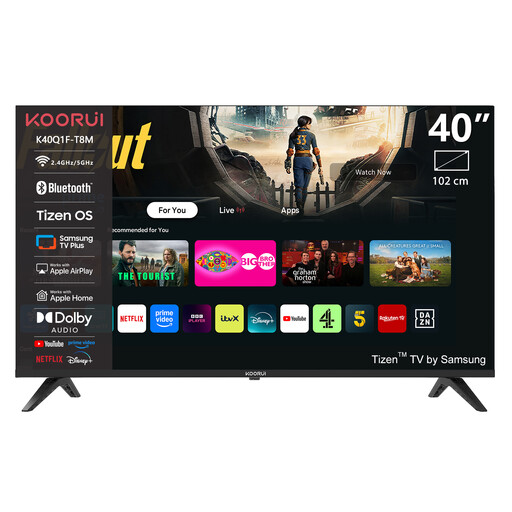 Image unavailable
KOORUI K40Q1FQ-T8 40-inch Full HD QLED TV
The product name describes a 40-inch Full HD QLED TV with Tizen OS. For seats beside the screen, check the viewing angle of this exact model.
View at Joybuy
 Image unavailable
KOORUI K65N3UQ-T8 65-inch 4K UHD QLED TV
The product name describes a 65-inch 4K UHD QLED TV with Tizen OS. Compare the viewing angle of this model with the seating in your room.
View at Joybuy
 Image unavailable
METZ 86MQE8000Z 86-inch QLED Google TV
The product name describes an 86-inch QLED TV with 4K HDR10+ and Google TV. Compare the size with your seating arrangement and check the viewing angle of this specific model.
View at Joybuy
 Image unavailable
Samsung S85F Series GQ55S85FAU 55-inch OLED 4K
The product name describes a 55-inch OLED TV with 4K. Check the viewing angle of this exact model; Sony warns that static images left on screen for long periods or displayed repeatedly can cause image retention on OLED screens.
View at Joybuy
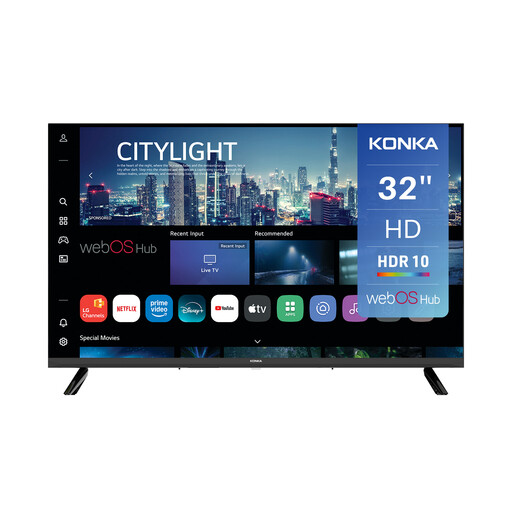 Image unavailable
Konka KDG32YR682ANTS 32-inch DLED TV with 720p HD
The product name mentions webOS Hub and AirPlay. If you want to share photos from an Apple device, check that the sharing method works with this TV model and your device.
View at Joybuy
Frequently asked questions
Should I choose OLED if the family sits spread out?
Not automatically: check the viewing angle of the exact model. OLED and LCD TVs with a confirmed IPS panel are options to investigate, while a VA LCD may be a better fit if viewers sit almost directly in front of the screen. With OLED, also bear in mind photos left on screen for long periods. RTINGS.com discusses viewing-angle differences, and Sony warns of possible image retention.
How do I get iPhone photos onto an LG TV?
LG describes using AirPlay to share photos from compatible Apple devices. For the method described, the iPhone and TV need to be connected to the same Wi-Fi network. Check that AirPlay is available and enabled on the TV you’re considering.
Can I leave one holiday photo on an OLED all day?
That isn’t a suitable way to use it regularly: Sony says that photos displayed for long periods or repeatedly can cause image retention on OLED screens. Follow the screen protection advice for your TV.
What should I consider in the Netherlands regarding electricity costs and the warranty?
Compare the EU energy label for the exact screen version and take size and settings into account. ACM ConsuWijzer states that if a TV breaks sooner than you could reasonably expect under normal use, the retailer must offer an appropriate solution free of charge, such as a repair, replacement or refund.


