What should you look for when buying?
Start with your viewing distance and the available width. Then choose a TV based on the light in the room and the Dutch viewing services you want to use.
| What to consider |
What to look for when buying |
Who is this important for? |
| Size and placement |
Measure your viewing distance; the Consumers’ Association gives around 2.4 times the screen diagonal as a guide. Also check the overall dimensions and stand width of the exact model. |
If space is limited, I want a screen that’s comfortable to watch from my seat and fits on my furniture. Around 29% of consumers put size and placement first. |
| Dark film scenes |
Compare the black levels and contrast of specific models. LCD uses a backlight, and the type of backlighting varies between TVs. |
If I mostly watch films in the evening, I care about dark scenes and contrast. Around 23% of consumers give these picture qualities the highest priority. |
| Visibility during the day |
Consider where your windows and lights are, and compare model-specific information about brightness and reflections. |
If my living area gets a lot of daylight, I want to know whether reflections will interfere with the picture. Around 18% of consumers prioritise daytime viewing. |
| Dutch services and subtitles |
Check that your preferred app is available on the exact TV model and find out how subtitles work with your viewing source. |
If I watch Dutch programmes, I want easy access to my service and subtitles. Around 18% of consumers prioritise access to Dutch viewing services. |
| Energy use and aftercare |
Compare the energy label for the exact models, check who the seller is and find out what any additional services include. |
When making my choice, I also want to consider energy use and what support is available after purchase. Around 12% of consumers give energy use and aftercare the greatest weight. |
Joybuy products for your viewing needs
These models include 43- and 48-inch OLED, LCD and QLED TVs. Measure your viewing distance and the available width, then compare the specifications that suit your lighting conditions and viewing source.
 No image available
LG OLED48G69LS 48-inch OLED evo AI G6 4K Smart TV
If 48 inches suits your viewing distance and available space, this is an OLED model worth comparing for films with dark scenes.
The product description lists 4K, pixel dimming and Dolby Vision.
The title lists 120Hz Native and VRR 165Hz.
View at Joybuy
 No image available
Philips 43PUS8001/12 43-inch 4K TV
If 43 inches suits your viewing distance and furniture, compare this model as an LCD alternative for your living area.
The product description lists an LED LCD screen, HDR10+ and three HDMI ports.
The Consumers’ Association explains that LCD TVs often struggle to produce true black in dark scenes. Compare the picture quality of the exact model.
View at Joybuy
 No image available
METZ 43MQF7500Z 43-inch QLED 4K UHD Google TV
If 43 inches suits your viewing distance and space, this QLED LCD model is worth comparing with OLED.
The product name lists 4K UHD, Google TV, HDR10+ and Dolby Vision.
The METZ blue product information sheet lists power consumption of 50.0 W in SDR and 80.0 W in HDR for the 43MQF7500Z.
View at Joybuy
 No image available
Hisense 43E7S 43-inch 4K QLED TV
If 43 inches suits your viewing distance and available space, you can compare this QLED model with other screen types.
The product name lists 4K and QLED. The product description mentions Filmmaker Mode, Dolby Vision and MEMC.
QLED is an LCD option here; the Consumers’ Association points out that LCD and QLED TVs often struggle to produce true black.
View at Joybuy
 No image available
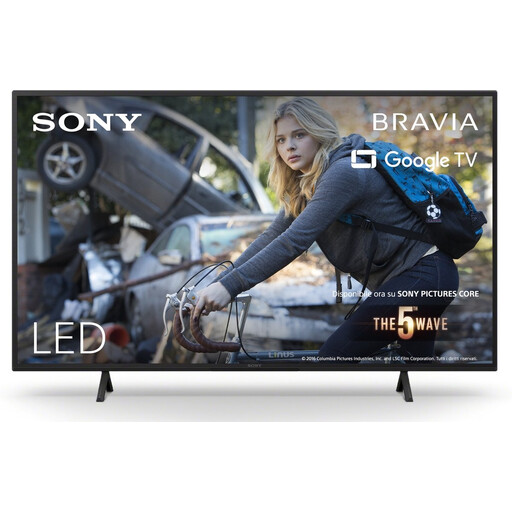
Sony KD-43X75WLP 43-inch Bravia LED TV
If 43 inches suits your viewing distance and setup, this LCD model is worth considering for films and external devices.
The product name lists 4K, and the product description mentions Dolby Vision and the X1 picture system.
The description lists HDMI connections for set-top boxes. The Consumers’ Association explains that LCD TVs often struggle to produce true black in dark scenes.
View at Joybuy
Frequently asked questions
How do I choose a screen size without judging by the size of a small room alone?
Measure from your eyes, while sitting in your usual spot, to where you plan to put the screen. The Consumers’ Association gives around 2.4 times the screen diagonal as a guide to a comfortable viewing distance. Also consider nearby screen sizes and check the overall dimensions and stand.
Will a smart TV automatically give me Dutch subtitles?
No, subtitles aren’t always switched on automatically. For NPO broadcasts, NPO says you need to switch on TT888. The controls vary depending on whether you’re watching live TV, through a set-top box, on the website or in the app. For other services, check how subtitles work with your viewing source.
What should I check when installing a TV on narrow furniture?
Compare the overall width, stand width and depth of the exact model with your furniture, not just the screen diagonal. For example, Sony lists these dimensions separately for the K-43S3.
How do I compare the energy use of TVs for films?
Compare the EU energy label and product information sheet for the same model variant. The European Commission lists data for SDR and HDR separately; energy use can vary between these picture settings.
Do I still have rights in the Netherlands after the manufacturer’s warranty ends?
Yes. Your statutory rights are separate from the manufacturer’s or seller’s warranty. According to ACM ConsuWijzer, if a product breaks sooner than you could reasonably expect under normal use, the seller must offer an appropriate solution at no cost. There is no single fixed statutory warranty period for every TV.


