
Viewer with a narrow TV stand
You want to check in advance that the screen, stand and space needed for cables will all fit. The Dutch Consumers’ Association also recommends checking the TV’s height and width.


First, measure the available width, height and depth of your shelf and compare them with the TV’s dimensions, including its stand; the screen size alone won’t tell you whether it will fit. Then choose between a compact Full HD TV and a larger 4K model, based on your documentary sources, viewing distance, room brightness and seating positions. The Dutch Consumers’ Association emphasises that no screen technology is better in every respect. Also check the apps, connections and energy label for the exact model.
You want to check in advance that the screen, stand and space needed for cables will all fit. The Dutch Consumers’ Association also recommends checking the TV’s height and width.
Consider how dark scenes, bright nature footage and images viewed from different seats look. Your room and viewing position affect which features matter most.
You want to use your own streaming services and any external devices, and check whether 4K is available for the programmes you actually watch.
Best suited to: a space where a larger model won’t fit, or when your available sources and viewing distance don’t call for 4K.
The trade-off: you get less screen space and no native 4K detail. Check the dimensions and apps for the exact model.
Best suited to: viewers who value dark-scene performance and watching from different seats, provided the larger TV fits.
The trade-off: the Dutch Consumers’ Association lists deep blacks and a wide viewing angle as general OLED strengths, but notes that QLED TVs can often get brighter. Compare models in the lighting conditions of your room.
Best suited to: anyone with room for a 43-inch screen who wants to compare 4K models for a room that’s often bright.
The trade-off: brightness, reflections and viewing angles vary between models. The Dutch Consumers’ Association outlines general differences between OLED and QLED; the panel label alone won’t tell you which TV is better for your room.
| Buying concern | What to look for | Who should pay extra attention? |
|---|---|---|
| Will the TV fit in the space? | Measure the available width, height and depth and compare them with the exact model’s dimensions, including its stand. Remember to allow space for cables, too. | If shelf space is tight, I want to know whether the stand will fit before choosing a screen size. Around 36% of consumers put physical fit first. |
| Will scenes be easy to see? | Compare specific models in your usual lighting and from your seating positions; look at black levels, brightness and reflections. | If picture quality is my main concern for dark space scenes or bright nature footage, I want to assess the TV in my own viewing conditions. Around 29% of consumers make picture features their top priority. |
| Will my sources and apps work? | Check that your preferred service is available on the exact model and that your external devices will work with the available connections. | If I watch documentaries through specific services, I want to know in advance whether my source will work and which picture format is available. Around 21% of consumers start by checking sources, apps and connections. |
| What should I consider for long-term use? | Compare the energy label and consumption in kWh per 1,000 hours for standard and HDR viewing. Also read the terms of any additional cover. | For consumers who prioritise energy use and service, label details and terms are important to check before buying. Around 14% of consumers put running costs and service first. |
The casing and stand also affect whether a TV will fit on a shelf. The screen size in inches doesn’t tell you the full width, height and depth you’ll need.
Measure the available space and compare it with the exact model’s dimensions, including the stand.
To see extra native 4K detail, you need content that has been filmed and made available in 4K. The difference therefore depends on the source and your viewing conditions.
Check what your service offers and which titles you watch, then weigh that against the screen size and where you’ll place the TV.
The Dutch Consumers’ Association generally describes OLED as strong on black levels and viewing angles, while QLED TVs can often get brighter. That doesn’t mean this applies to every individual model.
Compare specific TVs with your room’s lighting, viewing distance and seating positions in mind.
An additional warranty product is separate from your statutory rights if a product is faulty. The Dutch government explains that the retailer is responsible for providing a solution when a product is faulty.
Before paying, read what additional cover is actually provided and how it relates to your statutory rights.
The Dutch models mentioned range from compact Full HD TVs to 43-inch 4K QLED models.
The Dutch OLED42C67LA is a 42-inch 4K OLED model for anyone looking for a suitable size and interested in OLED picture features.
The models mentioned offer different sizes and screen technologies: the 32-inch Full HD F6000F and the 43-inch 4K Mini LED QN90F.
The Dutch BRAVIA 3 II is a 43-inch 4K Google TV model for a setup with enough room for this size.
This selection mainly features compact 32-inch TVs, as well as a 42-inch 4K OLED model. Compare the dimensions, resolution and smart TV features with your available space and documentary sources.
 No image available
A compact option to compare when available shelf space is your main consideration.
32-inch Full HD QLED with Tizen OS. The product name also mentions Dolby Audio.
 No image available
A 32-inch model to compare with other compact options if you also want to weigh up the smart TV platform.
The product name lists QLED and Google TV. Check whether your preferred documentary app is available on the exact model.
 No image available
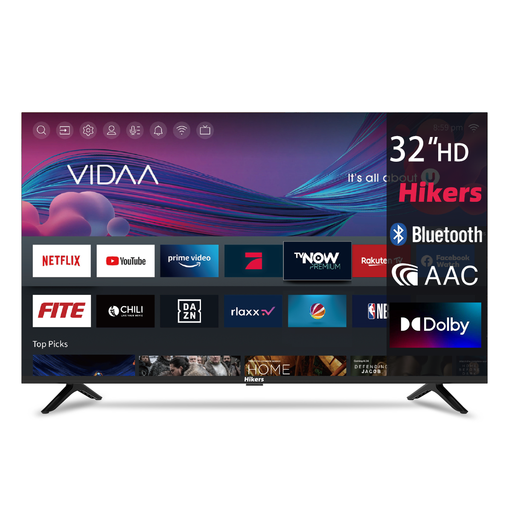
A compact TV to consider when size and connections matter for your setup.
The product name lists HD, VIDAA, DVB-T2/S2, 3 HDMI connections and 2 USB connections. Check that the listed connections are suitable for your devices.
 No image available
A compact option where it’s important to weigh the stated resolution against your sources and viewing distance.
Listed as HD Ready with 1366 × 768 pixels; this is not Full HD resolution. The product name also mentions Google TV, HDR10 and Dolby Audio.
 No image available
A larger option for anyone looking to compare OLED and 4K, with enough room for a 42-inch model.
4K OLED with webOS. The stated dimensions, including the stand, are 93,2 × 57,7 × 17 cm; measure the available space before choosing this size.
Measure the available width, height and depth and compare them with the exact model’s dimensions, including the stand. Also measure the distance from your eyes to where the screen will go; the Dutch Consumers’ Association suggests about 2.4 times the screen size as a starting point for viewing distance, not a hard-and-fast rule.
No. Check the screw holes, compatible bracket and installation instructions for the exact model. Sony warns that a VESA rating alone doesn’t mean every bracket will be suitable; follow the model-specific mounting information.
You’ll only see native 4K detail if the content has also been filmed and made available in 4K. The Dutch Consumers’ Association notes that, according to the buying advice consulted, regular programmes from NPO or RTL weren’t available in 4K; so check what your service currently offers and the titles you watch yourself.
Compare the energy label’s consumption in kWh per 1,000 hours and check the figures for standard and HDR viewing separately. Energielabel.nl describes the current A–G scale for televisions; your actual electricity costs also depend on viewing time, usage and your electricity tariff.
No, additional warranty cover isn’t compulsory. If a product is faulty, the retailer must provide a solution; according to the Dutch government, the Netherlands has no fixed statutory warranty period. So check exactly what additional cover a paid-for package provides.