What should you look for in a TV for your portfolio?
First, measure the viewing area and the distance to the screen. Then decide how you’ll connect your laptop or phone, and test your own files. The Consumers’ Association discusses viewing distance and picture quality as criteria to consider, while the right connection depends on the exact TV model and your source device.
The percentages below show each consumer’s main buying priority for this type of portfolio use.
| Factor |
What should you check? |
Who should give it more weight? |
| Readability and picture quality |
Test text, photos and slides from the seats people will use; check the picture mode and readability with your original files. |
When I discuss my work, I want to assess details and text clearly rather than rely on an extra-vivid demo mode. Around 29% of consumers prioritise readability and how their own work is presented. |
| Size and positioning |
Measure the viewing distance and the available width and height; check the dimensions including the stand. |
In a small rented flat, I want the TV to fit in its chosen spot without taking up unnecessary room. Around 29% of consumers put space and positioning first. |
| Connectivity |
Check the outputs on your source device and the HDMI inputs and wireless features on the exact TV model. |
When I present from my own laptop or phone during a discussion, I want to know in advance that the connection works. Around 24% of consumers prioritise connectivity. |
| Screen use and energy consumption |
Take long periods displaying static slides into account when considering OLED; compare the energy labels of the exact models on the same basis. |
For regular use, I want to know how the screen handles slides left on display for a long time and what the energy label says about consumption. Around 18% of consumers put usage and screen care first. |
Joybuy TVs for portfolios
This Joybuy selection features 43-inch 4K TVs for displaying portfolios, including models with wired or specified wireless connection options. Check the features of the exact model and your own source device before preparing a presentation.
 No image available
Philips 43PUS8001/12 43-inch 4K TV
An option to consider if you’re looking for a 43-inch TV for displaying your portfolio and presenting from a compatible Apple device.
43 inches; 3840 × 2160 pixels; three HDMI ports; Apple AirPlay.
View at Joybuy
 No image available
METZ 43MQF7500Z 43-inch QLED 4K UHD TV
A 43-inch 4K option to compare if you want to display your portfolio wirelessly from a compatible device.
QLED; built-in Chromecast; HDMI 2.1.
View at Joybuy
 No image available
TCL 43T6C 43-inch 4K QLED TV
A 43-inch 4K model to include in your comparison for displaying a portfolio in a compact space.
QLED; 4K; 120 Hz.
View at Joybuy
 No image available
Hisense 43E7S 43-inch QLED 4K UHD TV
A 43-inch 4K option to consider if you’re connecting your laptop or adapter via HDMI.
3840 × 2160 pixels; QLED; three HDMI 2.1 ports.
View at Joybuy
 No image available
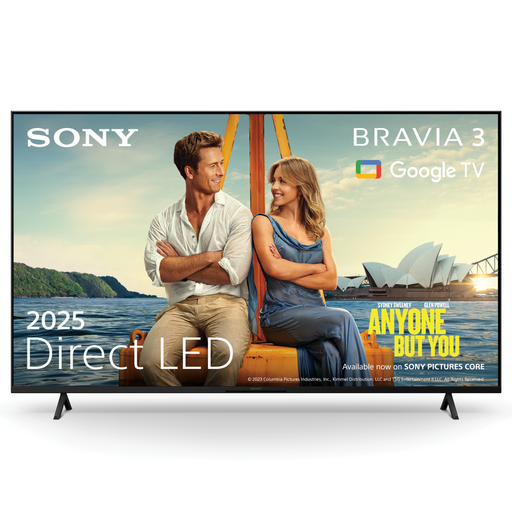
Sony K43S32BP.CEI BRAVIA 3 43-inch LED 4K TV
A 43-inch model to consider if you want to share your portfolio from a compatible device using a specified wireless feature or HDMI.
4K; Google Cast; Apple AirPlay 2; four HDMI inputs.
View at Joybuy
Frequently asked questions
How can I tell if a TV is too big for my room?
Measure the distance from your eyes to the planned screen position, and check the width and height including the stand. The Consumers’ Association uses the viewing distance divided by 2.4 as a starting point for the screen diagonal in centimetres; this isn’t a fixed rule.
Can I show my portfolio wirelessly from my phone?
It depends on your phone and the exact TV model. Samsung Netherlands describes screen mirroring for compatible combinations and notes that wireless mirroring requires a Wi-Fi connection to the TV. Test your particular setup in advance.
What should I do if I often leave the same portfolio slide on screen?
Avoid leaving static images on screen for long periods, particularly on an OLED TV. Sony warns that displaying photos and other images for long periods or repeatedly can cause permanent image retention. LG describes pixel cleaning for its OLED TVs, but this doesn’t guarantee that the risk will disappear.
Can I mount a TV on the wall in my rented home in the Netherlands?
According to the Dutch government, small changes that can be reversed without too much expense, such as drill holes that can be repaired, don’t require permission. This exception doesn’t automatically mean that permission is unnecessary for every wall mounting; consider the planned change and your rental situation.
What are my rights if I buy online or the TV is faulty?
For a standard online purchase of a new TV, ACM ConsuWijzer says you’ll generally have a statutory cooling-off period of up to 14 days after delivery. If a product is faulty, the retailer is responsible for the statutory guarantee; these rights are separate from any commercial manufacturer’s warranty.


