Start by looking at the position of the window in relation to the screen: extra brightness won’t automatically eliminate a direct reflection. RTINGS suggests that a mini-LED LCD is often a sensible choice for a bright room. An OLED may suit you if deep blacks and evening viewing matter too, but check how well the specific model handles reflections. Also compare sound quality and check whether you can connect your existing audio equipment to the TV.
Who is this guide for?
Opera fan with a bright living room
You often watch during the day and see tall windows reflected in dark scenes. That makes placement, reflection handling and brightness important factors to consider. The Dutch Consumers’ Association and RTINGS cover viewing conditions and reflections when choosing a TV.
Fan of dark stage scenes
You watch in the evening too, and care about black levels, shadow detail and viewing from different seats, without overlooking the daylight in your room. The Dutch Consumers’ Association describes differences in black levels and viewing angles between screen technologies.
Listener who values vocals and orchestral music
As well as picture quality, you want to assess sound quality and check whether you can connect your existing speakers or soundbar to the TV. The Dutch Consumers’ Association points out that sound quality varies from one TV model to another.
What should you look for?
Bright mini-LED LCD TV
A good fit if: the room gets a lot of daylight for long periods and visibility during the day is a priority. RTINGS often recommends mini-LED TVs for bright rooms.
The trade-off: the mini-LED label alone doesn’t tell you how well a TV handles direct reflections from windows. Compare black levels and viewing angles for the specific model too.
OLED with good reflection handling
A good fit if: you watch during the day and in the evening, and deep blacks are important to you. The Dutch Consumers’ Association describes OLED as a screen technology capable of displaying deep blacks.
The trade-off: check the reflection test for the exact model. RTINGS noted that, on the S95H it tested, blacks can look purplish in ambient light.
| What to consider |
What should you check? |
Who should pay particular attention? |
| Reflections from windows |
Check tests of both direct reflections and brightness for the specific model, and assess the screen from your seat. RTINGS explains that reflection handling involves more than just a matte or glossy screen finish. |
If a window is directly opposite your seat, you’ll want to know how visible it remains in dark scenes. Around 28% of consumers say reducing reflections from windows is their top priority. |
| Dark scenes |
Compare black levels, shadow detail and viewing angles in tests of the specific model, alongside its performance in ambient light. |
If you want to see stage scenes and shadows clearly during the day too, pay particular attention to contrast. Around 22% of consumers give dark scenes top priority. |
| Vocals and orchestral music |
Compare the TV’s sound rating and check that its connections are compatible with your existing equipment. The Dutch Consumers’ Association highlights differences in TV sound quality. |
If voices and music matter as much to you as picture quality, consider sound and connection options too. Around 22% of consumers put vocals and orchestral music first. |
| Screen size and recording source |
Measure your viewing distance and available space, and check the resolution of the opera recordings you watch. A 4K screen won’t add detail that isn’t in the recording. |
If you’re looking for a screen that suits your viewing distance and recordings, compare size and source together. Around 17% of consumers make this combination their top priority. |
| Energy use and additional costs |
Check the energy label for the exact model, including the information on SDR and HDR, and allow for any audio or installation costs. The European Commission explains the energy information shown on labels for electronic displays. |
If you want to factor in electricity use and the cost of any extra equipment, include both in your comparison. Around 11% of consumers put running costs first. |
Common buying mistakes
-
Focusing only on peak brightness
Brightness and reducing direct reflections are two different things. A window reflected directly in the screen can still spoil dark stage scenes.
From your seat, check where the window appears on screen, and compare both brightness and reflection handling for the specific model.
-
Assuming mini-LED or OLED guarantees a great picture
Screen technology alone doesn’t tell you how a particular model will perform in the light conditions in your room. Black levels and viewing angles can matter too.
Compare tests of the exact model and check how it performs in dark scenes under ambient light.
-
Leaving sound quality until after you buy
TV sound varies from model to model, and a soundbar won’t necessarily deliver rich, detailed audio. A separate audio system also needs space and may add to the cost.
Compare reviews of the TV’s sound and check that its connections suit your existing equipment before choosing a model.
-
Confusing the manufacturer’s warranty with your statutory rights
According to the Dutch government, there is no fixed term for the statutory guarantee in the Netherlands. A manufacturer’s warranty is in addition to this.
Read the terms of any extended warranty, and contact the retailer if you have a problem.
Brands to compare
Sony
The BRAVIA 9 II series is worth looking into if brightness and reflection handling are important in a bright room.
- RTINGS names the BRAVIA 9 II as its top pick from its selection for bright rooms. That verdict applies to the models in that test selection, not every Sony TV.
- Sony Netherlands describes the K65XR95M2PB.CEI as a 65-inch BRAVIA 9 II. It is a different model from the older BRAVIA 9 K-65XR90.
Samsung
The Dutch 55-inch OLED S95H, model QE55S95HFTXXN, is an OLED option to compare if both black levels and reflections matter to you.
- Samsung lists Glare Free for this model.
- In RTINGS’ test of the S95H, blacks can look purplish in ambient light. Don’t assume this finding automatically applies to every regional variant.
TCL
The Dutch C6K Pro range includes QD mini-LED TVs to compare for picture and sound in a bright room.
- For the 65C6K Pro, TCL lists features including local dimming and an ONKYO 2.1 system.
- The stated dimming zones and HDR brightness are product specifications; on their own, they don’t provide an independent assessment of visibility with your windows.
Philips
The OLED810/12 series combines OLED with Ambilight. The 48OLED810/12 is a smaller option to compare if screen size and viewing distance matter.
- For the 48OLED810/12, Philips lists features including Dolby Vision and Ambilight.
- The manufacturer’s description is not an independent reflection test for rooms with tall windows.
Joybuy TVs to compare
Below are Joybuy TVs in a range of sizes with QLED or QD-Mini LED listed in their specifications. Compare them as potential options for a bright room and opera audio; this is not a full comparison with OLED TVs.
 No image available
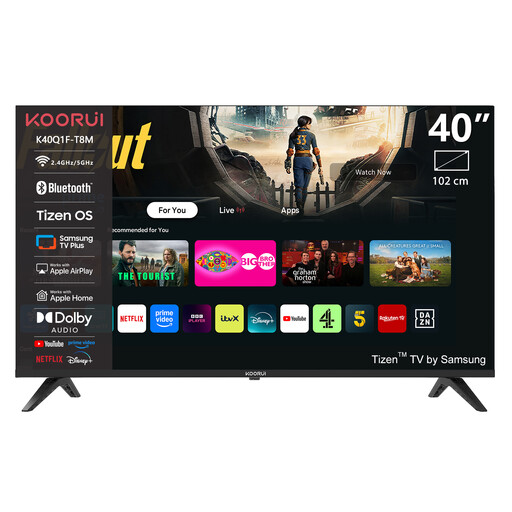
KOORUI K40Q1FQ-T8 40-inch Full HD QLED TV
The 40-inch size is worth considering in relation to your viewing distance and available space.
Specifications in the product name: Full HD, QLED, Tizen OS and Dolby Audio. Check the audio outputs on this exact model before connecting it to your existing setup.
View at Joybuy
 No image available
TCL T8D 85-inch 4K QD-Mini LED TV
With an 85-inch screen, it’s a good idea to measure your viewing distance and available space first.
Specifications in the product name: 4K HDR, Google TV, 144 Hz, FreeSync Premium, VRR, Onkyo 2.1 sound and HDMI 2.1. Check which connection you need for your own equipment.
View at Joybuy
 No image available
TCL 50Q6C 50-inch QD-Mini LED TV
The 50-inch model is a size to weigh up against your viewing distance and available space.
Specifications in the product name: 4K HDR Premium 1000 nits, Google TV, Dolby Vision IQ and Atmos, Onkyo 2.1 audio and 144 Hz. For a room with tall windows, compare reflection tests for this exact model.
View at Joybuy
 No image available
METZ 86MQE8000Z 86-inch QLED TV
First, measure your available space and viewing distance for this 86-inch model.
Specifications in the product name: Google TV, 4K HDR10+, 144 Hz, Dolby Vision Atmos, a 2.1.2 sound system with an integrated subwoofer and HDMI 2.1. Check the sound rating and connections for your own equipment.
View at Joybuy
 No image available
METZ 55MNE8000Z 55-inch QD-Mini LED TV
The 55-inch model is an option to compare if you think this size suits your viewing distance and space.
Specifications in the product name: Google TV, 4K HDR10+, 144 Hz, a 2.1.2 sound system and Dolby Vision Atmos. If you plan to use your own audio system, check that the connections are compatible.
View at Joybuy
Frequently asked questions
Should you buy a matte TV if you have tall windows opposite?
Don’t decide based on the matte finish alone. For the specific model, compare direct reflections from windows and black levels in ambient light. RTINGS explains that reflection handling depends on more than whether a screen is matte or glossy.
Will a 4K TV automatically make your older opera recordings look sharper?
No. A 4K screen can’t add detail that isn’t in the recording. Check the quality and resolution of your own source before treating screen resolution as a decisive advantage.
How do you connect your existing sound system?
Compare the outputs on the exact TV model with the inputs on your amplifier or soundbar. HDMI and an optical audio cable are common ways to connect a soundbar; check which connection suits your equipment.
What does a TV’s energy label tell you?
For electronic displays covered by European regulations, the label shows information including an energy efficiency class and energy use in SDR and HDR. Compare the label for the exact model; it doesn’t reflect how many hours you personally watch.
Are you always entitled to just a two-year guarantee on a TV in the Netherlands?
No. According to the Dutch government, there is no fixed term for the statutory guarantee in the Netherlands: you’re entitled to a product that does what you can reasonably expect it to do. A manufacturer’s warranty is in addition to this; if there’s a problem, contact the retailer.


