
Housemates sitting in different places
You watch together from the sofa and from chairs off to the side. Consider viewing angles and reflections, and choose a screen size that works for the furthest seat.


First, measure the distance to the furthest seat and check where your housemates usually sit. Then compare TVs that fit the room, looking at viewing angles and reflections. If there’s a lot of daylight, brightness is worth considering, while a high refresh rate alone doesn’t guarantee flawless handling of fast dance moves. Also check how you can watch the specific competition and whether the required app works on the TV.
You watch together from the sofa and from chairs off to the side. Consider viewing angles and reflections, and choose a screen size that works for the furthest seat.
You want a TV that suits the room, without features no one will use. Compare the energy label too, and check whether watching the competition requires extra equipment or a subscription.
You want to follow the dance moves clearly. Compare how the TV actually handles motion, rather than relying only on its advertised refresh rate.
First, measure your viewing distance and check that the screen is easy to see from all the seats you’ll use. Then compare reflections, motion handling and how you’ll watch the competition on the TV.
| What to consider | What should you look for? | Who is this important for? |
|---|---|---|
| Visibility for everyone | Measure the distance to the furthest seat and check the picture from the side chairs you plan to use. Check for reflections under your usual lighting. The Consumers' Association gives around 2.4 times the screen diagonal as an average preferred viewing distance, based on its own research. Use this as a starting point, not a fixed rule. | If your housemates watch from different spots, you’ll want the picture to remain clear and usable from the side too. Around 31% of consumers in this breakdown prioritise good visibility for the whole group. |
| Shared costs | Choose a screen size and panel technology only after you’ve worked out the viewing distance. Compare the energy labels for the exact models, and check whether watching the broadcast requires extra equipment or a subscription. | If you’re paying together, you won’t want to choose a size or features that don’t suit the room or how you’ll use the TV. Around 25% of consumers in this breakdown mainly weigh up the shared purchase and running costs. |
| Motion during dance performances | Distinguish the panel’s native refresh rate from image-processing terminology. Where possible, also assess a broadcast featuring fast, unpredictable movement. | If fast dance routines are the main attraction, you’ll want to know what the picture actually looks like. Around 25% of consumers in this breakdown consider motion handling their main priority. |
| Access to the broadcast | First find out which channel or service is showing the competition. Then check whether the app works on the exact TV model, or whether you’ll need a compatible external streaming device. | If you want to watch a particular competition, you’ll need to know how it’s being broadcast first. Around 19% of consumers in this breakdown mainly need access to the right broadcast. |
A higher panel refresh rate doesn’t tell you everything about motion handling. According to the Consumers' Association, generated in-between frames can also cause picture artefacts during fast, unpredictable movement.
Compare the native panel refresh rate separately from image processing, and look for similar fast-moving content where possible.
When you’re watching together, the side view and reflections can affect the experience. The Consumers' Association generally describes OLED TVs as offering wider viewing angles and QLED TVs as often being brighter, but that doesn’t automatically tell you how a specific model performs.
Check the picture from the side seats you plan to use, under your usual lighting.
According to the Consumers' Association, the difference you can see depends in part on the picture quality of the source material. The difference from Full HD isn’t always clear.
Check the quality of the actual broadcast and consider it alongside viewing distance, screen size and reflections.
ACM ConsuWijzer distinguishes between a manufacturer’s warranty and your statutory guarantee. The latter depends, among other things, on what you could reasonably expect from the product.
Check exactly what any additional warranty covers, and keep your proof of purchase.
The 43PUS7000/12 is a 43-inch 4K LED TV worth comparing if a more compact size suits your shared living space.
The 55C6K is a larger QD Mini LED option to compare if you have room for a bigger screen.
The QE55Q7F3AUXXN is a 55-inch QLED 4K model to compare with other larger LCD TVs.
OLED is a useful option to compare if your housemates sit in different parts of the room. The available LG specification is for the 2023 C3 series.
This selection includes OLED, QLED and LED TVs in a range of screen sizes. Compare the listed specifications with the seating, viewing distance and viewing setup you want in your room.
 No image available
A 55-inch OLED TV to compare if several housemates will be watching from different seats. Viewing angles vary by model and set-up.
The product information lists 4K, Wi-Fi and four HDMI ports.
 No image available
A 4K smart TV to compare if the listed viewing features suit your set-up and preferred way of watching.
The product information lists VIDAA Smart OS, AirPlay 2 and a 60 Hz panel refresh rate.
 No image available
A 43-inch QLED TV to compare if this size suits your room and viewing distance.
The product information lists 4K, a native refresh rate of 144 Hz and AI Smooth Motion.
 No image available
A 43-inch QLED TV to compare if this size and the listed viewing features suit your shared living space.
The product information lists Google TV, Chromecast and Google Cast, VRR and MEMC.
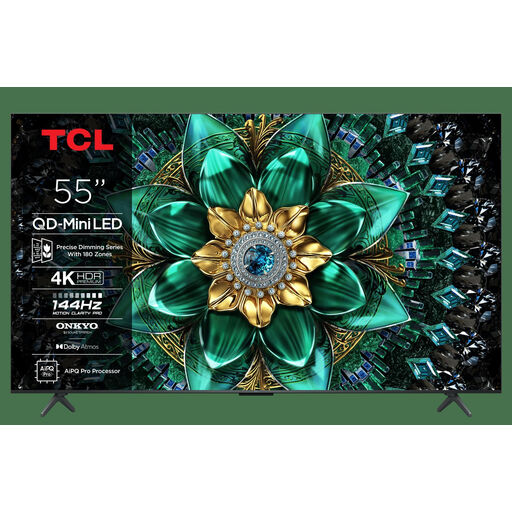 No image available
A 55-inch TV to compare if your room has space for this size and the listed viewing features suit how you’ll use it.
The product information lists 144 Hz, Google TV, AirPlay 2 and Google Cast.
Measure your usual viewing distances and the space available. Based on its own research, the Consumers' Association gives around 2.4 times the screen diagonal as an average preferred viewing distance. Use this as a starting point, and check the view from the furthest seat too.
Check the TV from your actual seats and under your usual lighting. This lets you assess reflections and the side view for the specific TV and set-up.
No. A higher panel refresh rate alone doesn’t guarantee flawless motion handling. The Consumers' Association points out that generated in-between frames can also cause picture artefacts during fast, unpredictable movement. Compare the panel refresh rate and the actual picture separately.
First check which provider is showing the specific competition and whether its app works on the exact TV model. If the broadcast is on NPO Start, NPO also lists Chromecast and AirPlay as ways to watch. This doesn’t confirm that every competition is available there.
No. It depends in part on the picture quality of the broadcast. According to the Consumers' Association, the difference from Full HD isn’t always clear, so check the picture quality the competition is actually broadcast in.