
Daytime viewer
You follow a stage during the day in an open-plan kitchen with windows or bright lighting. Check both the brightness and how well the specific model handles reflections: extra brightness won’t automatically prevent glare.


Start by considering the position of your windows and lights, and where you’ll be sitting. Then compare the reflections, brightness and viewing angle of the exact TV model. Measure the viewing distance and available space too, and check that you can watch the live broadcast you want using your chosen viewing method. An OLED, LCD or mini-LED label alone won’t determine which TV is right for you.
You follow a stage during the day in an open-plan kitchen with windows or bright lighting. Check both the brightness and how well the specific model handles reflections: extra brightness won’t automatically prevent glare.
You watch from different chairs or move between the dining table and the kitchen area. So compare how the picture looks from the side too. The Consumentenbond describes wider viewing angles as a general trend with OLED, not a feature of every model.
You’re looking for a screen that fits the available space and is easy to watch from the furthest dining chair. Measure both the viewing distance and the TV’s overall dimensions.
Start by considering the natural light and where you’ll be sitting. Then measure the viewing distance and available space, and check that you can watch the broadcast you want using your chosen viewing method.
| What to consider | What should you check? | Who should prioritise this? |
|---|---|---|
| Visibility in daylight | Compare the brightness and how well the exact model handles direct reflections. Take into account any windows and lights opposite the screen. | If you mainly watch during the day, you’ll want to follow the race without light sources interfering with the picture. Around 29% of consumers put daylight visibility top of their list. |
| Picture from different seats | Check the picture from the seats at either end, not just from directly in front of the TV. Consider the viewing angle and where the screen will go. | If you watch from different directions while cooking or sitting at the table, you’ll want to be able to follow the race from the side too. Around 22% of consumers prioritise viewing angle. |
| Motion handling | Look for a review of the exact model’s motion clarity with regular sports or TV footage. A stated panel specification doesn’t, by itself, tell you how it will perform during a live broadcast. | If you mainly want to keep up with the riders and fast camera movements, how the TV displays moving images is important. Around 21% of consumers put this first. |
| Screen size and placement | Measure the viewing distance from every seat and the available width. Compare these with the TV’s overall dimensions, including the stand if you’re placing it on a surface. | If space is limited, you’ll want a screen that fits and remains easy to see from the furthest seat. Around 14% of consumers are most concerned about getting the right fit. |
| Access to the broadcast | Check where the specific race will be broadcast and whether you can watch it through your TV provider, the relevant app or a connected device. | If you’re relying on a particular app or connection, check in advance that it gives you access to the broadcast you want. Around 14% of consumers prioritise access to the live broadcast. |
A window or light opposite the screen can still cause reflections, even on a bright TV. Brightness and reflection handling together determine how distracting the ambient light will be.
Compare both features on the same model, paying particular attention to direct reflections. Also consider whether moving the TV could change how the light falls on it.
Features vary by model and lighting conditions. The Consumentenbond describes wider viewing angles and deeper blacks as general OLED trends; according to the organisation, some LCD models can offer higher brightness.
Let your seating positions and the natural light determine which tests matter to you, and compare the features of the exact model.
Having the NPO app or a NPO livestream available doesn’t prove that every cycling race will be shown there. What’s available depends on the specific broadcast.
Check where the race will be shown and whether you can watch it through the TV, an app or a connected device.
Depending on the broadcast you choose, you may also need a separate TV service or an external streaming device.
The QN80H mini-LED and S95H OLED are two different 55-inch models to compare if you want to weigh up LCD and OLED.
The 43PUS8500/12 is a more compact 43-inch QLED LCD TV with Ambilight and Titan OS to consider as a specific model.
The BRAVIA 9 II is a large RGB LED TV to consider if you’re looking for a model suited to a bright room.
The 55T8C is a 55-inch QLED LCD model to consider alongside other TVs.
LG offers OLED models you can compare if viewing angle and black levels matter to you.
These TVs at Joybuy are suited to watching cycling in an open-plan kitchen. The range includes OLED, NANO and QLED models in various screen sizes. The listed features can help you compare, but they don’t, by themselves, show how a TV will perform in your lighting conditions or from your seats.
 No image available
An OLED option to compare if you watch from different seats; this doesn’t establish the viewing angle of this specific TV.
65 inches, OLED, 4K, 120 Hz and VRR up to 165 Hz.
 No image available
A 65-inch model to consider if you’re deliberately looking for a larger screen; check that it fits your space before you buy.
65 inches, NANO, 4K UHD and 50 Hz.
No image available
An option if you’re looking for a very large screen; allow for the space needed to position it and measure up beforehand.
85 inches, NANO, 4K UHD and 50 Hz.
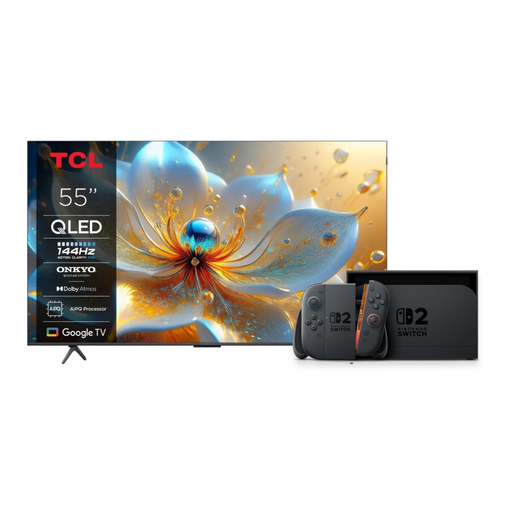 No image available
This bundle includes a Nintendo Switch 2 as well as the TV; check that you want both items.
55 inches, 4K QLED and 144 Hz for the TV in the bundle.
 No image available
The 43-inch size is a more compact option to compare if space is limited; also measure the viewing distance from the furthest seat.
43 inches, 4K and 60 Hz; Titan OS.
No. Extra 4K detail is only available if the broadcast is also offered in 4K. The Consumentenbond points out that this isn’t a given for regular TV programmes. For an open-plan kitchen, also consider reflections, viewing angle and choosing a suitable screen size.
Measure the available space and viewing distance, and follow the instructions for the exact TV and bracket when mounting it. Switch off the TV and unplug it before cleaning. Sony recommends using a clean, dry microfibre cloth on its screens and warns against spraying cleaning products directly onto the screen.
According to NPO, its TV channel livestreams are also available on the free, anonymous version. Check whether the race you want is included in each broadcast. The NOS information about live stages related to the 2026 Tour de France and isn’t a broadcast schedule for future editions.
According to the ACM, with a standard online consumer purchase you generally have a statutory 14-day cooling-off period after delivery, subject to applicable exceptions. The product must also meet what you can reasonably expect. If it’s faulty, the seller is responsible for providing an appropriate solution.
For TVs in the EU, the energy label scale runs from A to G. Compare the label and energy consumption of the specific models. According to the European Commission, the TV label also provides information about HDR energy consumption, screen size and resolution.