Who is this TV advice for?

Viewers in different seats

You watch with housemates from the sofa and side chairs, and want to be able to follow the action from the side too. The Consumers’ Association recommends assessing viewing angles and reflections from the places where you sit at home.

Watching sport together

You want to follow sprints and descents, so compare how well each TV actually handles motion rather than looking only at its quoted Hz figure. The Consumers’ Association highlights smooth motion as something to consider when choosing a TV for sport.

Housemates sharing a budget

You’re looking for a size that fits the living room and want to agree how to share the purchase cost, electricity use and any costs for accessing a race.

What should you look for in a TV for watching cycling together?

LCD, QLED or mini-LED

When to compare: if you also watch during the day or want to weigh up different screen sizes. Assess the specific model in the light conditions and alongside the side chairs in your living room.

Trade-off: the technology name alone doesn’t tell you how good the viewing angle or reflection handling is; compare these for each model.

OLED

When to compare: if housemates sit at an angle to the screen and contrast matters. Check the picture from the seats you plan to use too.

Trade-off: burn-in is worth bearing in mind if static images, such as channel logos, are displayed for long periods. That doesn’t automatically make OLED unsuitable for sport.

Keep your current TV or choose a smaller size

When to consider: if your current TV is easy to see from all your usual seats, or if the main issue is access to a race or picture settings.

Trade-off: a larger screen takes up more space and doesn’t, by itself, give you access to a race or paid channel.

What to consider What should you check? Who is this important for?
Viewing angle and reflections Check the picture from the usual side chairs. In daylight, look out for windows and lamps reflected in the screen. If I want to follow the race from a side chair, I want the picture to remain clear and not be obscured by distracting reflections. Around 28% of consumers prioritise viewing angle and reflections.
Motion in cycling footage Compare reviews of motion handling for the exact model; its quoted Hz figure is not a sports test. If I want to keep track of sprints and fast camera movements, I compare how the TV handles sports footage itself. Around 22% of consumers give motion handling top priority.
Size and space Measure the viewing distance from the seats and the space available for the screen and stand. If housemates sit at different distances, I want a size that suits both the viewing distance and the living room. Around 17% of consumers prioritise choosing a suitable size.
Shared costs Agree how to split the costs and compare the energy labels for the exact models, along with the terms of any extra services. If we’re paying for and using the TV together, I want to be clear about the purchase and any potential running costs in advance. Around 17% of consumers prioritise shared costs.
Access to the race Check the viewing options for the specific race and whether your chosen way of watching works on the TV. If I want to watch a particular race, I first check how it’s being broadcast and whether we already have access. Around 16% of consumers give access to the race top priority.

Common pitfalls when choosing a TV for cycling

  • Judging the TV only from directly in front

    A housemate sitting to the side may see a less bright or colourful picture, while light coming into the room can also reflect off the screen.

    Check the viewing angle and reflections from all the usual seats, in lighting conditions similar to those at home.

  • Assuming a high Hz figure means better cycling footage

    A quoted refresh rate alone doesn’t tell you how smoothly a particular broadcast will appear on that model.

    Look for a review of motion handling for the exact model and, if possible, watch some sports footage before you decide.

  • Assuming a smart TV shows every race

    Having a suitable app or smart TV doesn’t automatically give you access to the broadcast rights, channel or service for a particular race.

    Before you buy, check the provider, the specific race and the access you already have.

    If you need an extra sports package or subscription, this could mean recurring costs. Terms vary by race and service.

  • Choosing a larger screen without checking the size or where it will go

    Viewing distance and the available space help determine whether the size is practical. The type of mounting also needs careful consideration in a shared home.

    Measure the viewing distances and available space, and discuss where the TV will go with your housemates before ordering.

    A suitable stand, bracket or installation may involve additional practical costs. Check what you’ll need for your chosen setup in advance.

TV brands to compare for this viewing setup

LG

LG is worth comparing if you’re considering an OLED TV for a shared viewing setup.

  • LG lists 4K, OLED and picture processing among the specifications for the OLED55C56LB.
  • These specifications aren’t an independent assessment of how well the TV shows cycling from side seats. Check the viewing angle and reflections from the spots you plan to use.

Samsung

The QE55QN90FATXXN is a 55-inch mini-LED model to compare if the room gets a lot of light.

  • Samsung lists Glare Free as a feature of this model.
  • Glare Free is a manufacturer claim; check reflections for yourself in the room and from the seats you’ll actually use.

TCL

The 55Q6C is a QD mini-LED model to consider alongside TVs with other screen technologies.

  • TCL states that the 55Q6C has a native refresh rate of 144 Hz.
  • A quoted refresh rate isn’t an independent sports test. Also check the viewing angle and the broadcast you want to watch.

Philips

The Philips 55OLED810/12 is worth considering if you want to compare OLED with integrated Ambilight lighting.

  • Philips highlights Ambilight and viewing from an angle as benefits of this model.
  • These are manufacturer claims; Ambilight doesn’t replace checking the viewing angle and reflections from your seats.

TVs at Joybuy for watching cycling together

This selection includes LCD and QLED TVs, plus an OLED TV in a range of sizes. Measure the viewing distance and check visibility from the side chairs before choosing a size.

Hisense 55A6S 55-inch 4K LED TV

Hisense 55A6S 55-inch 4K LED TV

A 55-inch size to compare if you’re looking for a 4K TV to watch together; check that it suits your viewing distance and available space.

55 inches (139 cm), 4K UHD and LED.

View at Joybuy

METZ 86MQE8000Z 86-inch QLED Google TV

METZ 86MQE8000Z 86-inch QLED Google TV

Only compare this large screen if your room and viewing distance can accommodate it; a 144 Hz specification alone doesn’t prove better sports performance.

86 inches, QLED, 4K, 144 Hz and HDR10+.

View at Joybuy

Samsung S85F Series GQ55S85FAU 55-inch OLED 4K TV

Samsung S85F Series GQ55S85FAU 55-inch OLED 4K TV

A 55-inch OLED model to compare with LCD TVs if several housemates watch from different spots. Check the viewing angle and reflections in your own room.

55 inches, OLED and 4K.

View at Joybuy
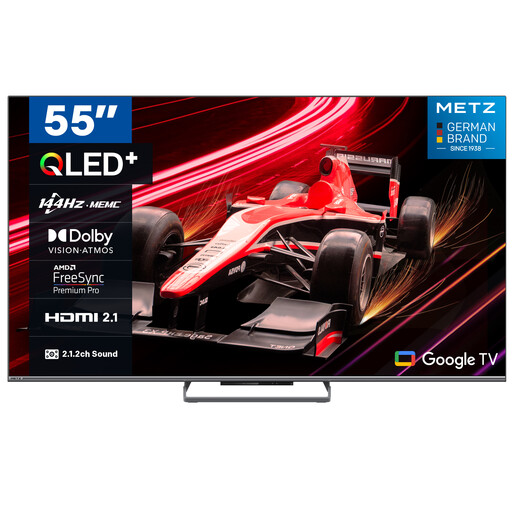
METZ 55MQE8000Z 55-inch QLED Google TV

METZ 55MQE8000Z 55-inch QLED Google TV

A 55-inch QLED model to compare if you’re looking for a TV for several seats; assess motion handling separately from the quoted refresh rate.

55 inches (140 cm), 4K, 144 Hz and HDR10+.

View at Joybuy
METZ 65MQE8000Z 65-inch QLED Google TV

METZ 65MQE8000Z 65-inch QLED Google TV

Compare this size with the available space and the distance to the furthest seat. The quoted 144 Hz is not, on its own, an assessment of sports performance.

65 inches (165 cm), 4K, 144 Hz and HDR10+.

View at Joybuy

Frequently asked questions about TVs for cycling

Do you need 144 Hz to watch a cycling race?

No, don’t choose a TV based only on its quoted refresh rate. For sport, the Consumers’ Association also highlights actual motion handling, picture quality and sound quality. A 144 Hz specification is no substitute for assessing how the TV displays sport.

How do you choose a TV size when several housemates are watching?

Measure the viewing distances from the usual seats and compare them with the space available. The Consumers’ Association notes that a larger screen needs a greater viewing distance. Also check the picture from the side chairs, as screen size alone doesn’t determine the viewing angle.

Do you need a sports subscription to watch cycling?

It depends on the race, the provider and your existing TV package. Before the race you want to watch, check which broadcast rights and viewing options apply at the time; a smart TV doesn’t automatically give you access to a paid service.

What can you try if the picture looks unnatural?

Use the setup wizard or compare the picture settings with a scene you know well. Then watch some moving sports footage too, as a still image won’t show you how the TV handles motion.

Can you fit a TV bracket in a rented home?

According to the Dutch Government, you don’t need your landlord’s permission for a minor alteration that can be reversed without much expense, such as small holes that can be filled in. Whether a particular installation counts as a minor alteration depends on the work involved; discuss where the TV will go with your housemates too.

What are your rights if you buy a TV online or it develops a fault?

According to the Dutch Government, distance purchases usually come with a 14-day cooling-off period. You’re also entitled to a product that’s fit for purpose; if there’s a fault, the seller must provide a solution. Check the terms and any exceptions that apply to your specific purchase.

How do you compare TVs’ energy use?

Compare the energy information on the labels for the exact models, rather than estimating energy use from the screen technology alone. The European Commission describes EPREL as the database for products that must carry an energy label in the EU.
