What should you focus on?
First, measure the viewing distances and the seats at either end of the arrangement. Then compare the viewing angle, light in the room and sound quality of the models that will fit your space.
| What to consider |
What to look for when buying |
Who is this important for? |
| Viewing from the side |
Compare the viewing angle of the specific model and mark out the seats at either end of your arrangement. The Dutch Consumers’ Association generally describes OLED as offering a wider viewing angle; check the specific model too. |
If guests are sitting at an angle to the screen, I want them to be able to follow the picture clearly. Around 31% of consumers give viewing from the side top priority. |
| Screen size for the back row |
Measure the distance from the nearest and furthest seats, and check that the TV will fit in the available space. Consider the screen’s width, not just its diagonal measurement. |
For a distant seat, I want to choose a screen size that suits the distance and the room. Around 25% of consumers prioritise screen size for the back row. |
| Vocals, instruments and bass |
Compare sound reviews for the specific model. If you’re considering external audio, check the connections and compatibility first. |
If music playback is my main priority, I want to consider both vocals and bass. Around 25% of consumers put concert sound first. |
| Visibility in a bright room |
Consider where the windows and lamps are in relation to the screen. Compare the reflection handling and brightness of the specific model. |
If there are windows or lamps near the TV, I want to factor in distracting reflections. Around 19% of consumers give visibility in bright conditions top priority. |
Joybuy products for this viewing set-up
This selection includes TVs from 55 to 85 inches, with OLED, QLED and QD mini-LED listed among their features. Compare the screen size with your viewing distance, and check the viewing angle, reflections and audio of the specific version.
 No image available
LG OLED83C67LA 83-inch OLED evo AI C6 4K Smart TV
The 83-inch diagonal is an option to compare with the distance to the back row; also check that the TV will fit in your available space.
83 inch, OLED evo, 4K Smart TV, α11 AI Processor 4K Gen3.
View at Joybuy
 No image available
LG OLED65C68LA 65-inch OLED evo AI C6 4K Smart TV
The 65-inch diagonal is a size to weigh up against the viewing distance and the space available for the screen.
65 inch, OLED evo, 4K Smart TV, Dolby Vision, Dolby Atmos.
View at Joybuy
No image available
LG OLED55C68LA 55-inch OLED evo AI C6 4K Smart TV
The 55-inch diagonal is an option to compare if limited space or your viewing distance calls for a smaller screen.
55 inch, OLED evo, 4K Smart TV, Dolby Vision, Dolby Atmos.
View at Joybuy
 No image available
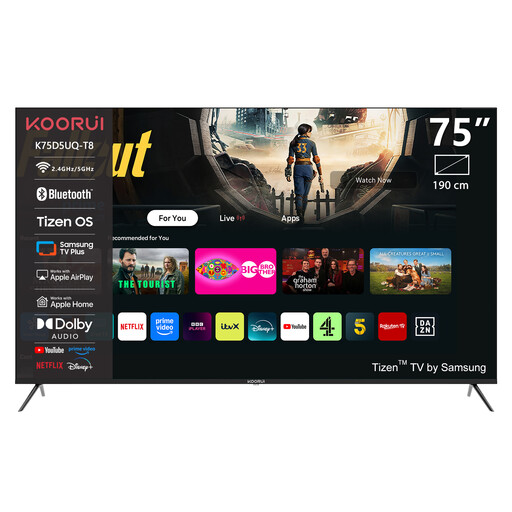
KOORUI K75D5UQ-T8 75-inch 4K UHD QLED Smart TV
The 75-inch diagonal is a size to compare with the furthest seat and the space available.
75 inch, 4K UHD, QLED, Tizen OS, Dolby Audio.
View at Joybuy
 No image available
TCL T8D 85-inch 4K QD-Mini LED Smart TV
The 85-inch diagonal is a size to weigh up against your viewing distance and the space available.
85 inch, 4K, QD-Mini LED, Google TV, Onkyo 2.1 Sound.
View at Joybuy
Frequently asked questions
How do I choose a screen size for multiple rows?
Measure the distance from the nearest and furthest seats, and check the space available for the screen too. Viewing-distance recommendations are a starting point: for example, RTINGS.com shows 65 inches at 2.68 metres in its size calculator. Check for yourself that the picture will be large enough for the back row.
Does Dolby Atmos automatically mean better concert sound?
No. An audio format alone doesn’t tell you how much bass the built-in speakers can reproduce. Assess the sound of the specific model and check the connection if you want to use a soundbar or receiver. RTINGS.com reported clear dialogue but little deep bass on a TV it rated highly; that assessment won’t necessarily apply to other models.
What should I check when setting up and using the TV?
Check the dimensions of the TV and stand, the space available and the sightlines from the seats at either end of the arrangement. Before installation, check where the windows and lamps are in relation to the screen, and follow the instructions for the TV and mount.
How do I compare the energy use of two TVs?
Compare the energy use in kWh per 1,000 hours on the energy labels, and check the separate HDR figure if you often watch HDR concert films. To estimate your own use, multiply the relevant kWh figure by your hours of use divided by 1,000, then multiply by your electricity tariff.
What are my rights when buying online in the Netherlands?
When you buy at a distance, the seller must provide information about things such as the product and the cancellation period, which is usually 14 days according to the Dutch Government. You’re also covered by the statutory guarantee: if there’s a problem with the product, the seller must provide a solution.


