
Viewer with limited space
You want to enjoy travel programmes from your usual seat, but need to work around a small TV unit or limited wall space. So measure not only the viewing distance, but also the space for the TV and its stand.


Start with your viewing distance and the width and depth of the space available: the TV needs to fit, including its stand. The Consumentenbond recommends dividing the viewing distance in centimetres by 2.4 as a starting point for choosing a screen size. Then compare the specific TV in your room, in its usual light and from your seat. LCD screens are often bright, while OLED generally offers deeper blacks and a wider viewing angle. Also check that your preferred channels or apps are available, that speech is clear and that you’re happy with the energy rating of the model.
You want to enjoy travel programmes from your usual seat, but need to work around a small TV unit or limited wall space. So measure not only the viewing distance, but also the space for the TV and its stand.
You watch during the day and in the evening, and want to weigh up brightness, reflections, contrast and viewing angle against the light in your room and your usual seat.
You want to watch travel programmes through your usual TV service or streaming platform, and care about ease of use and how clearly spoken dialogue comes through.
First, measure your viewing distance and the space available. Then compare picture quality, access to programmes, speech clarity and power consumption for the way you watch.
| What to consider | What to check before buying | Who it matters to |
|---|---|---|
| Screen size and fit | Measure your viewing distance and the width and depth of the space, including the stand. The Consumentenbond recommends dividing the viewing distance in centimetres by 2.4 as a starting point for choosing a screen size. | If space is limited, I want to know in advance whether both the screen and stand will fit where I plan to put them. Around 31% of consumers prioritise whether a TV will physically fit. |
| Picture quality in your room’s light | Compare brightness, reflections and viewing angle in the light and from the seat where you watch. The Consumentenbond describes LCD screens as often brighter, while OLED generally offers deeper blacks and a wider viewing angle. | I watch during the day and in the evening, and want to follow landscapes and dark scenes clearly from my seat. Around 25% of consumers prioritise picture quality in their room’s lighting. |
| Access to programmes | Check that the exact model has the apps, tuner and connections you need. To enjoy 4K detail, the source you use must also be available in 4K. | I switch between channels and streaming apps, and want to watch travel programmes through the services I use. Around 19% of consumers prioritise access to programmes. |
| Clear speech | Check how speech sounds on the TV itself, and see which audio connections are available before considering additional equipment. | I want to follow the commentary in a travel programme without immediately having to choose extra audio equipment. Around 13% of consumers prioritise speech clarity. |
| Power consumption and installation | Compare energy labels and model information on the same basis. Also consider what’s involved in installing the TV, including any bracket and fitting. | I want to factor in power consumption and the practicalities of installation before buying. Around 12% of consumers prioritise running costs and additional expenses. |
The screen size in inches doesn’t tell you whether the TV and stand will fit on your unit or whether there’s enough room on the wall you’ve chosen.
Measure your viewing distance and the full width and depth of the space available. Then compare these measurements with those of the exact model, including its stand.
The panel name alone won’t tell you how a TV will look in your room. To enjoy 4K detail, the source you watch must also provide it.
Compare the specific model in suitable room lighting, using pictures similar to the programmes you usually watch. If 4K detail matters to you, check that your usual source is available in 4K.
According to the Dutch government, statutory guarantee rights in the Netherlands have no fixed legal time limit. These rights are separate from any manufacturer’s warranty or additional cover.
If you’re considering extra cover, check what additional rights it provides. If there’s a fault, contact the retailer.
Not every change is minor or easy to put right. The wall and fixings must also be suitable for the planned installation.
According to the Dutch government, you don’t need permission for minor changes that can be reversed without significant cost. Larger changes may require permission. Check the installation area and the terms of your tenancy before drilling.
The Philips product page describes the 43PUS7800/12 as a 43-inch QLED LCD TV with 4K and HDR10+.
LG lists the OLED42C67LA as a 42-inch OLED model.
Samsung’s product page describes the UE43U8070HUXXN as a 43-inch Crystal UHD LCD TV.
TCL lists a 43-inch QLED version in its P7K range.
Sony lists the K-43XR32M2 BRAVIA 3 II on its support page as a 4K Google TV model.
These Joybuy product picks are here to help you compare options for a compact viewing space. Measure the space available for each model and check that its connections and features suit the source you watch through.
 No image available
An option to compare if you’re looking for a 42-inch OLED screen and it fits the space you have planned.
Listed features: 42 inches, 4K Ultra HD, OLED, Smart TV, Dolby Vision, HDR10, Dolby Atmos, HDMI 2.1, AMD FreeSync, webOS and Wi-Fi.
 No image available
A 43-inch option to compare if that size fits the space available.
Listed features: 43 inches, F and 4K.
 No image available
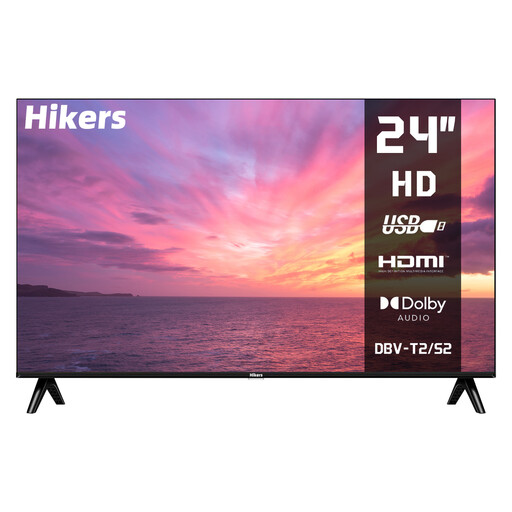
A small TV to compare if space is limited and you watch TV through a tuner.
Listed features: 24 inches (60 cm), HD, non-smart TV, HDMI, USB, DVB-S2/T2/C, Dolby Audio and HDR.
 No image available
A 4K option to compare if the TV and stand fit the space available.
Listed features: 4K.
 No image available
A 43-inch model to compare if that size fits and you’re looking for a QLED Smart TV.
Listed features: 43 inches, 4K, QLED and Smart TV (2026).
Measure the distance from your eyes to the planned TV position, as well as the space available for the TV. The Consumentenbond recommends dividing the viewing distance in centimetres by 2.4 as a starting point for choosing a screen size. Also check the dimensions of the exact model, including its stand.
Not for the resolution alone: the source must also be available in 4K to provide that level of detail. According to the Consumentenbond’s buying advice, regular broadcasts from NPO or RTL aren’t in 4K as standard.
According to the Dutch government, you don’t need permission for minor changes that can be reversed without significant cost, such as small holes that can be filled in. Larger changes may require permission. Whether your installation counts as a minor change depends on the work involved; also check that the wall is suitable.
Compare energy labels and model information on the same basis to get an idea of power consumption. According to the Dutch government, statutory guarantee rights in the Netherlands have no fixed legal time limit; if there’s a fault, contact the retailer. Check what additional rights any extra cover provides.
According to the Dutch government, when you buy a new, similar appliance as a private individual, you can use the free take-back scheme for old appliances, including when you buy online. Ask the retailer how collection will be arranged with your delivery or at your collection point.