What should you look for?
First measure the room and decide how the film will be played. Then compare picture quality in the available light and check that the dialogue is clear from the back row.
| What to consider |
What to look for when buying |
Who is this important for? |
| Screen size and visibility |
Measure the viewing distance and check the picture from the outermost seats. The Consumentenbond gives distance divided by 2.4 as a rough guide to screen diagonal in centimetres; the room layout remains the deciding factor. |
I want visitors at the back and sides to be able to follow the film; around 31% of consumers give visibility from around the room their highest priority. |
| Playing the film |
Test the final video, including sound and subtitles. For USB playback, check that the exact TV model supports the file extension and codecs; LG Netherlands warns that support can vary by model and file. |
What matters to me is that the finished film plays without problems with the picture, sound or subtitles; around 25% of consumers put reliable playback first. |
| Picture quality in the room’s lighting |
Check for reflections and assess the picture from the side in the lighting that will be used during the screening. The Consumentenbond describes QLED as a possible choice for higher brightness, and OLED as an option for a wider viewing angle and deeper blacks; compare the specific model. |
If the room can’t be fully darkened, I want to know how the picture looks in that lighting; around 25% of consumers give picture quality in the room’s lighting their highest priority. |
| Clear dialogue and setup |
Listen to the final film from the back row. Check that the laptop sends audio to the TV or existing sound system, and find out which connections you’ll need. |
I want people at the back of the room to be able to follow the dialogue, and to know what audio setup is needed; around 19% of consumers put clear dialogue first. |
TVs for a community film night
These LCD, QLED and mini-LED models are options for a community film night. Choose the screen size based on the measured viewing distance, and check in advance how you’ll connect and play the film.
 No image available
Hisense 65A6S 65-inch 4K UHD Smart TV
This 65-inch model is worth comparing if the measured viewing distance and room layout allow for this size.
65 inches; 4K UHD; Smart TV.
View at Joybuy
 No image available
TCL 65T8D 65-inch QLED QD-Mini LED 4K HDR Google TV
Compare this 65-inch model with your seating distance, and check the picture from the outermost seats before choosing this size.
65 inches; QLED with QD-Mini LED; 4K HDR; Google TV.
View at Joybuy
 No image available
Hisense 85E7S 85-inch 4K QLED HDR10+
The 85-inch screen may be an option if the room has enough space and the viewing distance suits this size.
85 inches; 3840 × 2160; QLED; HDR10+.
According to the product information, at least three people are needed to lift it. Wall mounting requires a suitable bracket and a sturdy wall.
View at Joybuy
 No image available
TCL 75Q7C 75-inch 4K Mini-LED 144 Hz Smart TV
This 75-inch model is worth comparing if the room layout and viewing distance allow for a larger screen.
75 inches; 4K; Mini-LED; 144 Hz; Smart TV.
View at Joybuy
 No image available
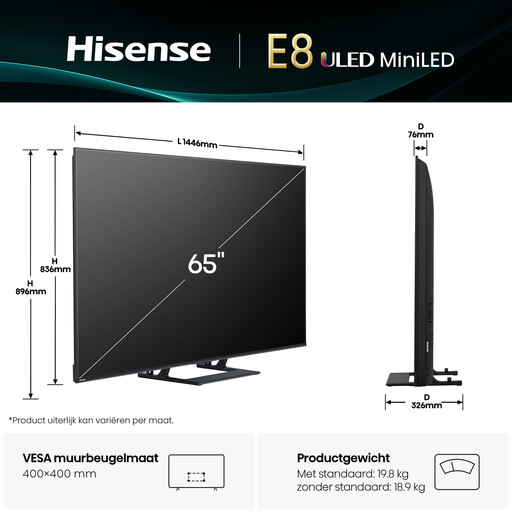
Hisense 65E8Q 65-inch 4K Mini-LED 144 Hz Smart TV
This 65-inch model is worth comparing if the size suits the viewing distance and seating arrangement.
65 inches; 4K; Mini-LED; 144 Hz; Smart TV.
View at Joybuy
Frequently asked questions
How do you choose the right TV size for the room?
First, measure the viewing distance from different seats. The Consumentenbond gives distance divided by 2.4 as a rough guide to screen diagonal in centimetres; also check that visitors at the sides can see the picture clearly. This is only a general guide, not a set size for every room.
Can the student play the film directly from a USB stick?
Test it on the exact TV model using the final film. LG Netherlands says the file extension and codecs, among other things, must be supported by the TV; also check that the subtitles work.
How do I connect a laptop, and what if there’s no sound?
Connect a suitable HDMI output on the laptop to an HDMI input on the TV, then select that input. LG Netherlands says HDMI can carry both picture and audio. Check the selected audio output on the laptop and test the film in advance; the controls vary by device.
Who can help if a TV you’ve bought is faulty?
For a consumer purchase, contact the seller if the product is faulty. The Government of the Netherlands explains that there is no fixed statutory warranty period in the Netherlands, and that your statutory rights are separate from a manufacturer’s warranty. If the club is buying the TV, also check who the legal buyer is.
Can the community club screen and share the student film?
Check the rights to the film, music and any other works used before screening or sharing the film. The Government of the Netherlands says copyrighted works may only be used with permission. If identifiable people appear in the film, also check the relevant privacy rules; according to the Dutch Data Protection Authority, the exception for strictly personal use does not automatically apply when an organisation shares content.


