Start by considering the distance to the back row, the viewing angles from the sides and the light in the room. Then choose between OLED and LCD/QLED or mini-LED. Also test whether voices are clear throughout the room and whether the documentary source works with the TV. Buying a TV or having a personal subscription does not, by itself, give you permission to screen a documentary at a community club event.
Who is this guide for?
Organisers with a back row
You want everyone at the back to be able to follow the picture and read the subtitles. So start by measuring the distance to the screen. The Consumers’ Association (Consumentenbond) suggests a viewing distance of around 2.4 times the screen’s diagonal as a comfortable starting point.
Organisers of a brightly lit community space
You may not always be able to darken the room, or some chairs may be at an angle to the screen. Brightness, reflections and viewing angle all need to be weighed up. The Consumers’ Association outlines the general differences between OLED and QLED.
Organisers who value clear dialogue
For documentaries with lots of spoken content, you’ll want to know in advance whether the TV’s sound will be clear enough for the room or whether you’ll need external audio. The Consumers’ Association highlights the significant differences in sound quality between televisions.
What should you look for when choosing?
OLED TV
Best suited when: you can dim the room and people will be sitting at an angle to the screen. The Consumers’ Association generally describes OLED TVs as offering a wider viewing angle and deeper blacks.
Keep in mind: LCD/QLED TVs can often be brighter. Compare the specific model in the lighting you expect for the event.
LCD/QLED or mini-LED TV
Best suited when: the room will stay bright or a large screen is important for the group. QLED is an LCD technology, and QLED TVs can often be brighter, according to the Consumers’ Association.
Keep in mind: the technology name alone won’t tell you how the picture will look from the seats at the sides. Viewing angle and picture quality vary between TVs.
| What to consider |
What should you check? |
Who should pay particular attention? |
| Screen size for the room |
Measure the distance from the furthest seat and check that the TV, including its stand, will fit in the available space. The Consumers’ Association suggests around 2.4 times the screen’s diagonal as a starting point; this doesn’t guarantee that subtitles will be readable from every seat. |
If I want people at the back to be able to follow the picture and subtitles too, the distance is the first thing I measure. Around 31% of consumers put visibility from the back row first. |
| Picture in the room’s lighting and from side seats |
Assess the model in similar lighting to what you expect in the room, and from the planned side seats. Brightness and viewing angle are separate considerations. |
If the room won’t be dark or the chairs are at an angle, I want to know whether the picture will be comfortable to watch from those seats. For around 25% of consumers, room lighting or viewing angle is a top priority. |
| Speech clarity |
Listen to spoken dialogue on the specific model in a similar room. Then decide whether you need a suitable external audio solution. |
For interviews and commentary, I want to be able to hear every word clearly from the seats, rather than relying on an audio specification. Around 25% of consumers give clear voices top priority. |
| Source and connections |
Decide whether you’ll use a laptop, player or streaming service, and check the required video and audio connections in advance. You’ll only benefit from the extra detail of 4K if the documentary is available in 4K. |
If I want to use a specific player or laptop, I check in advance that the picture and sound work through the connection I’ve chosen. For around 19% of consumers, the playback source is their most important purchasing priority. |
Common pitfalls
-
Choosing a screen size based only on the seats at the front
The right screen size depends in part on the viewing distance. If people at the back can’t follow what’s on screen, you may need to rearrange the room or choose a different size.
Measure the distance from the furthest seat normally in use, and check the space available for the screen and stand.
-
Assuming a bright QLED automatically has a wide viewing angle
Brightness and viewing angle aren’t the same benefit. The Consumers’ Association generally describes OLED as offering a wider viewing angle, while QLED TVs can often be brighter.
Compare the specific TV in the lighting you expect for the event, and check the picture from the seats at the sides.
-
Assuming the TV’s sound will be clear enough for everyone
Sound quality varies between televisions. A larger TV doesn’t guarantee that spoken dialogue will be clear throughout the room.
Test speech in the room where you’ll be watching before deciding whether you need external audio.
-
Confusing buying a TV with getting permission to screen a documentary
Buying a TV or using a personal source doesn’t automatically give you permission to screen a copyrighted documentary to a community club audience.
Before publicising the event, check what permission applies to your chosen title, source and screening arrangements.
Brands to consider
LG
The OLED65C56LB is a specific 65-inch OLED option to consider for a dimmed room with seats at the sides.
- LG lists an OLED screen and 4K for this model.
- These specifications don’t tell you how clear voices will be in your room. Be sure to assess the sound of the specific model too.
TCL
The 65C7K is a specific 65-inch QD mini-LED option to compare if the room will stay bright.
- TCL lists mini-LED and a stated HDR brightness level for this variant.
- Manufacturer specifications don’t measure how the picture will look from the side seats in your room.
Philips
According to Philips, the 65OLED810/12 combines a 65-inch OLED TV with Ambilight, if you’d like to factor that feature into your choice.
- Philips lists OLED, 4K and Ambilight for this model.
- These features don’t prove that voices will be clearer or that the model will suit every community space.
Samsung
The QE65QN90FATXXN is a specific 65-inch Neo QLED 4K mini-LED TV to compare as an LCD option.
- Samsung confirms the model identity and screen technology.
- The screen technology alone doesn’t tell you about viewing angle, reflections or speech clarity in the room.
TVs at Joybuy
These product options include large LCD/QLED and mini-LED TVs, as well as OLED TVs for group viewing. Check each model’s placement, picture from the side seats and sound clarity in your room.
 No image available
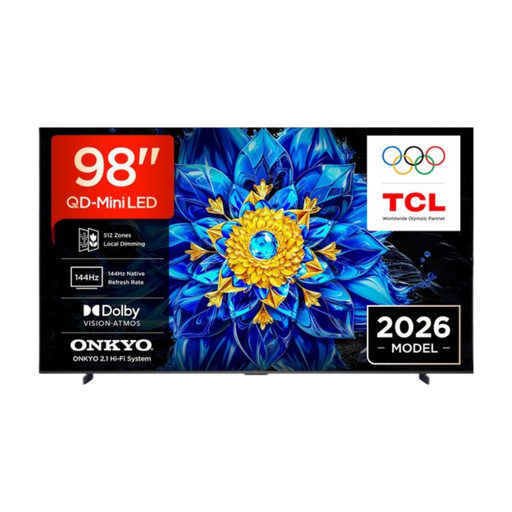
TCL T8D 98 inch 4K QD-Mini LED Smart TV
The 98-inch screen could suit a group viewing set-up, provided the viewing distance and available space are right.
The product description lists 4K, QD-MiniLED/QLED and dimensions of 2178 × 1247 × 64 mm without the stand. Check the space and mounting options before placing or wall-mounting the TV.
Joybuy
 No image available
TCL 75T8D 75 inch 4K QD-Mini LED TV
The 75-inch size could be an option for group viewing if the seating distance and available space are suitable.
The product description lists 4K, QD-MiniLED, HDMI 2.1 and Google TV. It also mentions an Onkyo 2.1-channel audio system; test for yourself whether spoken dialogue is clear throughout the room.
Joybuy
 No image available
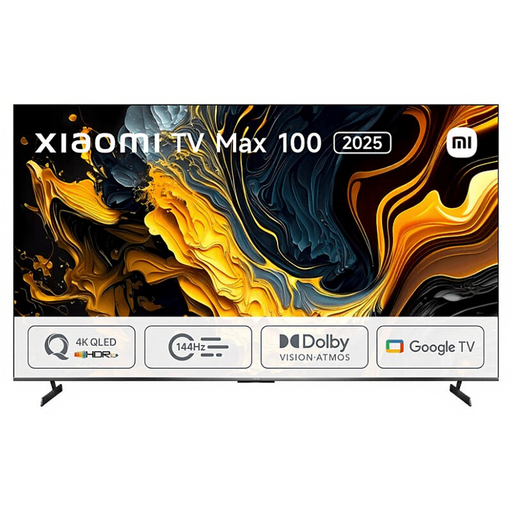
Xiaomi TV Max 2025 100 NGZEU1N
This 100-inch screen could be worth considering if your group needs a very large picture and the room can accommodate it.
The product description lists 4K, QLED, three HDMI connections and a width of 222,9 cm. Check that you have enough space and that the connections are suitable for your playback equipment.
Joybuy
 No image available
LG OLED77B68LA 77 inch 4K OLED Smart TV
A 77-inch OLED TV could be worth comparing if you also have seats at the sides. The Consumers’ Association generally describes OLED as offering a wider viewing angle.
The product information lists 4K and four HDMI 2.1 connections. A listed voice feature isn’t an independent measure of how clear the sound will be in your room.
Joybuy
 No image available
TCL 75Q7C 75 inch 4K Mini-LED Smart TV
The 75-inch size and mini-LED technology make this a model worth comparing for a group space. Assess the picture from the seats at the sides too.
The product description lists 4K, QD-Mini LED/QLED and a 144 Hz refresh rate. Place the TV on a stable surface or mount it with a suitable bracket, and keep the ventilation openings clear.
Joybuy
Frequently asked questions
How do you work out the right TV size for the back row?
Measure the distance from the back seats to the screen. The Consumers’ Association suggests around 2.4 times the screen’s diagonal as a starting point for comfortable viewing, and gives 55–77 inch as a guide for a distance of 4 metres. Also check that the documentary and subtitles are readable from the back.
What should you test before the documentary evening?
Test the playback source, picture and sound in the final set-up. Adjust the picture to suit the lighting you expect for the event. The Consumers’ Association recommends a setting suited to normal use rather than the bright shop setting.
How can you tell if the TV’s sound is good enough?
Listen to spoken dialogue on the specific TV model in the room where you plan to screen the documentary. The Consumers’ Association describes significant differences in sound quality between televisions. After listening, decide whether you need external audio.
Can a community club screen a documentary using a personal subscription or a purchased copy?
Not automatically. The Dutch Government states that permission from the creator is required to use copyrighted films. Videma describes a target audience licence for TV programmes from most Dutch public and commercial broadcasters; an event licence may be relevant for an event screening. Check what permission applies to your chosen documentary, source and screening arrangements.


