
Organiser with seats spread around the room
You want club members at the back and sides to be able to follow the film too. The Consumentenbond highlights viewing angle as a factor when choosing between screen technologies.


Start with the furthest and most off-centre seats: choose a screen size that works from those positions, then assess the picture in the room’s lighting. OLED is worth comparing for dim rooms and seats off to the side; in a bright room, mini-LED and other LCD models may be worth considering, but check for reflections too. Then test your holiday film from USB or a laptop connected via HDMI, and check that dialogue is clear at the back of the room.
You want club members at the back and sides to be able to follow the film too. The Consumentenbond highlights viewing angle as a factor when choosing between screen technologies.
You have your holiday film on a USB stick or laptop and want to check in advance that the picture and sound work. LG Electronics recommends checking the file extension and codec for USB playback.
You can’t adequately darken the meeting room, so you need to weigh visibility and reflections against the view from seats off to the side. The Consumentenbond and Tweakers identify brightness and screen technology as relevant considerations.
First assess the seating layout and ambient light. Then test the film using your planned playback method and check the sound from the back row.
| What to consider | What should you check? | Who will this matter most to? |
|---|---|---|
| Picture quality from every seat | Measure the viewing distances and check the picture from the furthest and outermost seats. The Consumentenbond gives around 2.4 times the screen diagonal as a guide to a comfortable viewing distance; also assess your actual seating layout. | If I want everyone to be able to follow the film, I focus on the furthest and side seats. Around 33% of consumers prioritise a good view from every seat. |
| Playing your own film | Test the whole file via USB and check that the TV supports its extension and codec. With a laptop, check the HDMI connection and supported resolution. | If I already have the holiday film on a USB stick or laptop, I want to know the planned playback method works before the get-together. Around 25% of consumers give trouble-free playback top priority. |
| Visibility in a bright room | Look out for windows, lamps and reflections, and compare the picture under the lighting you’ll use during the screening. Check the viewing angle from the side too. | If I can’t adequately darken the room, I want to assess the picture in those lighting conditions. Around 25% of consumers prioritise visibility in a bright room. |
| Clear, intelligible sound | Play a scene with dialogue and listen from the back of the room. If you’re using an external sound system, check which audio connections the TV has. | If I want people at the back to follow the dialogue too, I check the sound from those seats. Around 17% of consumers give clear dialogue top priority. |
For a group screening, viewing distance, angle and reflections can matter more than extra picture resolution.
Measure the layout and check the picture from the furthest and outermost seats before choosing a screen size.
A USB port doesn’t guarantee that the TV supports the codec used by your holiday film.
Test the whole film, including the sound, using your planned playback method. If USB doesn’t work, a laptop connected via HDMI may be an alternative; check the supported resolution too.
OLED generally offers a wider viewing angle, while a bright LCD model may be worth comparing in a room with more ambient light. The right choice depends on the specific model and room.
Assess both options under the lighting and from the seats your club will actually use.
Your own recordings raise different rights issues from other people’s protected music or footage.
Before the screening, check where the material came from and, where necessary, get permission to use it outside a strictly domestic setting.
The Dutch-market 65C6K is a specific QD mini-LED model worth comparing for a room with ambient light.
The QE65QN74FATXXN is a 65-inch Neo QLED mini-LED model to compare with other LCD and OLED options.
LG offers OLED and QNED/LCD models. Compare the specific range and check the playback method for your video file.
The 65PML9009/12 is a 65-inch QD mini-LED model with Ambilight to include when comparing specific features.
The BRAVIA 8 K-65XR80 is a 65-inch OLED model worth comparing for dim lighting and seats off to the side.
These Joybuy models offer OLED and QD mini-LED options to compare by screen size, seating layout and lighting.
 No image available
OLED is worth comparing if club members will be sitting off to the side of the screen; the Consumentenbond says OLED generally offers a wider viewing angle and deeper blacks.
The product description lists a 77-inch 4K OLED screen and 60 W audio.
 No image available
This OLED model is worth comparing if your club will be watching in dim lighting or from seats off to the side; the Consumentenbond says OLED generally offers a wider viewing angle.
The product description lists four HDMI 2.1 inputs. If you’re using a laptop, check that it supports the resolution you want when connected to the TV.
No image available
OLED is a technology worth comparing if viewers will be sitting off to the side of the screen; the Consumentenbond says it generally offers a wider viewing angle than LCD.
The product description lists a 55-inch 4K OLED screen. Check whether that size will work for the distance to the back row.
 No image available
Mini-LED is an LCD option worth comparing if the room will stay bright; Tweakers says mini-LED TVs are suitable for bright rooms. Also assess the specific model’s picture from the side.
The product description lists an 85-inch 4K QD mini-LED screen and Onkyo 2.1 audio.
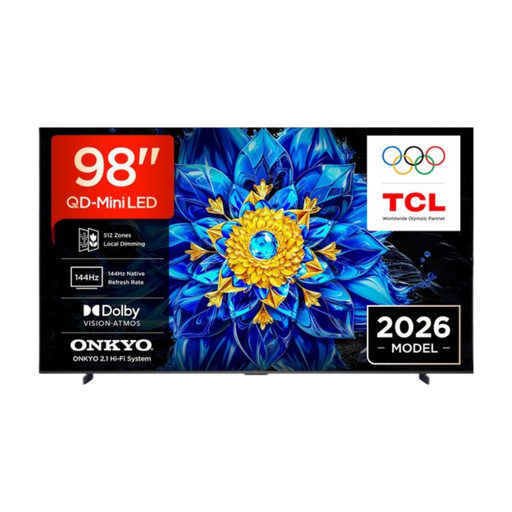 No image available
Mini-LED is an LCD option worth comparing for a bright room; also check that the viewing angle suits your spread-out seating. Tweakers says mini-LED TVs are suitable for bright rooms.
The product description lists a 98-inch 4K QD mini-LED screen and Dolby Atmos audio. Check the screen size against the available space and viewing distance.
No, not just because you’re sharing the film with your club. Extra 4K detail also requires suitable source material; according to the Consumentenbond, the difference from Full HD isn’t always easy to see in practice. So start with viewing distance, source material and seating.
Check which file extensions and codecs the exact TV model supports, and play the actual file all the way through in advance. A USB port doesn’t guarantee video compatibility; a laptop connected via HDMI may be an alternative.
That depends in part on what the film contains: your own recordings are different from other people’s copyrighted music, images or film. Before showing it outside a strictly domestic setting, check what permission you need for the material; club members don’t automatically count as part of that setting. A private streaming subscription or a purchased copy does not, by itself, grant the right to show it at a club event.
The retailer. According to the Government of the Netherlands, if you make a claim under the statutory guarantee, the retailer must provide a solution. An additional guarantee is most relevant if its terms offer more than you’re already entitled to.