What should you look for when choosing?
Start with the size and fit. Then assess how your own viewing source looks, before checking the sound, access to your services and energy use.
| What to consider |
What to look for when buying |
Who is this most important for? |
| Screen size and fit |
Measure the viewing distance and the available space, including the stand. The Dutch Consumers’ Association suggests a viewing distance of around 2.4 times the screen diagonal; 32–43 inches is a guide for a distance of around 2 metres. |
I want the TV to fit on my unit and be comfortable to watch from where I sit. Around 28% of consumers put fit first. |
| Watching older comedies |
Watch a clip from your own source; according to the Dutch Consumers’ Association, 4K doesn’t guarantee a better picture. For a 4:3 recording, bars on the left and right can preserve the original aspect ratio, according to Sony Support. |
I want to see how my own versions look before prioritising extra picture features. Around 22% of consumers prioritise how older comedies look. |
| Clear dialogue |
Listen to a conversation at normal volume. Compare the sound quality of the exact model; the Dutch Consumers’ Association notes that voices aren’t always easy to make out on TVs. |
I want to follow jokes and conversations at normal volume. Around 22% of consumers put clear dialogue first. |
| Your viewing source and controls |
Check that the app or connection you want is available on the exact model. ACM ConsuWijzer points out that missing software updates can limit how smart devices work and affect their security. |
I want to keep using my existing service, receiver or player with ease. Around 17% of consumers prioritise access to their viewing source and controls. |
| Running costs |
Compare the EU energy label and model information under equivalent conditions. The label also includes information about energy use when viewing HDR content, according to the European Commission. |
I want to know how much energy my TV and any additional devices will use. Around 11% of consumers put running costs first. |
Brands to consider
These model examples can help you compare screen sizes and technologies. The features listed apply to the specific models and aren’t recommendations for the brand as a whole.
Philips
The Dutch models 32PFS6900/12 and 43PUS7000/12 offer examples of a 32-inch Full HD option and a 43-inch 4K option, respectively.
- Philips lists Ambilight for the 32PFS6900/12, and Dolby Atmos and DTS:X for the 43PUS7000/12.
- These manufacturer specifications don’t prove that dialogue is easier to hear on these models; compare the exact TVs.
Samsung
The UE32F6000FUXXN and UE43U7000FUXXN are examples of 32-inch Full HD and 43-inch 4K TVs.
- Samsung lists Tizen for the 32-inch F6000F and 4K picture processing for the 43-inch U7000F.
- This model information isn’t a measure of voice clarity or how older recordings are processed; check the services and performance of each TV.
LG
The OLED42C54LA is a 42-inch OLED model for anyone considering this screen technology.
- According to LG, this model offers 4K and pixel-level control of black levels. The Dutch Consumers’ Association says OLED generally performs well for black levels and viewing angles.
- The Dutch Consumers’ Association emphasises that no screen technology is better in every respect; these general features don’t guarantee an advantage with every old recording.
TVs at Joybuy
These TVs range from 32 to 43 inches. Measure your viewing distance and available space, and choose a TV to suit the source you watch.
 No image available
CHiQ L32QM10E 32-inch QLED Google TV
A 32-inch option to compare if space is limited; check that the size suits your viewing distance.
32 inches; QLED; Google TV.
View at Joybuy
 No image available
METZ 43MQF7500Z 43-inch QLED 4K UHD Google TV
Only compare this 43-inch option if your viewing distance and TV unit have enough space for it.
43 inches (109 cm); QLED; 4K UHD; Google TV; HDR10+; Dolby Vision and Dolby Atmos; HDMI 2.1; VRR; MEMC; Chromecast built-in.
View at Joybuy
 No image available
Hisense 43E7S 43-inch 4K QLED Smart TV, 120Hz
A 43-inch model to consider if you have enough space at your viewing spot and the right viewing distance.
43 inches; 4K; QLED; 120Hz; Smart TV.
View at Joybuy
 No image available
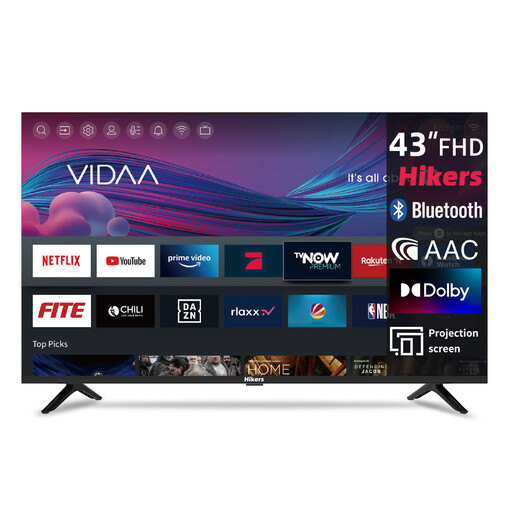
Hikers 43-inch Full HD Smart TV
Compare this Full HD option with your viewing source and check that the apps you want are available on the model.
43 inches (108 cm); Full HD; Wi-Fi; VIDAA; triple tuner DVB-C/S2/T2; Molotov, Netflix, Prime Video, Disney+ and YouTube listed.
View at Joybuy
 No image available
CHiQ U43QM10E 43-inch 4K UHD QLED Google TV
A 43-inch option to compare if the distance from your seat and the available width allow for this size.
43 inches; 4K UHD; QLED; Google TV; HDR10; VRR; Dolby Audio; triple tuner DVB-C/T/T2/S/S2; dual-band Wi-Fi.
View at Joybuy
Frequently asked questions
How should I adjust the picture for my usual viewing room?
At home, choose a home picture mode rather than a shop mode, and assess a familiar scene in the lighting you normally use. Adjust the brightness and contrast so that light and dark areas remain clear; changing the settings can affect energy use.
Are black bars beside an old comedy a fault?
Not necessarily. An older film with a 1.33:1 aspect ratio may have black bars on the left and right when shown on a widescreen TV. Check the recording and aspect ratio setting before stretching the picture.
How can I compare the energy use of TVs in the Netherlands?
Use the European energy label and the model information, not just the energy rating. The label also gives information about energy use when viewing HDR content; compare TVs under equivalent conditions.
What are my rights if I buy a TV online or it breaks too soon?
When you buy a new TV online, you generally have a statutory 14-day cancellation period after delivery. You’re also covered by the statutory guarantee: if a TV used normally doesn’t do what you could reasonably expect, the seller is responsible for providing an appropriate solution. In the Netherlands, there isn’t one fixed guarantee period for every TV.
Can I return my old TV when I buy a new one?
Yes. When you buy a similar new appliance, the retailer must take back an old appliance from a private customer free of charge. According to the Dutch government, this also applies to online purchases; ask how the handover will be arranged when your new TV is delivered.


