First, measure the distance from where you usually watch, then work out which screen will physically fit. The Consumentenbond suggests a comfortable viewing distance of around 2.4 times the screen diagonal, but treat this as a starting point rather than a fixed rule. Then compare the picture, reflections and speech clarity of specific models. OLED may suit a dark room, while LCD or QLED models are also worth considering if there’s more ambient light.
Who is this guide for?
Evening viewer who cares about picture detail
If you mostly watch in low light, you’ll want to assess colour, contrast and shadow detail in art footage. The Consumentenbond considers factors including contrast, viewing angle and reflections when testing TVs.
Viewer with limited space
If you watch from bed, it’s worth considering screen size, viewing distance and where the TV will go together. The Consumentenbond uses viewing distance as a guide to choosing screen size.
Viewer who wants clear speech and easy access
If spoken commentary matters to you, check the speech clarity and access to your preferred documentary service on the specific model. The Consumentenbond includes both sound and available content in its TV advice.
What should you look for when choosing?
OLED TV
A good fit if: you mostly watch in a darkened bedroom and care about contrast and dark scenes.
Consider: images left on screen for a long time may be a concern. The Consumentenbond tested older OLED models for this, but that does not predict the risk for a current model.
LCD LED or QLED TV
A good fit if: there’s often ambient light, or an LCD model better suits your preferred size and the features you need.
Consider: compare contrast, viewing angle and screen reflections for each model. The Consumentenbond notes that LCD backlighting can limit how deep the blacks appear.
| What to consider |
What to look for when buying |
Who it matters to |
| Colour, contrast and visibility |
Compare tests of the exact model for colour reproduction, contrast, viewing angle and reflections. Take account of how much light there is in your bedroom. |
When I watch art footage in a dark room, I want to be able to assess subtle tones and dark details. Around 36% of consumers give colour and contrast top priority. |
| Screen size and placement |
Measure the viewing distance and the space available for the screen and stand. The Consumentenbond suggests around 2.4 times the screen diagonal as a starting point. |
Watching from bed, I want a screen that’s comfortable to view and will actually fit in the space available. Around 29% of consumers prioritise viewing distance and space. |
| Clear commentary and documentaries |
Read independent sound tests and check whether the exact model gives you access to your preferred service and connections. |
If I want to follow voiceovers and spoken explanations, clear speech and access to my documentary service are essential. Around 21% of consumers prioritise this combination. |
| Power consumption and privacy |
Compare the energy label for SDR and, if you watch HDR, for HDR too. Check the privacy settings before connecting the TV to the internet. |
I want to know how much power it uses for the way I watch and what data a connected TV processes. Around 14% of consumers make power use and privacy their main considerations. |
Common pitfalls
-
Assuming a panel name or HDR logo guarantees lifelike art reproduction
A panel type or supported HDR format alone doesn’t tell you how accurately a specific TV reproduces colour and contrast. The programme you watch also needs to be available in the format you want.
Compare tests of the exact model and check which picture formats your documentary service offers before weighing up its features.
-
Choosing a screen size without measuring from your bed
A TV may be too large for the space available or uncomfortable to watch from your actual viewing distance.
Measure the distance from your eyes to the screen and the available width and height. Also check the dimensions of the exact model, including the stand if you’ll be using it.
A different layout or wall mounting could be an option if the TV won’t fit where you planned to put it. Check the dimensions and mounting details first.
-
Confusing your legal rights with a manufacturer’s warranty
A manufacturer’s or retailer’s warranty is not the same as your statutory right to a product that, under normal use, meets what you could reasonably expect. ACM ConsuWijzer explains the difference.
Before considering extra cover, check your statutory rights with the retailer.
-
Claiming OLED burn-in is either impossible or inevitable
In a trial involving older OLED models, the Consumentenbond observed image retention when images were left on screen for a long time. That trial does not determine the risk for a current model.
Read the instructions and terms for your chosen model, and bear in mind the effect of leaving images on screen for a long time.
Brands to compare
LG
The OLED42C54LA is a 42-inch OLED model to consider if you’re looking for a relatively compact screen.
- LG lists a 4K screen and per-pixel blacks for this model.
- These specifications don’t prove independent colour accuracy for art footage. Compare reflections and sound for the exact model too.
Philips
The 42OLED810/12 is a 42-inch 4K OLED model with Ambilight, which you can take into account if you’d like lighting while you watch.
- Ambilight is a separate feature to assess according to your preference for bedroom lighting.
- This feature doesn’t prove more accurate reproduction of artworks. Compare picture and sound separately.
Samsung
The QE43Q7F2AUXXN is a 43-inch 4K QLED model to compare with compact OLED options.
- Samsung lists Quantum Dot and smart TV features for this model.
- Manufacturer colour claims aren’t independent measurements. Also check reflections, viewing angle, sound and the full model number.
Sony
The K-43S3 is a 43-inch LCD TV with Google TV and documented details for placement and connections.
- Sony lists a direct LED LCD screen, 4K resolution and a 20 × 20 cm VESA pattern.
- These specifications alone don’t prove better colour or contrast reproduction.
TCL
The 43C655 is a 43-inch QLED model with Google TV to compare with other screen technologies.
- TCL lists Dolby Vision and HDR10+ for the C655 series.
- Support for HDR formats doesn’t tell you how well the 43-inch version displays HDR. Check the details for this exact size.
TVs at Joybuy
This selection includes a compact OLED TV and 43-inch LCD and QLED models to compare for viewing distance, placement and access to documentaries.
 No image available
LG OLED42C68LA 42-inch 4K OLED smart TV
A compact OLED option to compare with your viewing distance and the amount of light in your bedroom.
The product information lists 4K, Dolby Vision, HDR10 and webOS. HDR support alone doesn’t tell you how well the TV displays HDR.
Image retention may be a consideration if images are left on screen for a long time. The Consumentenbond trial mentioned involved older OLED models and doesn’t predict the risk for this model.
View at Joybuy
 No image available
LG 43NU800B6LC 43-inch 4K smart TV
A 43-inch LCD option to weigh up against your viewing distance and the space available.
The product information lists 4K, webOS, HDR10 and HLG. The title mentions Nano UHD; the No Glare claim isn’t an independent measurement of reflections.
View at Joybuy
 No image available
Hisense 43E7S 43-inch 4K QLED TV
A 43-inch QLED option to compare for fit in your space and access to your documentary service.
The product information lists 4K UHD, HDR10+, VIDAA and VESA mounting details. HDR support isn’t a measure of picture quality.
View at Joybuy
 No image available
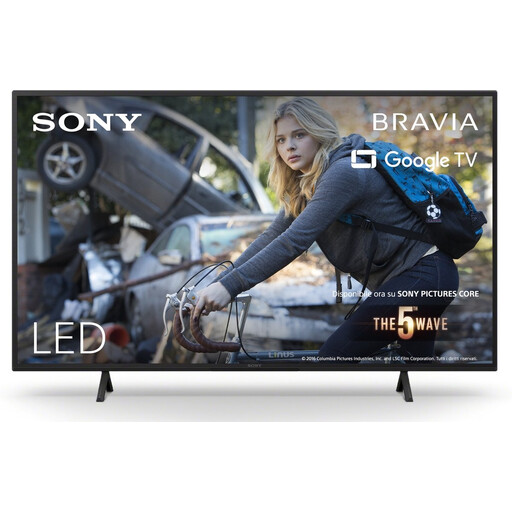
Sony KD-43X75WLP 43-inch 4K LED smart TV
A 43-inch LED option to assess for viewing distance, placement and access to streaming.
The product information lists Google TV, 4K and Dolby Vision. These features aren’t an independent assessment of how the TV displays art footage.
View at Joybuy
 No image available
CHiQ U43QM10E 43-inch 4K QLED smart TV
A 43-inch QLED option to compare with your viewing distance and the space available in your bedroom.
The product information lists 4K UHD, Google TV, HDR10 and Dolby Audio. HDR support alone doesn’t tell you how well HDR is displayed.
View at Joybuy
Frequently asked questions
What screen size is right if you watch from bed?
Measure the distance from your eyes to where you plan to put the screen. The Consumentenbond suggests around 2.4 times the screen diagonal as a comfortable starting point, and recommends looking at 32–43 inch screens for a viewing distance of 200 cm. Also check that the TV will fit with its stand.
Does a 4K TV always show more detail in art documentaries?
No. The documentary also needs to be available in 4K. The Consumentenbond notes that the difference from Full HD isn’t always clearly visible, so consider colour, contrast and reflections too.
What should you check when wall-mounting a TV?
Check the dimensions, weight and VESA pattern for the exact model, then choose a bracket and position to suit. For example, Sony lists a 20 × 20 cm VESA pattern for the K-43S3; this won’t necessarily apply to other TVs.
How do you set up a smart TV’s privacy settings?
Read the privacy policy before connecting the TV to the internet, check its privacy settings and keep the device up to date. The Dutch Data Protection Authority says consent is required to collect and store data about online viewing habits.
How do you compare TVs’ power consumption?
Compare the consumption shown on the Dutch TV energy label in kWh per 1,000 hours for SDR and, if you watch HDR, for HDR too. For a fair comparison, use the same expected viewing time and the picture format you’ll actually watch.


