What should you look for when choosing?
First, measure the available space and viewing distance. Then check how you’ll play your showreel, before comparing the picture quality and cost of the specific TV.
| What to consider |
What should you check? |
Who should pay extra attention to this? |
| Showreel picture quality |
Watch the source file in your usual lighting and from where your audience will be sitting. Compare reflections, viewing angle and visible detail; the Consumentenbond points out that 4K alone doesn’t tell you how good the picture is. |
I want the colours, dark scenes and fine details in my showreel to be clearly visible, so I assess the actual file in the presentation space. Around 36% of consumers put showreel picture quality first. |
| Size and positioning |
Measure the viewing distance and the space available for the furniture and TV, including its stand. The Consumentenbond suggests around 2.4 times the screen diagonal as a comfortable starting point for viewing distance. |
I want the TV to fit on my existing furniture and leave room to move around, without the screen feeling uncomfortably large from the seats. Around 29% of consumers give size and positioning top priority. |
| Playing content from your own source |
Check the video output on your laptop or player and the inputs on the TV; also see whether you’ll need a cable or adapter. Test the picture and sound with the final file. |
I want to play my showreel reliably from my own laptop or player and know in advance which connection works. Around 21% of consumers prioritise connectivity and source compatibility. |
| Use and additional equipment |
Compare the energy label’s consumption in kWh per 1,000 hours and check what you’ll need for your set-up. Energielabel.nl lists consumption per 1,000 hours as a point of comparison. |
I want to factor in the TV’s running costs and any equipment I might need for my set-up, not just the screen itself. Around 14% of consumers give overall costs and usage top priority. |
Joybuy products
These TV options suit a compact set-up for showing an animation showreel, ranging from a 42-inch OLED TV to 43-inch models.
 No image available
LG OLED42C68LA 42-inch 4K Ultra HD OLED Smart TV
A 42-inch OLED option to compare if you’re looking for a compact screen with OLED picture quality for your animation showreel.
42 inches, 4K Ultra HD, OLED and Smart TV.
Joybuy
 No image available
Philips 43PUS8001/12 43-inch 4K TV
A 43-inch model to consider if this size fits your room and you want a larger picture for a small group.
43 inches, 4K and Ambilight.
Joybuy
 No image available
Hisense 43A6S 43-inch 4K UHD Smart TV
A 43-inch 4K model to include in your comparison if its size suits your available space and viewing distance.
43 inches, 4K UHD, Smart TV, 60 Hz and Dolby Vision.
Joybuy
 No image available
Hisense E7 PRO Series QLED Gaming TV 43E7S PRO
A 43-inch QLED model to compare if this size fits your compact space and you want to consider the screen technology too.
QLED and model 43E7S PRO.
Joybuy
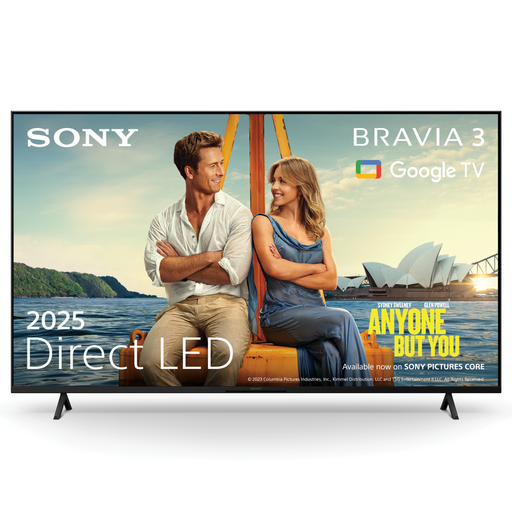 No image available
Sony K43S32BP.CEI BRAVIA 3 LED 43-inch 4K Smart TV
A 43-inch 4K TV to consider if the larger screen size fits and you can test the connection to your own playback device in advance.
43 inches, LED, 4K and 2025 model year.
Joybuy
Frequently asked questions
Do I need 4K for my animation showreel?
Not necessarily. A 4K panel has more pixels than Full HD, but the Consumentenbond says resolution alone doesn’t guarantee good picture quality. Check your showreel’s resolution and view it on the TV.
Can I show my showreel from a laptop without an internet connection?
That depends on the connections available on your laptop and TV. A suitable direct video connection may be an option; check in advance whether you need a cable or adapter, and test the picture and sound with the final file. The availability of TV apps doesn’t prove that your showreel can be played through them.
Do I need to ask my landlord for permission to fit a wall bracket?
It depends on the work involved. The Dutch Government says that minor changes that can be undone without significant expense, such as filling drill holes, are permitted. This doesn’t mean that every wall bracket or fixing automatically meets that condition; check the terms of your tenancy if in doubt.
What are my rights if I buy online and the TV is faulty?
According to ACM ConsuWijzer, when you buy a new television online, you generally have up to 14 days after delivery to change your mind. Your statutory guarantee also applies: if the product doesn’t do what you could reasonably expect under normal use, the seller is responsible for providing a suitable solution. A manufacturer’s guarantee doesn’t replace this right.
What should I do with my old television?
When you buy a new, similar appliance, the seller must take back your old one free of charge, according to the Dutch Government. There are also ways to return your old TV when your new one is delivered online.


