
Jazz singles collector
You want to check that your records’ size and speed are supported. For older or varied releases, also check whether you need an adapter for the centre hole.


Start by checking the speed and size of your own singles. If they have a large centre hole, check whether you’ll need a suitable adapter. Then choose a turntable that works with your amplifier or active speakers. Automatic models require fewer steps, while adjustable models may need more setting up. A turntable that plays at 33⅓ and 45 rpm won’t necessarily play records at 78 rpm.
You want to check that your records’ size and speed are supported. For older or varied releases, also check whether you need an adapter for the centre hole.
You want to connect your turntable properly to the amplifier or active speakers in your listening room. Check that the phono or line output you choose matches the input on your equipment.
You don’t mind spending time on setup if you want to adjust or change components. Check in advance which parts are replaceable and what settings the model requires.
First check your records, then make sure the turntable connects to your existing sound system, and finally consider how much manual operation and adjustment you’re comfortable with.
| What to consider | What to check before buying | Who is this important for? |
|---|---|---|
| Record size and speed | Compare the size and speed of your records with the specifications of the exact model. Also check whether it comes with any centre adapter you need. | If I want to play my jazz singles, I first check the markings on the records and whether their centre holes fit. Around 36% of consumers put record compatibility first. |
| Connecting to speakers or an amplifier | Check whether the turntable has a phono preamp and whether its phono/line setting matches the input on your equipment. | If I want to connect the turntable to my existing amplifier or active speakers, its phono or line output must match the input. Around 29% of consumers prioritise this connection. |
| Operation when changing records | Check whether the chosen model operates automatically and is suitable for the size of your records. | If I often put on a different single, automatic start and return can mean fewer steps. Around 21% of consumers mainly want to be able to change records easily. |
| Adjustments and components | Check which parts of the model can be replaced and what adjustments are needed before use. | If I want to set up the turntable myself or change components later, I check what the model allows and requires. Around 14% of consumers put adjustability first. |
A turntable that plays records at 33⅓ and 45 rpm won’t automatically play records at 78 rpm. The record’s size alone doesn’t tell you which speed it needs.
Make a note of the markings on your own records and compare them with the speeds and sizes the turntable supports. For 78 rpm records, also check that the stylus is suitable; support for the right speed alone doesn’t confirm this.
You may need different playback equipment for records that use unsupported speeds.
A turntable needs phono pre-amplification before its signal can go to a standard line input. This may be built into the turntable or amplifier, or provided by a separate device.
Before you buy, map out the connections from the turntable to the speakers. Compare the input on your amplifier or active speakers with the phono/line setting on the exact model.
If neither the turntable nor the receiving device has a phono preamp, you’ll need a separate one.
In a comparison, the Consumentenbond often reports poorer sound quality and less careful handling of delicate records with suitcase-style models than with separate hi-fi models. This isn’t a verdict on every individual model.
Weigh the convenience of built-in speakers against the operation and record handling you’re looking for, and assess the specifications of the exact model.
The AT-LP70XBT and AT-LP3XBT offer different approaches, balancing simpler setup with more adjustment options.
The PS-LX3BT and PS-LX5BT are examples of automatic models designed for the specified 7- and 12-inch record sizes.
The DP-300F combines automatic operation with adjustment options for those who want to use them during setup.
The SL-1500C is worth considering if your collection includes records that are played at 78 rpm.
The Debut EVO 2 is a manually configured option for a hi-fi setup where you choose the rest of the audio equipment yourself.
This selection includes turntables for singles at 33⅓ and 45 rpm, including an automatic model and models with built-in speakers.
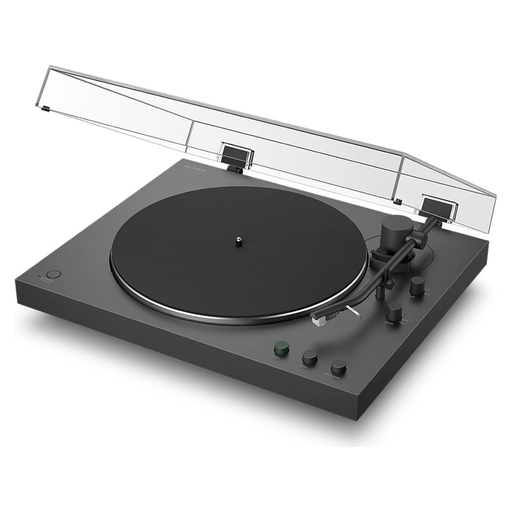 No image available
Automatic operation and a phono/line switch make this a good match if you want fewer steps and need to connect the turntable to compatible audio equipment.
Sony lists support for 7- and 12-inch records at 33⅓ and 45 rpm. The product description says a 45 rpm adapter is included.
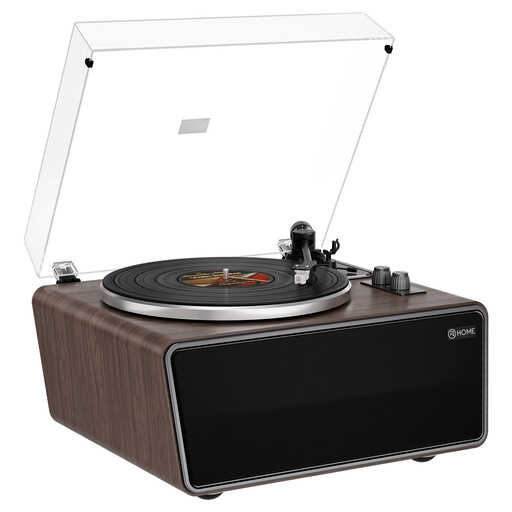 No image available
The built-in speakers make this an option if you’re looking for a listening setup with speakers in the turntable itself.
The product description lists four built-in speakers, an AT-3600L cartridge and playback at 33⅓ or 45 rpm with 7-, 10- and 12-inch records. It also mentions phono/line outputs and a phono preamp.
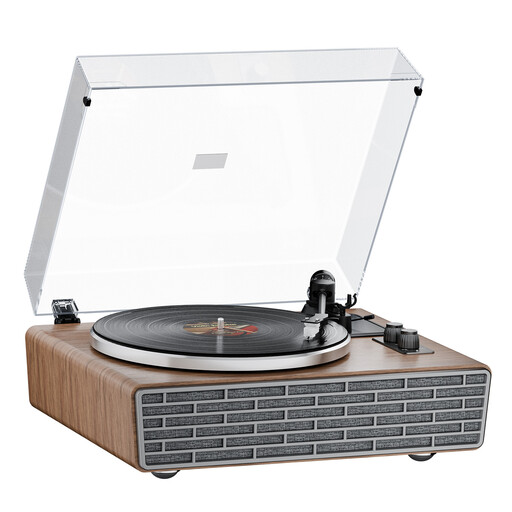 No image available
The built-in speakers are designed for those who want to play singles without adding separate speakers to their setup.
The product description lists four built-in speakers, Bluetooth and 33⅓ and 45 rpm. It also mentions a 45 rpm adapter and RCA phono/line connections.
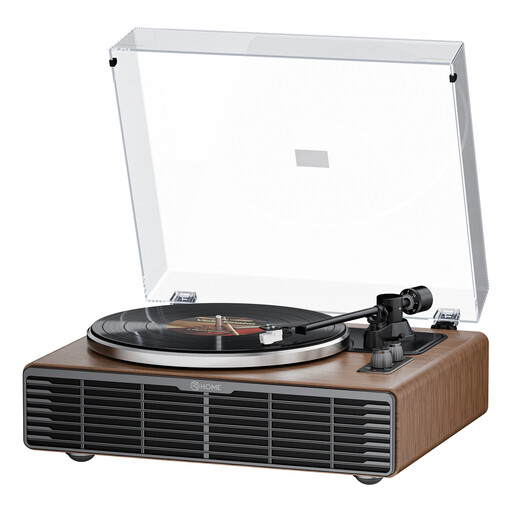 No image available
The built-in speakers are a handy option if you don’t want separate speakers as part of your listening setup.
The product description lists four speakers, Bluetooth, 33⅓ and 45 rpm, and RCA phono/line connections.
No. It depends on the size and speed of your records. Compare these with the specifications of the exact model, and check that you have a suitable adapter if they have a large centre hole. Sony lists support for 7- and 12-inch records at 33⅓ and 45 rpm for the PS-LX3BT; Technics also lists 78 rpm for the SL-1500C.
It depends on the turntable and the equipment you’re connecting it to. According to the Consumentenbond, phono pre-amplification is needed; it may be built into the turntable or amplifier, or supplied by a separate device. Check that the phono/line setting matches the input you want to use.
Follow the manual for the exact model when setting up and adjusting the tonearm and cartridge. Audio-Technica specifically warns that the AT-LP3XBT must be set up correctly before use to help prevent premature wear to the stylus and records.
For eligible distance purchases from a business, the cooling-off period is usually 14 days. According to the Dutch Government, an online purchase from a private individual isn’t covered by its explanation of distance selling. The Netherlands has no fixed statutory guarantee period. The appropriate remedy for a faulty product depends on the circumstances; normal wear and tear or damage caused by your own actions doesn’t automatically entitle you to the same remedy.
Possibly, depending on your existing sound system. You may need speakers, an amplifier or a separate phono preamp. Also check whether the turntable comes with an adapter for the centre holes on your singles.