
Vandaag of morgen in huis

Kwaliteit gegarandeerd

Welkomstaanbiedingen ontgrendelen: GRATIS bezorging | Tot 80% korting | Gratis 30 dagen JoyPlus-proefperiode
Download de app
A wireless computer mouse seems simple enough, until you find yourself switching between a laptop, desktop and tablet every day. That’s when you quickly notice the difference between a basic model and a mouse designed for multiple devices. A connection that doesn’t suit your equipment, a shape that’s too small or the lack of horizontal scrolling can make your purchase less useful than you expected.
The Trust Ozaa+ wireless mouse is designed for right-handed home and office users who work across several devices. Even so, not everyone needs every feature. Start by checking the following common pitfalls.
Some mice work only with a 2.4GHz USB receiver. That’s convenient for a desktop or laptop with a spare USB port, but less useful with a tablet or slim laptop that doesn’t have the right connection. A Bluetooth mouse can pair directly with compatible devices, but not every model supports multiple Bluetooth profiles.
So check whether the mouse connects via Bluetooth, a USB receiver or both. The Trust Ozaa+ combines a 2.4GHz receiver with Bluetooth and, according to the product information, can pair with up to three devices at once: one via the receiver and two via Bluetooth.
An optical mouse with 3200 DPI can let you adjust the cursor speed precisely, but a higher figure doesn’t automatically make a mouse better suited to office work. For spreadsheets and documents, the shape, buttons and controls are often more important than the maximum DPI.
Look out for adjustable DPI. This lets you set the cursor to move more slowly when editing text, or faster when working across wide spreadsheets or large screens. The Trust Ozaa+ has an optical sensor with an adjustable resolution of up to 3200 DPI.
A mouse may be described as ergonomic and suitable for office use, but still not fit your hand. Compact models are easy to carry around, while a larger model gives your palm more support. A right-handed mouse also won’t be a good fit for left-handed use.
Check the dimensions and hand orientation before you buy. The Ozaa+ measures 120 × 75 × 45 mm, weighs 110 grams and is designed for right-handed use. If you’re looking for a compact mouse, a smaller model may be a better choice.
If you want to use a mouse with three devices, the combination of connections matters more than the term “multi-device” on its own. Check:
The Trust Ozaa+ connects via a 2.4GHz receiver and two Bluetooth channels. Its stated compatibility includes Windows, macOS and Chrome OS. If you’re using it with a tablet, always check that the operating system and Bluetooth version support it.
A standard scroll wheel usually moves vertically. If you work with wide spreadsheets, timelines, large images or long documents, a mouse with a horizontal scroll wheel can save you time. Alongside its standard scroll wheel, the Ozaa+ has an extra side wheel for horizontal navigation.
This feature is especially useful if you regularly scroll from side to side. For everyday web browsing, a second scroll wheel may be unnecessary.
A rechargeable wireless mouse means you don’t have to replace AA or AAA batteries. Check how the mouse charges and whether you can keep using it while it’s charging. According to the product information, the Trust Ozaa+ has a built-in rechargeable battery, a charging cable and an LED indicator showing the remaining battery level. You can continue using the mouse while it charges.
For any product, check the difference between a rechargeable battery and disposable batteries included in the box. It affects both ease of use and ongoing costs.
The Ozaa+ has six buttons, a rubber grip and a relatively large design. Its quiet buttons are intended for workspaces where click noise is unwelcome. Here, “quiet” means that click noise is reduced according to the product description; the experience may vary depending on the user and the surface.
A large mouse is less suitable if you travel often. If you’re after a compact option, you could consider the Trust Yvi+ or Trust Zaya. If you regularly work with wide documents, the Ozaa+’s extra scroll function may be more useful.
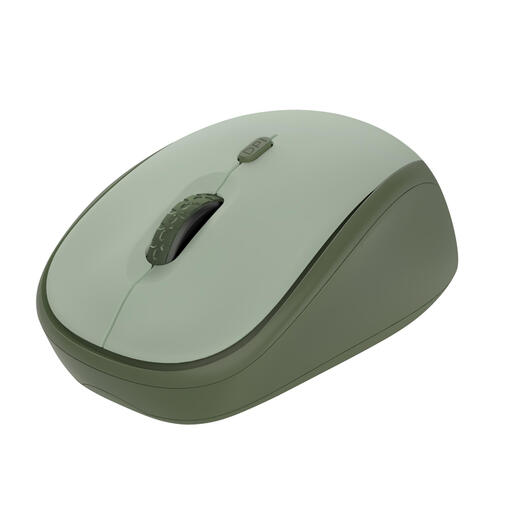
Why it suits this user: This compact RF mouse is ideal for basic office tasks and use on the go. Its adjustable 800 to 1600 DPI and quiet buttons keep things simple.
The specifications clearly state that it has a USB receiver, three buttons and a compact design. This avoids any confusion about Bluetooth capabilities and multi-device use.
RF connection, quiet clicks, DPI switch and, according to the product information, a casing made with 83% recycled material.

Why it suits this user: This Trust Ozaa+ multi-device mouse combines Bluetooth, a 2.4GHz receiver, horizontal scrolling and a large, right-handed design.
The connection options and dimensions are clearly listed. You can see in advance that this is a large, right-handed mouse, not a compact travel model.
Pair with up to three devices, side scroll wheel, quiet buttons, rechargeable battery and adjustable optical sensor up to 3200 DPI.
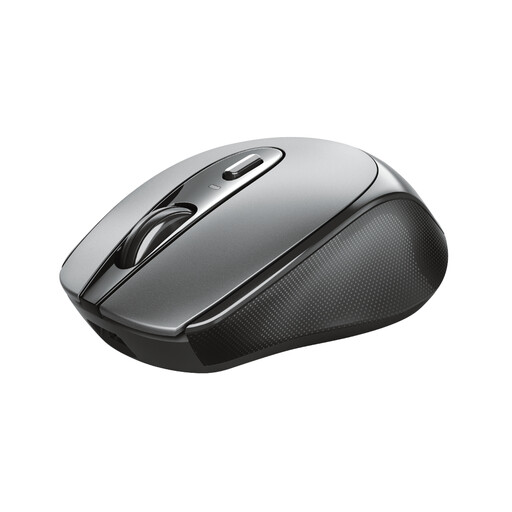
Why it suits this user: The Zaya is a compact, rechargeable mouse for people who work from home, in the office or on the go, and don’t need a large model.
The product is described as suitable for both left- and right-handed use. The USB receiver can be stored inside the mouse, making it less likely to get lost on the go.
Rechargeable battery, USB-C connection, four buttons and three DPI settings: 800, 1200 and 1600.
With an RF mouse, plug the USB receiver into a spare port and switch on the mouse. For Bluetooth, open the device’s Bluetooth settings and follow the pairing steps. Keep the receiver stored inside the mouse when you’re not using it.
Charge a rechargeable mouse with the cable supplied or a suitable cable. Use the DPI button to adjust the cursor speed for text, spreadsheets or larger screens. Clean the sensor and buttons carefully, and keep them away from liquids.
We’ve put together a complete, up-to-date list of products that meet these strict selection criteria and the applicable European safety regulations.
According to the product information, the mouse can connect to up to three devices: one via the 2.4GHz USB receiver and two via Bluetooth. You can then switch between paired devices using the designated switch control.
Yes. The product description mentions an extra side scroll wheel for horizontal navigation. This can be useful for wide spreadsheets, timelines and documents. For standard word processing, a regular vertical scroll function is enough.
No. According to the product specifications, the Trust Ozaa+ has a built-in rechargeable battery. You can charge the mouse using the cable supplied and, according to the product information, continue working while it charges.
