
Vandaag of morgen in huis

Kwaliteit gegarandeerd

Welkomstaanbiedingen ontgrendelen: GRATIS bezorging | Tot 80% korting | Gratis 30 dagen JoyPlus-proefperiode
Download de app
A compact wireless keyboard-and-mouse set may seem easy to choose. Yet issues often only emerge after a few weeks: the layout turns out not to suit you, Bluetooth does not work with every device, or the battery needs charging more often than expected. For remote workers, students and office professionals, it is therefore wise to look beyond colour and price.
The Trust Lyra wireless keyboard and mouse combines a compact keyboard with a wireless mouse. According to Trust’s product information, you can pair up to three devices via Bluetooth or a USB receiver. This makes the set appealing to anyone who switches between a computer, tablet and smartphone. However, check in advance that the specifications match your everyday needs.
The Trust Lyra uses a QWERTY US keyboard with an ANSI layout and 78 keys. This is not the same as a Dutch QWERTY or AZERTY keyboard. The position of the Enter key, punctuation marks and certain special characters may differ.
For English-language typing or users accustomed to an American layout, this can be practical. Anyone who writes a lot in Dutch should check that the physical keys correspond to the selected software language. The wrong layout can cause small but recurring frustrations.
A Bluetooth keyboard and mouse work without occupying a USB port, but the device must support Bluetooth. A USB receiver is often convenient for a desktop computer or office PC. Some sets offer only one type of connection, so check whether you need both options.
According to the Trust Lyra’s product specifications, it supports Bluetooth 5.0 and a wireless radio connection via USB. The set can remember or connect to up to three devices at the same time, allowing you to switch between them. The exact pairing steps may vary depending on the operating system.
Claimed battery life depends on usage, settings and conditions. The Trust Lyra’s product description states that it has a rechargeable battery with up to six months of use on a single charge. Treat this as a product specification measured under certain conditions, not as a guaranteed period for every user.
Also pay attention to the charging method. A rechargeable keyboard and mouse saves you from regularly buying disposable batteries, but you still need to connect the set to a charging cable in good time.
The keyboard is a TKL-style compact model with 78 keys and dimensions of approximately 287 × 126 × 17 millimetres. It weighs around 365 grams. This makes it easier to fit into a laptop bag or on a smaller desk than a full-size keyboard with a numeric keypad.
The keys use a scissor mechanism. This type is commonly found in slim keyboards and laptops. The product description also mentions quiet, low-profile keys. Keep in mind that “quiet” is not a standardised sound classification. The actual experience also depends on the surface, keystroke and typing speed.
For mobile working, the number of connections matters more than simply having Bluetooth. According to the product specifications, the Trust Lyra supports three paired devices and is compatible with Windows, macOS, ChromeOS, Android, iOS and iPadOS.
One possible setup:
For a tablet or smartphone, check that the operating system and Bluetooth functionality support an external keyboard and mouse. Support for certain features, such as multimedia keys, may vary by system.
According to the product information, the included mouse is suitable for both left- and right-handed use. Cursor sensitivity can be adjusted; the description specifies a range of 800 to 1600 dpi, while the specifications mention an optical sensor of 1200 dpi. In practical terms, this means the mouse is designed for general office, study and home use rather than demanding gaming.
An ergonomic wireless mouse does not need to be large to be comfortable, but its shape must suit your hand. If you work long hours, it is worth checking that the mouse provides enough support and that the buttons are easy to reach.
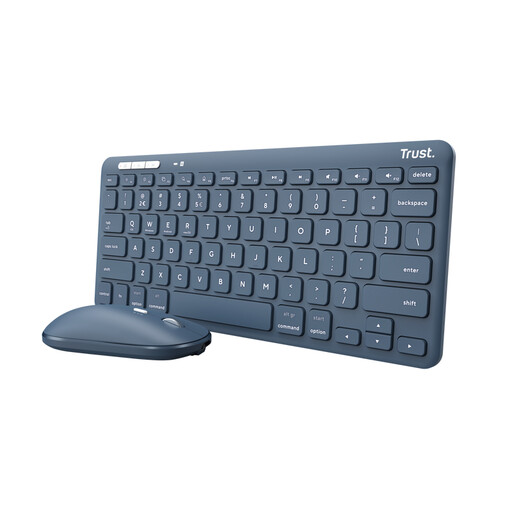
Why This Fits Their Persona: A practical wireless set for students, a first home office or a compact desk where a computer and tablet are used side by side.
The set offers both Bluetooth and a USB receiver and supports three devices. However, check that the QWERTY US layout suits you.
Compact design, scissor keys, rechargeable battery and compatibility with Windows, macOS, Android, iOS, iPadOS and ChromeOS.
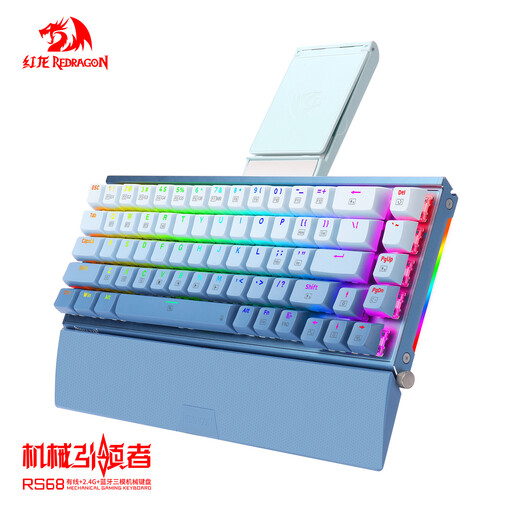
Why This Fits Their Persona: Suitable for users who type or game alongside office work and prefer a mechanical keyboard to a quiet scissor-key set.
The product specification mentions tri-mode connectivity, Bluetooth and a hot-swappable PCB. This is not a complete keyboard-and-mouse set, so a separate mouse is required.
Aluminium body, replaceable mechanical switches, RGB lighting and detachable wrist rest according to the product description.
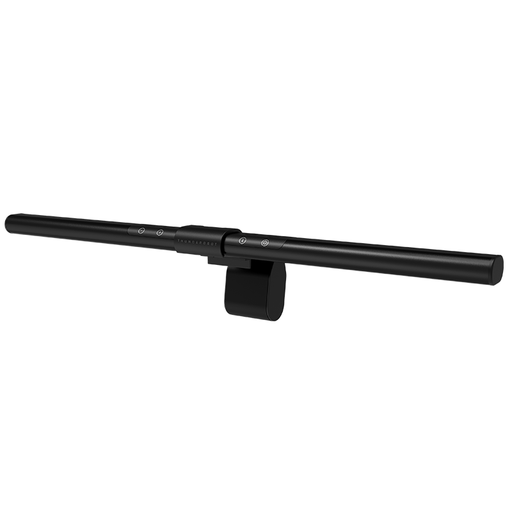
Why This Fits Their Persona: An ideal addition for anyone with a fixed monitor setup who wants to combine a keyboard, mouse and lighting in one compact workspace.
The light offers ten dimming levels and an asymmetric light source. Check your monitor’s thickness and use the lamp in accordance with the safety instructions.
Ra95 rating, ten dimming levels and USB power according to the product information. This product is a monitor light, not a keyboard-and-mouse combination.
Browse a current selection of products for a practical, compact and well-organised workspace. Check each product’s current specifications, layout and compatibility.
Keep the keys and mouse clean with a soft, dry cloth. Avoid water, harsh cleaning products and opening the casing. Store the USB receiver in a designated place when taking the set with you.
According to the product information, the set is compatible with Windows, macOS, ChromeOS, Android, iOS and iPadOS. However, the physical layout is QWERTY US ANSI. The set can therefore work technically with a Dutch laptop, but the key positions and characters may differ from those on a Dutch keyboard.
Trust states that the rechargeable battery provides up to six months of use on a single charge. Actual battery life may vary depending on usage frequency, connection type and settings. Regular charging helps prevent interruptions during work or study.
Yes, according to the specifications, the Trust Lyra supports Bluetooth. This is convenient for tablets, smartphones and laptops without an available USB port. For a desktop computer, the included USB receiver may be more practical. Check in advance which connection your device supports.
