Who is this choice for?

Groups watching from a wide sofa

You want guests sitting at the side to be able to follow the scenery and colours clearly. Compare the viewing angle of the specific model, not just the screen technology. The Consumers’ Association identifies viewing angle as an important difference between TVs.

Evening viewers who dim the lights

You mostly watch in low light and care about contrast in dark scenes. Also check how the screen handles any lights left on; the Consumers’ Association describes deep blacks as a feature of OLED TVs.

Viewers sitting further away

You want everyone to have a clear view from their own seat without choosing a screen that is too large for the room. So measure your viewing distance before choosing a screen size.

What should you look for when buying?

OLED TV

Best suited if: guests often sit at an angle and you usually watch with the lights dimmed. The Consumers’ Association describes OLED as typically offering wide viewing angles and deep blacks.

Bear in mind: the OLED label alone says nothing about reflections or the sound quality of a specific model.

LCD or QLED TV

Best suited if: the room is often well lit and you want to compare LCD options. QLED is a type of LCD, not another name for OLED.

Bear in mind: the viewing angle may be more limited. Assess the TV from the seats at either end of the sofa, and check black levels and reflections.

Mini LED LCD TV

Best suited if: visibility with the room lights on is a priority. Mini LED is also an LCD technology.

Bear in mind: Tweakers found the TCL C7L and C8L models it tested to be bright, but also noted reflections, limited viewing angles and blooming in the dark. These findings apply to the models tested.

What to consider What should you check? Who should pay particular attention?
Viewing from different seats Compare the viewing angle and reflections for the specific model, ideally from the seats at either end of the sofa and in similar lighting conditions. If guests are watching from the side, I want to assess the colours and contrast from those seats. Around 31% of consumers prioritise a clear view from different seats.
Contrast in dim evening light Compare dark scenes on the TV you’re considering; with Mini LED, also check for blooming around bright areas of the picture. When I watch in low light in the evening, I want to be able to follow dark scenes clearly. Around 25% of consumers prioritise contrast in dim light.
Screen size and viewing distance Measure the distance from the seat to the screen and check the dimensions of the specific TV. If guests sit further from the screen, I want a size that suits the room and viewing distance. Around 19% of consumers prioritise this.
Visibility with the lights on Assess brightness alongside reflections and viewing angle; a bright screen can still reflect light. If the lights stay on while we’re watching, I want a clear view of the picture from different seats. Around 13% of consumers prioritise visibility with the lights on.
Sound and access to programmes Check how clear the sound is on the model and whether the channel, service, app or connection you want is compatible with your subscription and equipment. If spoken commentary needs to be clear and I use a particular service, I want to check both the sound and access to programmes in advance. Around 12% of consumers prioritise sound and access to programmes.

Common mistakes

  • Choosing based only on brightness or the word QLED

    A bright screen doesn’t guarantee that guests sitting at the side will have a clear view or be free from reflections from lamps. QLED is a type of LCD.

    Compare the viewing angle and reflections of the specific model in a set-up similar to your living room.

  • Assuming 4K guarantees sharper travel programmes

    A 4K screen won’t automatically add 4K detail to a programme that isn’t available in that resolution.

    Check the picture quality of the source, and also take viewing angle, contrast and screen size into account.

  • Assuming a good picture also means clear spoken commentary

    The Consumers’ Association has found significant differences in TV sound quality. An external sound system may mean an additional purchase.

    Assess spoken dialogue on the TV you’ve chosen and, if necessary, check which connection an external sound system requires.

  • Confusing a manufacturer’s warranty with all your statutory rights

    ACM ConsuWijzer distinguishes between your statutory rights and a warranty from the retailer or manufacturer.

    Keep your proof of purchase and report any problem to the retailer first.

Brands to compare

LG

The OLED evo C6 range available in the Netherlands is worth considering if you’re looking at OLED for evening viewing. Check the exact size and version.

  • LG lists an OLED screen and webOS for the OLED55C68LA.
  • These are model specifications and manufacturer claims, not an independent assessment of reflections, sound or the suitability of every LG TV.

TCL

The C7L is a Mini LED option available in the Netherlands to compare if you also watch with the lights on.

  • Tweakers rated the C7L it tested as bright.
  • The test also noted reflections, blooming in the dark and limited viewing angles. TCL’s specifications and test results are not directly comparable measures.

Philips

According to Philips, the 55OLED811/12 combines OLED with Ambilight, which you may want to consider when thinking about the lighting around the TV.

  • Philips describes Ambilight as lighting behind the TV that responds to the content you’re watching.
  • This description of the experience is a manufacturer claim; check that the feature and sound suit your set-up and viewing group.

Sony

The BRAVIA 7 II range available in the Netherlands offers an LCD option with RGB LED backlighting to compare with OLED and Mini LED.

  • Sony lists various screen sizes and HDR for the range.
  • Sony’s claims about the colour experience from every seat are manufacturer claims; check the viewing angle and reflections for the version you choose.

TVs on Joybuy

This selection includes TVs with different screen sizes and technologies. For each TV, compare the viewing distance, viewing angle, reflections, sound features and access to the programmes you want to watch.

Hisense 65A6S 65-inch 4K UHD Smart TV

Hisense 65A6S 65-inch 4K UHD Smart TV

The 65-inch size is worth comparing if the viewing distance suits your room and seating.

The product title lists 4K UHD, Smart TV HomeOS U9.5, Dolby Vision HDR, Game Mode Plus (VRR 60 Hz), DTS Virtual: X and Alexa Integrated.

Joybuy
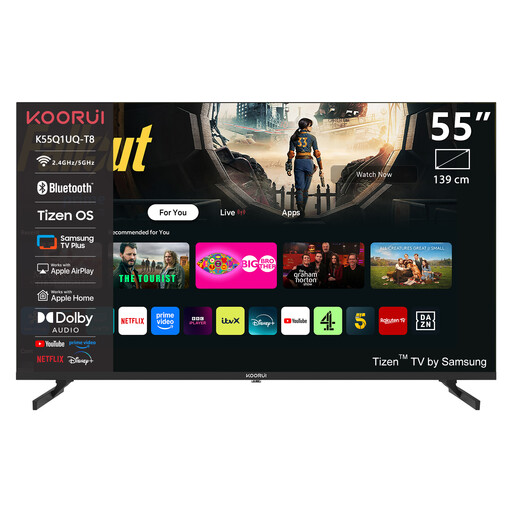
KOORUI K55Q1UQ-T8 55-inch 4K QLED TV

KOORUI K55Q1UQ-T8 55-inch 4K QLED TV

The 55-inch size is worth weighing up alongside the viewing distance and seating in your room.

The product title lists 4K QLED, Tizen TV and Dolby Audio.

Joybuy

TCL T8D 85-inch 4K QD-Mini LED Smart TV

TCL T8D 85-inch 4K QD-Mini LED Smart TV

An 85-inch screen is a large size to consider only after measuring the viewing distance and available space.

The product title lists 4K, QD-Mini LED, Google TV, 144 Hz, FreeSync Premium, VRR, Onkyo 2.1 Sound and HDMI 2.1.

Joybuy

TCL 65T8D 65-inch QLED TV

TCL 65T8D 65-inch QLED TV

Compare the stated 65-inch size with your viewing distance and the space where the TV will go.

The product title lists QLED with QD-Mini LED dimming, 4K HDR, Google TV, Dolby Vision, HDR10+, Atmos, 144 Hz VRR, FreeSync Premium and Onkyo 2.1 Sound.

Joybuy

METZ 86MQE8000Z 86-inch QLED Google TV

METZ 86MQE8000Z 86-inch QLED Google TV

The 86-inch size calls for careful comparison with the viewing distance and the space available for the TV.

The product title lists QLED, 4K, HDR10+, Dolby Vision Atmos, 144 Hz, Google TV and a 2.1.2 sound system with an integrated subwoofer.

Joybuy

Frequently asked questions

Does a TV for travel programmes need to be 4K?

Not for that reason alone: 4K detail depends on the resolution in which the programme was filmed and is made available. Check what your channel or streaming service offers, as the Consumers’ Association recommends.

How do you choose a screen size for your seating?

Measure the distance between the seats and the TV, and also check that guests sitting at the side have a clear view. The Consumers’ Association cites around 2.4 times the screen diagonal as a general preferred viewing distance based on its own research; treat this as a guide, not a fixed rule for every viewer.

Can you keep using your existing TV provider or streaming device?

Before buying, check which tuner, app or connection your provider requires. Some cable or satellite subscriptions may also need a smart card with a CI+ module when using the built-in tuner; an external device is usually connected via HDMI.

What can you do if voices aren’t clear through the built-in speakers?

Compare the sound of the specific TV and check which connection is suitable for any external sound system. The Consumers’ Association has found significant differences between TVs and suggests a soundbar as a possible improvement.

What energy information can you compare when choosing a TV?

For TVs covered by the relevant EU rules, the energy label shows a scale from A to G. The European Commission also provides information on consumption in SDR and HDR, screen size and resolution; compare models using the same basis for energy consumption.
