
Travellers with a phone or tablet
If you want to edit a reading list in your hotel room without bringing a full-size keyboard, focus on device compatibility, packed size and a convenient place to position your screen.


Start with the device you use to edit your reading list: check the connection it supports, its operating system and the keyboard layout. A slim or folding model can be useful if luggage space is limited, while a roomier keyboard layout is worth considering if you edit a lot of text. A touchpad is particularly worth considering if you want to use a pointer as well as type; if so, check that it works with your device and reading-list app.
If you want to edit a reading list in your hotel room without bringing a full-size keyboard, focus on device compatibility, packed size and a convenient place to position your screen.
For longer titles or notes, a practical keyboard layout may matter more than the smallest possible packed size. For example, ProtoArc describes different layouts for the XK01 and XK01 TP.
If you update a reading list on, for example, a tablet and a laptop, consider the available connection options and how you switch between devices. Logitech describes this feature for the Pebble Keys 2 K380s.
First, check that the keyboard can connect to your device and reading-list app. Then compare its packed size with the space you have available, and choose a layout and controls suited to how much you type.
| What to consider | What should you check? | Who should pay particular attention? |
|---|---|---|
| Device and connection | Check the operating system, Bluetooth support, keyboard layout and whether you can use a USB receiver. | I want to know first whether I can connect the keyboard to the device I use for my reading list. Around 33% of consumers make this their top priority. |
| Packed size and set-up | Compare the size when folded and unfolded, and allow space for your screen. ProtoArc lists the XK01’s dimensions in both configurations. | If my bag is small but I also need to set the keyboard up on a hotel desk, both sets of dimensions matter. Around 27% of consumers prioritise packed size and set-up. |
| Keyboard layout and noise | Check the exact keyboard layout and whether the number and position of the keys suit the way you work. Descriptions such as ‘quiet’ from manufacturers are not independent noise measurements. | For longer titles and notes, I want a layout that suits the way I type. Around 20% of consumers prioritise typing and quiet operation. |
| Pointer controls | Check that the touchpad works with your device and reading-list app; having a touchpad does not in itself guarantee app compatibility. | If I’d rather use a pointer than keep touching the screen, I want to know whether the controls work in my app. Around 13% of consumers make built-in pointer controls their top priority. |
| Power on the go | Check how your chosen version is powered and take a suitable charging cable if necessary. | I want to avoid being left without a working keyboard while travelling. Around 7% of consumers prioritise power on the go. |
A folding keyboard takes up less room when folded, but it also needs to fit your workspace when opened. For the ProtoArc XK01, the manufacturer lists dimensions in both configurations.
Measure the space available in your bag and on your desk separately, and leave room for your screen too.
ProtoArc describes the XK01 as having 105 keys and a number pad, while the XK01 TP has 88 keys and a touchpad. They are different versions.
Check the full model name and decide whether you want a number pad or integrated pointer controls.
The keyboard layout of the version you choose determines where the characters are. For example, the product listing for the Trust Lyra describes a US QWERTY version.
Check the layout of the exact version and compare it with your device’s keyboard settings.
ACM ConsuWijzer explains that statutory guarantees in the Netherlands do not amount to one fixed two-year period; what you can reasonably expect from a product is also taken into account.
Keep your proof of purchase and contact the seller if something goes wrong.
Logitech describes both slim keyboards for mobile devices and compact models designed for use with multiple devices.
ProtoArc offers folding models with different keyboard layouts, including a version with a touchpad, according to the manufacturer.
Trust describes compact Bluetooth keyboards designed for use with multiple devices.
Keychron describes the B1 Pro as a compact keyboard with several connection options.
These product picks focus on portable keyboards for editing a reading list on a phone or tablet, including folding models and keyboards designed for specific tablets.
 Image unavailable
The folding design and magnetic stand make it a good fit for using a phone or tablet on the go.
Bluetooth; rechargeable; magnetic stand for a phone or tablet; aluminium body.
 Image unavailable
This folding model combines typing with a touchpad for use with a tablet, smartphone or computer.
Tri-fold design; Bluetooth; integrated touchpad.
Check that pointer controls work with your device and reading-list app.
 Image unavailable
The folding design with touchpad could suit you if you want to type on the go and use pointer controls too.
Folding; touchpad; leather case.
Check in advance that the touchpad works with your device and reading-list app.
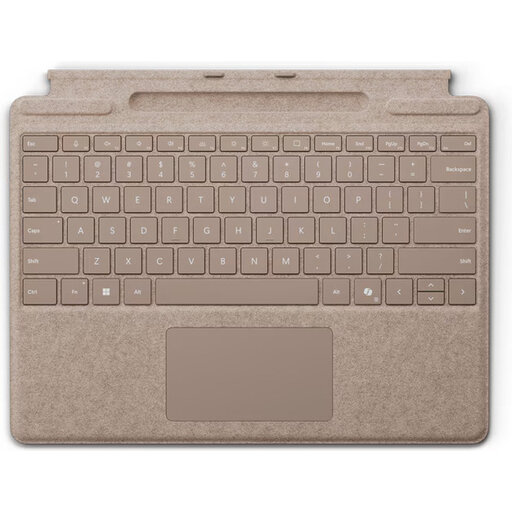 Image unavailable
This model is designed for use with Surface Pro. Check that it is compatible with your specific device before choosing it.
QWERTY version; Dune colour.
 Image unavailable
This version is designed for a specific iPad Pro; check that your tablet matches the model listed.
Version for iPad Pro 13-inch (M4).
First, check which connections your keyboard and device support. Trust says the Lyra supports two Bluetooth connections and one connection via a USB receiver. Before you leave, also test that the keys and shortcuts you need work in your reading-list app.
You can’t tell just from the fact that it has a touchpad. ProtoArc lists a touchpad for the XK01 TP; test the pointer controls on your device and in your app before choosing this version.
Check how your chosen version is powered and whether you’ll need a suitable charging cable. According to ACM ConsuWijzer, statutory guarantees in the Netherlands do not have a standard two-year period: the duration depends on what you can reasonably expect from the product. The seller is your point of contact for statutory guarantees, so keep your proof of purchase.
For a standard online consumer purchase, you generally have a statutory cooling-off period of up to 14 days after delivery. ACM ConsuWijzer also outlines exceptions, such as made-to-measure products; check the terms that apply to your purchase.
Take a discarded electrical keyboard to an appropriate collection point. The Dutch Government also explains the old-for-new scheme when buying a similar new appliance. According to the Dutch Government, flat batteries must not go in general waste; take them to a collection point, such as a shop that sells batteries.