
Traveller short on luggage space
You want to take a keyboard with your phone or tablet without adding much bulk. You compare slim and foldable models, and consider whether you might also need a stand.


Choose a slim or compact keyboard if you mainly type and want to save space in your luggage. If you often select and edit text, give more weight to the layout and navigation features. A foldable model takes up little room in your bag, but it still needs to fit on your hotel desk when unfolded. Check the exact keyboard layout, compatibility with your device and power requirements too. Manufacturer descriptions of typing comfort are not independent tests.
You want to take a keyboard with your phone or tablet without adding much bulk. You compare slim and foldable models, and consider whether you might also need a stand.
You select, move and correct text, so you look at the layout, arrow keys and any touch controls—not just how much room the keyboard takes up in your bag.
You switch between devices on the go, such as a phone, tablet and laptop. Check that the keyboard supports your operating systems and lets you switch between paired devices.
Start with the device you’ll be writing on and the edits you make most often. Then compare the packed size with the space available on your hotel desk.
| What to consider | What to look for | Who is this important for? |
|---|---|---|
| Packed size and desk space | Compare the size in your bag with the keyboard’s dimensions when open, and check whether you’ll need a separate stand. | If I have limited luggage space, I want a keyboard that packs down small and fits on the hotel desk. Around 36% of consumers put packed size and available desk space at the top of their list. |
| Layout and navigation | Check the exact key layout, arrow keys and editing keys. If there’s a touchpad, make sure it works with your device too. | If I often select and edit text, I want to be able to find the navigation and editing keys easily. For around 29% of consumers, layout and navigation are the top priority. |
| Connectivity and compatibility | Check Bluetooth support, system requirements and how to switch between paired devices. | I want to know in advance whether the keyboard works with the phone, tablet or laptop I’ll be writing on. Connectivity and compatibility come first for around 21% of consumers. |
| Power and usage | Check whether the keyboard is rechargeable or uses replaceable batteries, and whether you’ll need access to charging while travelling. | If I write while travelling, I want to know whether I’ll need to charge the keyboard or bring spare batteries. Power and usage matter most to around 14% of consumers. |
A foldable keyboard can take up considerably more desk space when opened. ProtoArc lists the XK01 as 215,50 mm wide when folded and 386,39 mm when unfolded.
Measure the space you’ll need for both your screen and the unfolded keyboard. Also check whether you already have a suitable device stand.
ProtoArc lists the XK01 as having 105 keys and a numeric keypad, and the XK01 TP as having 88 keys and a touchpad. They have different layouts.
Decide whether extra keys or integrated cursor control matters more for the way you edit, and check the full model name on the product page.
The QWERTY label doesn’t specify which key legends a particular version has. For example, Apple describes a Dutch version of the Magic Keyboard (USB-C), while an international model description doesn’t tell you which legends are on the version being offered.
Check the language of the exact version and look at the keys in the product images, as well as the input language set on your device.
The Keys-To-Go 2 is a slim model with a protective cover, while the Pebble Keys 2 K380s is a compact keyboard for switching between devices.
The XK01 is foldable and has a numeric keypad, while the XK01 TP combines a foldable layout with a touchpad.
Keychron describes the B1 Pro as a slim 75% layout with 77 keys, offering a choice of Bluetooth, 2.4 GHz or a wired connection.
Apple Netherlands describes the standalone Magic Keyboard (USB-C) with a Dutch layout for supported Mac, iPad and iPhone software.
This selection includes keyboards for typing on the go, from foldable models to compact and full-size options. Check that the size and layout suit your luggage, hotel desk and writing device.
 No image available
An option if you’re looking for a foldable Bluetooth keyboard with a magnetic stand for a phone or tablet.
The product name specifies a rechargeable version with an aluminium casing.
 No image available
Suitable if you’re looking for a mechanical keyboard with a 75% layout and want to use the US QWERTY key legends.
The listed connection options are wired, Bluetooth and 2.4 GHz. The product name lists compatibility with Win, Mac and PC.
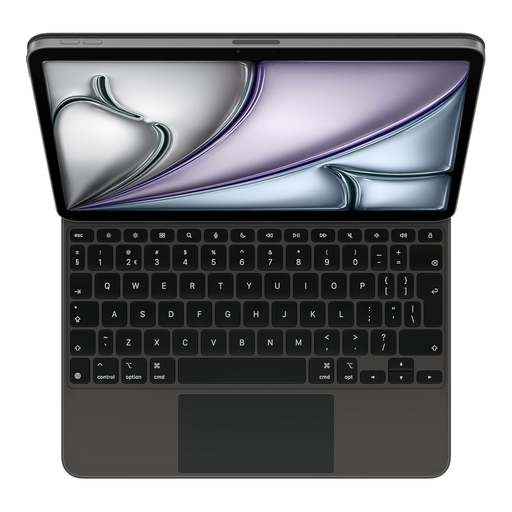 No image available
A keyboard for anyone using an iPad Air 11-inch (M3) who specifically wants a Dutch version.
This model is designed for the iPad Air mentioned and is not a universal standalone keyboard.
 No image available
A foldable Bluetooth keyboard with a touchpad for typing on the go and controlling the cursor without a separate mouse.
 No image available
Suitable if you prefer a full-size keyboard with a numeric keypad and are happy to make extra room for it in your bag and on your desk.
The product name lists a US QWERTY layout and wireless connectivity.
Open your device’s Bluetooth settings and select Keys-To-Go 2, as described by Logitech. Remove the isolation tab from the battery compartment first, if it’s still there. For Android, Logitech describes a separate key combination to activate the Android layout.
It depends on the model and system requirements. Logitech lists switching between up to three devices for the Keys-To-Go 2 and Pebble Keys 2 K380s. Check that your devices and the layout of the exact version are supported.
For many distance purchases from a business, you have a 14-day cooling-off period, according to the Dutch government. The relevant terms and exceptions still apply. If a product is faulty, the seller must offer a solution. The Netherlands does not have a fixed statutory two-year guarantee for every product.
EASA advises taking portable electronic devices with a lithium battery in your hand luggage. Spare batteries and power banks should also be carried in hand luggage and protected against short circuits, according to EASA. Check your airline’s rules for your specific flight too.