
Writers who edit frequently
You regularly rearrange and correct text, and want shortcuts close to hand. Programmable features are worth considering separately if you often carry out the same custom tasks.


Start with the shortcuts in your writing app and operating system. You don’t need a programmable keyboard for everyday text editing, though customisable actions can be useful if you often repeat the same sequence of tasks. Then choose between a compact model for writing in different places and a layout that feels comfortable for longer sessions. Check the exact model’s layout, connection options and any software requirements. Manufacturer specifications are not an independent test of comfort or typing speed.
You regularly rearrange and correct text, and want shortcuts close to hand. Programmable features are worth considering separately if you often carry out the same custom tasks.
You write in different places or on different devices, and are weighing up a compact size and easy connectivity against the keyboard layout.
You mainly write at a fixed workstation and want to assess the key feel, layout and set-up. An ergonomic product description is no guarantee against discomfort.
First, compare the keyboard’s functions with your writing app. Then consider its size, your workspace and device compatibility.
| What to consider | What to look for | Who should pay extra attention? |
|---|---|---|
| Shortcuts and editing | Check the keyboard shortcuts in your writing app and whether any macro software supports your operating system. | If I often rearrange sentences, I want quick access to editing shortcuts in my writing app. Around 33% of consumers put shortcuts and text editing first. |
| Portability and switching devices | Compare the dimensions and layout, and check for Bluetooth, available USB ports and any accessories you’ll need. | If I write in different places while travelling, I want a keyboard that suits my luggage and devices. Around 27% of consumers prioritise portability and switching between devices. |
| Key feel and workspace | If possible, try the key feel and layout. Also consider the space available and how your screen and keyboard are positioned. | For long writing sessions, I mainly want a key feel and set-up that suit my workspace. Around 20% of consumers prioritise extended typing and their workspace. |
| Layout and compatibility | Check the physical language variant, selected input layout, writing app and connection to your device. | If I write in Dutch, I want the characters and keyboard shortcuts to match my device. Around 20% of consumers give keyboard layout and compatibility top priority. |
Windows and macOS already offer keyboard shortcuts for many text-editing tasks. Macros are designed to carry out custom sequences of actions.
Try the shortcuts in your writing app first, then decide whether programmable features would add anything.
A compact model may position keys differently or leave out a numeric keypad. Different connection options may also require different ports.
Check which keys you use often and which connections your devices support.
Depending on the model, you may also need to carry a receiver or cable.
Physical language variants and system requirements differ. Products with similar names, such as Magic Keyboard, may also come in different versions.
Check the full model name, language variant and compatibility before choosing.
A keyboard’s shape alone doesn’t tell you how it will work for you. Your set-up and taking breaks from screen work matter too.
Assess the keyboard as part of your workspace, and try an unusual layout if you can.
The MX Keys S is an option for writers who want to set up recurring actions as well as use everyday shortcuts.
The KW 9200 MINI is a compact option for writing in different places or on different devices.
The Lyra is a compact option for multiple devices, while the Keyra has a separate split layout.
The Dutch version of Magic Keyboard (USB-C) is designed for writers using devices and systems that meet the stated requirements.
The K3 Max is a compact mechanical option for anyone who wants to customise keys or macros.
This selection includes compact keyboards for writing in different places, as well as larger or programmable options for a fixed workstation. Check each model’s layout, connection and any software requirements.
 No image available
The foldable design is an option if you write in different places and want to take your keyboard with you.
The product description lists Bluetooth, a magnetic stand, an aluminium case and support for iOS, Android, Windows and HarmonyOS.
 No image available
The compact layout may suit a smaller workspace or use with different devices.
This mechanical model has a 75% layout with 82 keys, and wired, Bluetooth and 2.4G connections. The product information lists compatibility with Windows and Mac; the specified layout is US QWERTY.
 No image available
The foldable design with an integrated touchpad is aimed at typing on mobile devices.
The specified layout has 63 keys. The product description lists Bluetooth and support for iOS, Android and Windows.
 No image available
The full-size layout is an option if you write at a fixed workstation and want a roomier keyboard layout.
This model has 108 keys and a US layout. The product description lists Bluetooth, 2.4 GHz and USB-C connectivity.
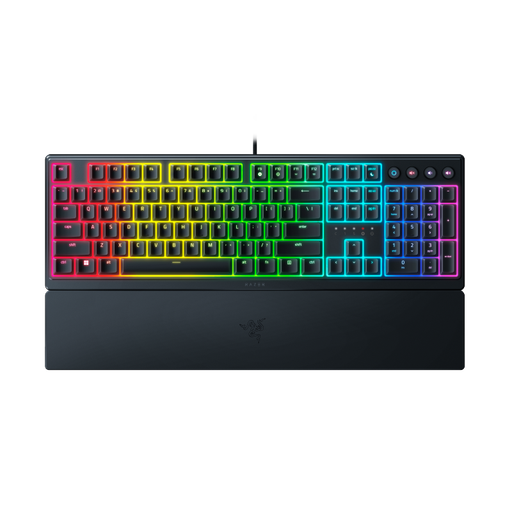 No image available
The listed macro features may be useful if you often carry out the same custom tasks at a fixed workstation.
The product information lists programmable keys, macro recording, a full-size wired design and a magnetic wrist rest. The specified layout is US.
No, not for everyday editing, as Windows and macOS already offer keyboard shortcuts. Check the commands in your writing app; programmable features are mainly useful if you want to combine recurring tasks of your own.
Compare the physical keyboard layout with your device’s input layout, and try the shortcuts you use in your writing app. Microsoft Support explains how to change the input layout in Windows; Apple Support notes that keyboard shortcuts can vary between apps.
It depends on the model. Logitech lists Logi Options+ for Smart Actions; the CHERRY download page offers CHERRY KEYS for Windows. Standard operating system shortcuts are different from these model-specific features.
Check whether your device supports Bluetooth or has a suitable port for a receiver or cable, and follow the connection options for the exact model. CHERRY describes Bluetooth, receiver and cable channels for the KW 9200 MINI; Trust lists Bluetooth and a USB receiver for the Lyra. Both models are described as rechargeable.
For employees who work with a screen for more than 2 hours a day, Arboportaal explains that the screen and keyboard must not be attached to each other. A separate screen or keyboard must be available when using a laptop. This is not a general legal purchasing requirement for every personal writer.