
Drivers who want a wider view
If you play a truck simulator, for example, you may value the extra horizontal space. Check that the game supports your preferred aspect ratio, and that your PC and desk can accommodate the screen.


An ultrawide monitor is a good choice if extra horizontal screen space is your priority and your game, PC and desk can accommodate it. A 16:9 screen is a better fit if you’d prefer a less wide setup. Also check which refresh rate each model supports through the video input you’ll be using, and where to plug in your headphones: a headphone output doesn’t mean there’s a microphone input too.
If you play a truck simulator, for example, you may value the extra horizontal space. Check that the game supports your preferred aspect ratio, and that your PC and desk can accommodate the screen.
If you want to see instruments, navigation and details of your surroundings clearly, compare the resolution and screen size with what your PC can handle.
If you want to keep using your existing headphones, it’s worth deciding in advance whether the audio will come through your PC, console or monitor, and which connections you’ll need.
A good fit if: you want extra horizontal screen space in a supported transport simulator and have room for a wide screen.
Trade-off: the higher resolution puts more demands on your PC, and 21:9 doesn’t automatically mean every game will show more of the gameplay.
A good fit if: you’d prefer a less wide screen and are looking for QHD resolution.
Trade-off: you won’t get the horizontal space of a 34-inch 21:9 screen. Also check how to connect your headphones and, if needed, your microphone.
A good fit if: you already have multiple screens and separate side views matter more to you than one wide screen. SCS Software documents configurations with separate views on each monitor for Euro Truck Simulator 2.
Trade-off: you’ll need to configure the game and screen setup. Connecting multiple screens isn’t the same as using one ultrawide screen.
| Point to consider | What should you check? | Who is this important to? |
|---|---|---|
| Horizontal screen space | Check that your game supports 21:9, measure the available desk width and consider your PC’s performance. | If I want to see more of the driving environment, I need to know whether the game and my setup can accommodate that. Around 31% of consumers make horizontal screen space their top priority. |
| Instruments and detail | Compare the resolution and screen size with the performance your PC can deliver in the game. | I want to read instruments and navigation clearly without overlooking the demands on my PC. Around 25% of consumers prioritise clear image detail. |
| Headphone audio | Decide whether you’ll connect your headphones to your PC, console or monitor. Check separately whether you need a microphone connection. | If I want to keep using my existing headphones, I need to know in advance where the audio will come from and how I can speak while playing. Around 25% of consumers make the headphone connection their top priority. |
| Suitability for your setup | Measure the space and check which video outputs your device has; the available refresh rate may vary between inputs. | I want a screen that fits on my desk and connects to my PC or console. Around 19% of consumers make their existing setup the deciding factor. |
Dell lists a maximum of 165 Hz via DisplayPort and 144 Hz via HDMI for the S2722DGM. So the input you choose affects the maximum setting available on this model.
Check the specification for the input you’ll actually use and compare it with the output on your PC or console.
Dell lists a mini-jack for headphones on the S2722DGM; this doesn’t confirm that you can also connect a headset microphone.
If you want to speak while playing, check the audio connections on your monitor and device separately.
SCS Software describes separate views as part of a specific multi-monitor setup. Connecting one wide screen isn’t the same as using that setup.
Choose based on the view you want in your game, and check which screen setup you’ll need.
ACM ConsuWijzer makes it clear that your statutory warranty applies even without an extra warranty product. You should therefore assess the cover offered by an additional product separately.
Before buying, compare the additional cover on offer and what it would add in your circumstances.
The LG 34U640B-B is a documented 34-inch ultrawide option to consider if you’re looking for one wide screen for simulations.
The Evnia 34M1C5500VA/00 is another documented 34-inch ultrawide option.
The Dell S2722DGM is a documented 27-inch QHD alternative in a 16:9 setup.
This selection includes 16:9 screens and ultrawide models to suit different screen preferences. For your game, check the aspect ratio, resolution you need, connections and available space.
 No image available
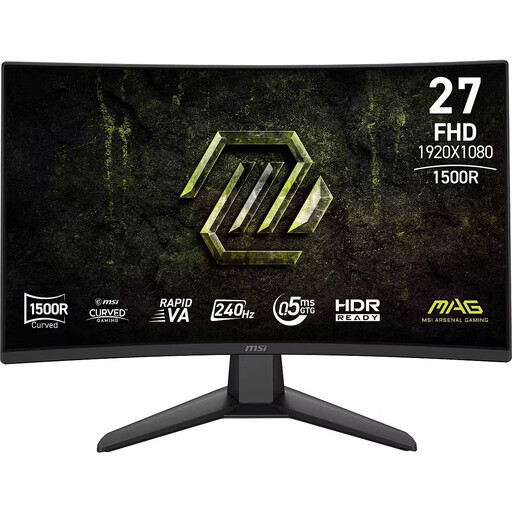
A 27-inch screen for anyone considering a less wide format; check that Full HD suits the kind of image you want in your game.
The product name lists Rapid VA, 240 Hz, 0,5 ms and Adaptive-Sync.
 No image available
For anyone considering a wide 34-inch screen; check that your transport simulator supports the aspect ratio and that your PC can handle the resolution you want.
LG Netherlands lists 21:9, 3440 × 1440 pixels and 144 Hz for this model; the product name describes it as a curved VA screen.
 No image available
An option to compare if you’re considering a larger gaming monitor.
The product name lists 39 inches. Before buying, check the exact resolution, aspect ratio and connections you’ll need for your setup.
 No image available
For anyone comparing a 27-inch QHD screen with an ultrawide model; check the aspect ratio and connections that suit your device.
The product name lists 2560 × 1440 pixels and Quad HD.
 No image available
For anyone comparing an ultrawide screen with a 16:9 setup; check that your game and PC can handle the resolution you’ve chosen.
The product name lists 3440 × 1440 pixels, 280 Hz and QD-OLED. G-SYNC Compatible and FreeSync Premium Pro are also mentioned.
No, you can also route the audio through your PC or console if its connection is compatible with your headphones. If you want to use the monitor, check the audio output on the exact model; a headphone output doesn’t mean there’s a microphone input too.
Yes, SCS Software documents configurations with separate views across three monitors. Follow the setup instructions for your screen configuration; this feature doesn’t tell you how other transport simulators display their image.
Check which refresh rate the model supports through the input you’ll be using, and compare it with the output on your device. Dell lists a maximum of 165 Hz via DisplayPort and 144 Hz via HDMI for the S2722DGM.
For online purchases, you’ll often have a cooling-off period of up to 14 days after delivery, according to ACM ConsuWijzer. Before buying, check the applicable exceptions and the returns policy for the specific offer.
The European Commission classifies computer monitors as electronic displays that carry an energy label. Compare the label and model information, including HDR display data, for the monitors you’re considering.