
Seller of individual cards
Wants to use the same crop and background every time. A fixed camera set-up can help keep the framing consistent for each card; Canon recommends using a tripod for consistent product shots.


Choose a compact camera with a close-up mode if you want a fixed lens and fewer separate components. Choose a mirrorless camera if you want to tailor the lens and magnification to your card photos and have room for a separate macro or close-up lens. First, check whether you can frame the whole card and the details you want in focus. For glossy cards, consider the direction of the light separately: lighting that reduces reflections can also make gloss and texture less visible.
Wants to use the same crop and background every time. A fixed camera set-up can help keep the framing consistent for each card; Canon recommends using a tripod for consistent product shots.
Wants to show small print details or damage separately. So, consider not only magnification, but also the space between the lens, card and lighting.
Wants to control reflections without hiding gloss or surface texture. The direction of the light partly determines which surface features are visible.
Best for: anyone who wants to get started with a fixed lens and fewer separate camera components.
Trade-off: you can't change lenses, so check whether your set-up can capture both the whole card and a detail clearly. OM SYSTEM lists a microscope mode for the TG-7.
Best for: anyone who wants to choose a lens to suit both full-card photos and close-ups.
Trade-off: the right lens may need to be bought separately. Check the mount, magnification and available working space for the exact combination.
| What to consider | What to look for | Who is this important for? |
|---|---|---|
| Capturing card details clearly | Check the magnification of the exact lens and the space in front of it; test both the whole card and a detail. | If I want to show small print details or damage, I need to know whether the lens can focus closely enough without the lighting getting in the way. Consumers who prioritise capturing details are estimated to make up around 31%. |
| Reflections and gloss | Consider whether you can move the lighting; if needed, take separate shots for readability and surface texture. | If I want to photograph a glossy card so it's easy to read and also show its surface, I need to be able to adjust the light. Consumers who prioritise controlling reflections are estimated to make up around 25%. |
| Repeatable framing | Check whether the camera can be kept steady and whether you can keep the background and shooting position consistent. | When photographing a series of individual cards, I don't want to have to work out the crop and background again for every shot. Consumers who prioritise repeatability are estimated to make up around 25%. |
| Complete set-up | Check which lens is actually included and whether you'll also need a support, lighting or another lens. | If I want to put together a usable set within my budget, I need to be able to compare what's included. Consumers who prioritise the components and cost of the complete set-up are estimated to make up around 19%. |
The stated magnification applies to a specific lens; it doesn't automatically apply to every lens that fits the same camera body.
Check the exact lens included, the mount and the crop you want before comparing camera deals.
A distance measured from the camera sensor doesn't tell you directly how much space is left in front of the lens for the card and lighting.
Test the whole card and a detail with the lighting you actually plan to use.
Lighting that reduces reflections can also make gloss or surface texture less visible.
If needed, take separate shots: one for readability and another to bring out the gloss or relief.
EOS R cameras use the RF mount. Canon lists the RF 35mm F1.8 MACRO IS STM as a separate lens for close-ups.
The NIKKOR Z MC 50mm f/2.8 is a separate lens for the Z system.
Sony cameras with an E mount can be paired with the separately sold E 30mm F3.5 Macro lens.
The XF30mmF2.8 R LM WR Macro is a separate macro lens option for the X system.
The Tough TG-7 has a fixed lens and close-up modes, including a microscope mode.
These cameras offer different zoom and lens set-ups for photography. The listed zoom or lens information alone doesn't tell you whether a model can capture small card details in focus, so check this for your card size and shooting distance.
 No image available
The listed optical zoom gives you flexibility with framing; separately check whether the camera can capture the card details you want in focus.
The product name lists 4K video and WiFi.
 No image available
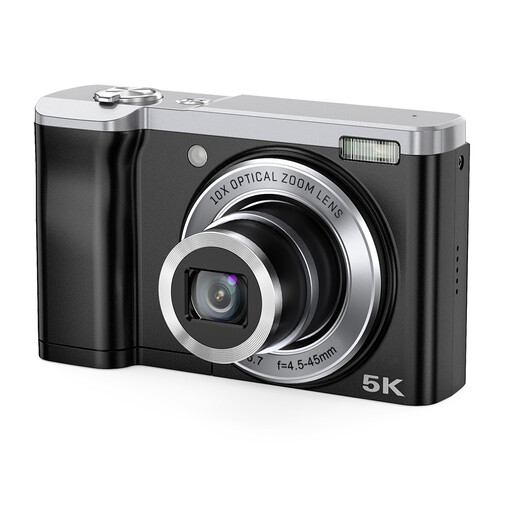
The listed zoom gives you framing options; check whether the camera can focus at the distance you need for your card photos.
The product name lists 56MP and 10× optical zoom.
 No image available
This mirrorless camera is listed with a zoom lens; check whether the included lens is suitable for the focusing distance you need to capture card details.
The product lists a 16–50 mm zoom lens.
 No image available
The included zoom lens offers a range of focal lengths; check its close-up capabilities separately for the details you want to photograph.
The product information lists a 16–50 mm f/3.5–5.6 OSS II lens and a 3-inch touchscreen.
 No image available
A compact camera can make for a simple, fixed set-up; check whether its close-up distance and framing suit your cards.
The product information lists 20Mpx and 2,7× optical zoom.
Not necessarily. First, check whether the camera and lens combination can capture the whole card in focus at the crop you want. Higher magnification matters most when you want to show small details separately at a larger size; the stated magnification applies to the exact lens.
Start with movable lighting and check the result on screen. The Canadian Conservation Institute describes lighting a surface evenly from both sides at a 45° angle; other lighting directions can bring out gloss and texture instead. Treat this as a test set-up, not a fixed setting for every card.
Keep the camera steady and use the same framing and background each time. Canon recommends using a tripod for consistent product shots; check from time to time that the card is still positioned in the same way.
According to the Dutch government, online purchases from a business usually come with a 14-day cooling-off period, although exceptions may apply. If a product is faulty, contact the seller. In the Netherlands, the statutory guarantee doesn't have a fixed legal term of two years.
Check who the seller is, what import charges may apply and whether the product meets European safety requirements. The Dutch government states that electronic devices in the EU must carry a CE mark; a Dutch-language website doesn't prove that the seller is based in the EU.