Who is this choice relevant to?

Analysing dark game scenes

You examine shadows, bright HUD elements and transitions in a darkened room. Black levels and any halos are among the factors that determine which panel suits you. RTINGS outlines the trade-off between OLED’s blacks and the halos that can occur with mini-LED.

Reviewers with a persistent timeline

You keep recording or analysis tools open for long periods and take the risk of permanent OLED burn-in into account. RTINGS describes this risk as a difference to consider when choosing a panel.

Reviewers of fine motion detail

You compare small details or fast-moving action and match the monitor’s resolution and motion handling to the recording. RTINGS distinguishes between the screen’s refresh rate and the source’s fps.

What should you look for when choosing?

OLED

Choose this when: dark scenes and individual bright details are your priority, and fixed interface elements are not left in the same place for long periods.

Trade-off: displaying a static image for long periods carries a risk of burn-in. Check the maintenance features and warranty terms for the exact model.

Mini-LED

Choose this when: you want to assess dark scenes and also regularly keep a timeline, scoreboard or analysis interface on screen.

Trade-off: mini-LED can show halos around bright objects. RTINGS also found some black smearing and VRR flicker on the AOC Q27G3XMN it tested; this does not necessarily apply to every model.

IPS without mini-LED

Choose this when: fixed interface elements stay visible for long periods and you want to avoid the risk of OLED burn-in.

Trade-off: RTINGS describes standard IPS monitors as generally offering less deep blacks than OLED. So, check how the specific model performs in a dark room too.

Consideration What should you check? Who is this important for?
Black levels and dark details Compare black-level and local-dimming tests for the exact model; check whether your content is SDR or HDR. If I want to assess shadows in a dark room, I look at blacks and bright details against a dark background. Around 36% of consumers put black levels first.
Fixed on-screen elements for long periods Work out how long the same elements stay visible; check the OLED maintenance features and the written burn-in cover. If I often leave a timeline or scoreboard on screen, I take the risk of OLED burn-in into account. Around 29% of consumers put an analysis interface that stays visible for long periods first.
Resolution and workspace Match the source resolution, screen size, viewing distance and video output; compare QHD and 4K at the intended screen size. If I want to view fine details alongside analysis tools, I want to know whether the source makes the most of the screen resolution. Around 21% of consumers prioritise resolution and workspace for detail.
Motion, fps and Hz Check the recording’s fps and compare motion and flicker tests for the exact screen; confirm which settings the connection supports. If I want to follow fast action in existing footage, I look at both the recording’s fps and the screen’s motion handling. Around 14% of consumers put motion handling first.

Buying pitfalls

  • Focusing only on the refresh rate

    Hz describes the screen’s refresh rate; fps describes how many frames the recording provides. A higher screen refresh rate does not add frames to existing footage.

    First check the fps of your recordings. Then compare motion tests and check which settings are supported by the connection you use.

  • Choosing OLED without considering a persistent timeline

    Displaying the same interface elements for long periods can carry a risk of OLED burn-in. An LCD alternative avoids this specific OLED risk, but does not automatically provide the same deep blacks.

    Check how long fixed elements stay on screen and review the maintenance features and written warranty terms for the exact model.

  • Assuming a mini-LED specification guarantees perfect shadow detail

    The number of dimming zones alone does not tell you how the screen performs. RTINGS found some black smearing and VRR flicker at varying frame rates on the AOC Q27G3XMN it tested.

    Look for a review of the exact model and check what it says about local dimming, black smearing and VRR flicker.

Brands to consider

ASUS ROG

The ROG Swift OLED PG32UCDM Gen3 is a 31,5-inch 4K QD-OLED model for anyone looking to combine screen detail with dark images.

  • ASUS lists 240 Hz, HDMI 2.1 and DisplayPort 2.1 for this model.
  • ASUS presents OLED Care Pro as a feature designed to reduce the risk of burn-in.
  • OLED Care Pro does not guarantee that burn-in is impossible; check the warranty terms for the exact model.

AOC Gaming

The Q27G3XMN/BK offers a 27-inch QHD option with VA and mini-LED for dark scenes and analysis elements.

  • AOC lists 336 dimming zones and up to 180 Hz for this model.
  • RTINGS found some black smearing and VRR flicker at varying frame rates on the Q27G3XMN it tested.
  • When buying, check the full model code, including /BK.

Dell Alienware

The AW2725Q is a roughly 27-inch 4K QD-OLED model for anyone who values fine detail as well as dark-image quality.

  • Dell lists 4K and 240 Hz for the AW2725Q.
  • These specifications alone do not indicate how suitable the screen is for analysis tools left static for long periods; bear in mind the general risk of OLED burn-in.

Samsung Odyssey

The Odyssey OLED G6 G60SD combines QHD with a Samsung-specified 360 Hz, for anyone who also values fast PC gaming alongside image analysis.

  • Samsung presents OLED Safeguard+ as burn-in prevention technology.
  • A high refresh rate does not add frames to existing recordings. Check the full model code and the specifications for the version you are considering.

Joybuy monitors for image analysis

This selection includes OLED monitors for dark scenes and a mini-LED monitor for anyone who also keeps fixed analysis elements on screen.

MSI MAG 322UP QD-OLED E16 31,5-inch 4K UHD gaming monitor

MSI MAG 322UP QD-OLED E16

The QD-OLED version is well suited to assessing dark scenes. Bear in mind the risk of OLED burn-in if interface elements stay static on screen for long periods.

31,5 inch; 4K UHD; 165 Hz; 0,03 ms; USB-C.

Joybuy

GIGABYTE MO32U 31,5-inch 4K OLED monitor

GIGABYTE MO32U

The OLED version could suit you if you want to assess dark scenes. Take the risk of displaying static images for long periods into account if analysis tools stay open for a while.

31,5 inch; 4K UHD; OLED.

Joybuy

Alienware AW2725Q 26,7-inch 4K QD-OLED monitor

Alienware AW2725Q

The QD-OLED panel and 4K format are well suited to viewing dark scenes and fine details. Bear in mind the general risk of OLED burn-in if interface elements stay fixed on screen.

26,7 inch; 4K UHD; QD-OLED; 240 Hz.

Joybuy

KTC 27-inch 4K mini-LED gaming monitor with Fast IPS

KTC M27P6

The specified combination of Fast IPS and mini-LED may be worth considering if you view dark scenes and use fixed analysis elements. Mini-LED can show halos around bright objects.

27 inch; 4K at 160 Hz or FHD at 320 Hz; Fast IPS; USB-C 65 W.

Joybuy
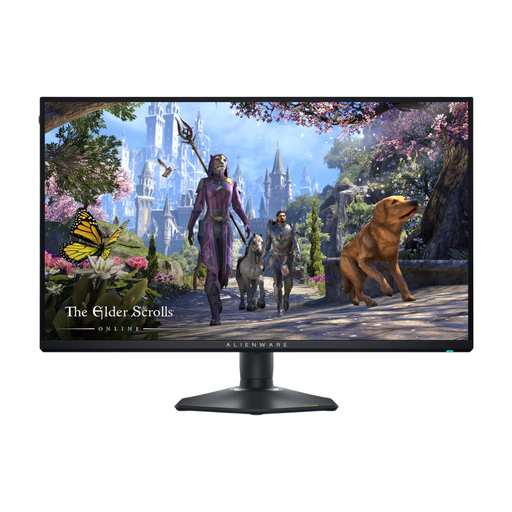
Alienware AW2725QF 27-inch 4K LCD gaming monitor

Alienware AW2725QF

The IPS version avoids the specific risk of OLED burn-in when analysis elements stay visible for long periods. IPS generally produces less deep blacks than OLED.

27 inch; 4K UHD; dual mode with FHD; 180 Hz in 4K mode.

Joybuy

Frequently asked questions

Do you need 360 Hz to assess recorded tournament footage?

Not just to play existing footage. Hz describes the screen’s refresh rate, while fps is the number of frames provided by the source. So compare the fps of your recordings with the monitor’s motion handling. A high Hz rating may be relevant separately if you also play games.

How do you set up a monitor for viewing in a dark room?

Start with a suitable picture mode, then adjust brightness and black level to suit the room. RTINGS warns that calibration values can vary between individual units, even for the same monitor model. So don’t copy settings from another screen without checking them.

Do your rights end when the manufacturer’s warranty expires?

No. According to ACM ConsuWijzer, in addition to a manufacturer’s or retailer’s warranty, you have a legal guarantee for as long as a product meets the standard you could reasonably expect under normal use. What this means in the case of burn-in depends on the circumstances, the product information and the specific complaint; check the terms for the exact model.

What information can help you compare power consumption?

In the EU, energy labelling applies to electronic displays, including computer monitors. Compare the energy label and, where relevant, the EPREL information for the exact model; the label also includes information about HDR performance.
