
Vandaag of morgen in huis

Kwaliteit gegarandeerd

Welkomstaanbiedingen ontgrendelen: GRATIS bezorging | Tot 80% korting | Gratis 30 dagen JoyPlus-proefperiode
Download de app
If you're looking for a touchscreen monitor for a commercial application, you know the choice can be overwhelming. Whether you're developing a kiosk display, setting up a point-of-sale system, or controlling an industrial machine, the screen's reliability and functionality are crucial. A consumer-grade model is often inadequate. You need a durable solution that can withstand intensive daily use.
This article is designed to help you make an informed choice. We will discuss the key specifications that professionals should look for and highlight several popular models suitable for various business environments.
The specifications of a professional touchscreen monitor go beyond just screen size. Here are three key considerations that make a difference in integration and durability.
Most modern, high-quality touchscreens use PCAP (Projected Capacitive) touch technology. This type of screen detects touch via an electrical field and responds with high accuracy to finger movements. A PCAP touchscreen almost always supports multi-touch, meaning it can register multiple touch points simultaneously. This is essential for functions like zooming and rotating, which significantly enhance the user experience of an interactive screen.
For seamless integration into a kiosk, counter, or machine panel, an open frame monitor is a common solution. This type of built-in monitor lacks its own front and side bezels, allowing you to mount the screen flush within your own design.
Additionally, pay attention to the IP rating. An IP65-rated monitor, for example, is dust-tight and protected against water jets. This makes the screen suitable for use in public spaces, the hospitality sector, or industrial environments where it may come into contact with moisture and dirt.
The monitor's size is directly related to its application. A 17-inch touchscreen, for instance, is compact and often used for control panels or POS systems. A 22-inch touchscreen offers more screen real estate and is a popular choice for information kiosks. For interactive presentations or digital signage in retail, a larger size like a 27-inch touchscreen is often more suitable.
Based on specifications relevant to professional applications, we have selected a few models from iiyama touchscreen. These monitors are often chosen for their reliability and specific features for integration and intensive use.
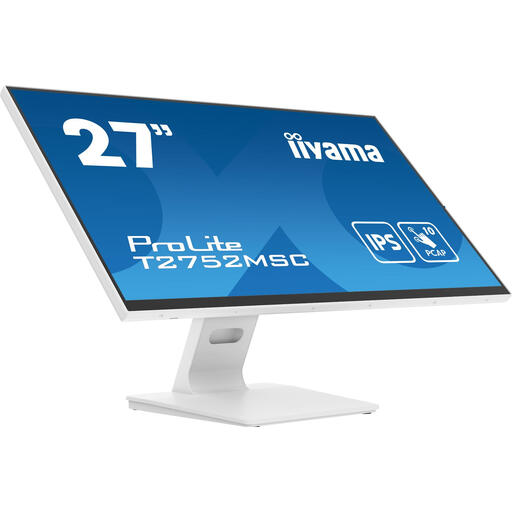
Why this model stands out This model combines a large 27-inch touchscreen with advanced technology. The Optical Bonding technique, which fills the gap between the panel and the glass, reduces reflections and increases durability. The bezel-free glass design and anti-fingerprint coating ensure a sleek appearance and easy maintenance.
Advantages
Who is this for? This screen is an excellent choice for retail environments, showrooms, and meeting rooms where both interaction and high-quality image performance are important.
View the iiyama ProLite 27-inch
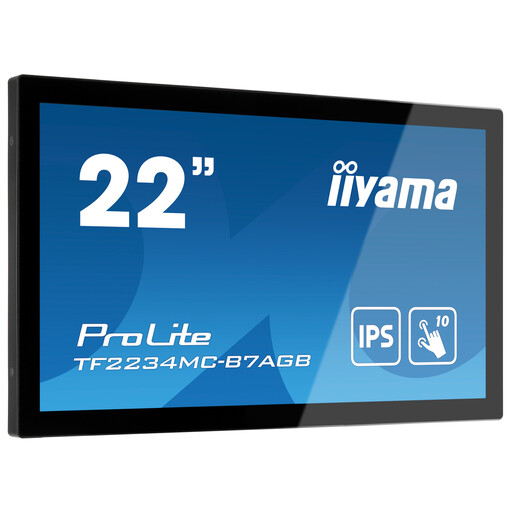
Why this model stands out This 22-inch touchscreen is a classic open frame monitor designed for integration. The front-facing IP65 rating makes the screen dust- and water-resistant, which is essential for unattended kiosks or industrial applications. The anti-glare coating reduces reflections in brightly lit environments.
Advantages
Who is this for? System integrators and kiosk manufacturers who need a reliable and robust built-in monitor for public or industrial environments.
View the iiyama ProLite Open Frame
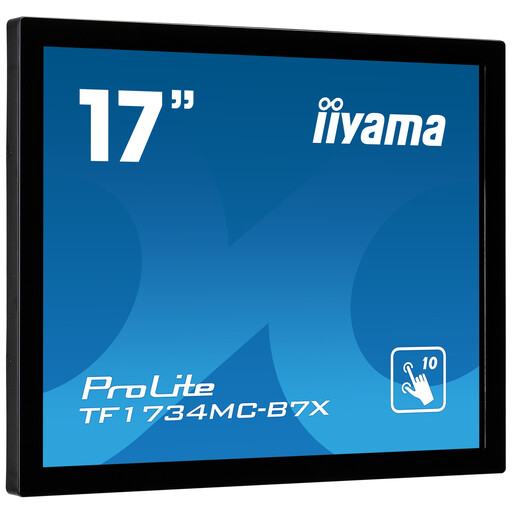
Why this model stands out This compact 17-inch touchscreen is also an open frame monitor with an IP65 rating. A distinctive feature is its "Touch Through-Glass" function. According to iiyama, this allows the screen to be mounted behind an additional glass plate and still register touches, providing extra protection in demanding environments.
Advantages
Who is this for? Ideal for system integrators who need to build a touch solution into vandal-prone or highly hygienic environments, such as ticketing machines or production lines.
The models mentioned above represent a selection of the available possibilities. Depending on your project, you may have different specifications or integration requirements. For projects that require a specific finish, such as a glass desktop or counter, you can also browse our range of Desk Glass for a seamless integration.
An open frame monitor is a screen without a full enclosure. It consists of the display panel and the necessary electronics mounted on a metal chassis. This design allows the screen to be built directly into a larger unit, such as an information kiosk, machine, or piece of furniture, for a fully integrated look.
PCAP stands for Projected Capacitive. This is a touch technology where a grid of sensors projects an electrical field. When a finger touches the screen, this field is disturbed. The processor calculates the location of the disturbance and registers it as a touch. PCAP screens are highly accurate, durable, and support multi-touch.
No, an IP65 rating does not mean the monitor can be fully submerged in water. The '6' stands for complete protection against dust ingress. The '5' stands for protection against low-pressure water jets from any direction. This is sufficient to protect the screen from rain, spills, or cleaning with a wet cloth, but not from submersion. Furthermore, the IP rating often applies only to the front of the monitor.
