
Users of a USB-A charging case
If you already have a suitable USB-A cable or charging case, check what power supply your toothbrush model needs. Philips, for example, describes a USB-A adapter for a Sonicare toothbrush with a USB-A cable.


Start by checking the connection on your existing charging accessory: a USB-A cable needs a USB-A port, while USB-C is suitable only if the accessory supports it. Extra ports are useful if you want to connect other devices at the same time. A USB port on an adapter does not mean you can plug the toothbrush handle directly into it; check the instructions for your model.
If you already have a suitable USB-A cable or charging case, check what power supply your toothbrush model needs. Philips, for example, describes a USB-A adapter for a Sonicare toothbrush with a USB-A cable.
If you want to connect a toothbrush accessory and another device at the same time, check the number of ports and the connection types. Belkin describes adapters with two USB-A ports, as well as models with both USB-A and USB-C.
If your toothbrush uses a charging station, glass, case or magnetic charger, first find out which component needs power. Philips describes different charging methods for Sonicare; Oral-B lists a magnetic charger for the iO8n.
First check how your toothbrush charges and what connection its accessory uses. Then consider the number of ports and the size of the adapter.
| What to consider | What should you check? | Who is this important for? |
|---|---|---|
| Connection | Check the plug at the power end of the cable and the instructions for your exact toothbrush model. | If my existing cable uses USB-A, I don’t want to choose an adapter with USB-C only. The connection is the top priority for around 36% of consumers. |
| Multiple devices | Count the devices you want to connect at the same time and check the port type required for each one. | At a shared desk, I want to connect my charging accessory and another device at the same time. Charging multiple devices at once is the main consideration for around 29% of consumers. |
| Charging method and safety | Compare your model’s instructions with the output ratings and conformity information for the individual adapter. | I want to establish which charging component my handle needs and what information applies to the adapter. This is the most important consideration for around 21% of consumers. |
| Size | First make sure the connection and charging method are suitable; then compare the dimensions with the space available. | Once the connection is right, I want a simple set-up that doesn’t take up unnecessary space. Size is the main consideration for around 14% of consumers. |
Mains adapters placed on the market in the Netherlands must meet the applicable European safety requirements and carry the required CE marking. The Dutch government’s Ondernemersplein explains this obligation; check the information for the specific adapter.
With some charging methods, a separate component connects the handle to the power supply. Having the right USB port on an adapter does not automatically replace a charging station or case.
Look up the charging instructions and required components for your exact handle model before choosing an adapter.
An adapter with USB-C only is not a direct connection for a USB-A cable.
Check the plug at the power end of your cable, then choose a suitable port or a charging connection that the model instructions confirm is compatible.
For one adapter with USB-C and USB-A, Belkin lists separate output ratings: 30 W for USB-C and 12 W for USB-A.
Check the ratings for each port and compare them with the instructions for your charging accessory.
These examples relate to specific charging accessories and adapter versions. The brand name alone does not confirm that an adapter is suitable for your toothbrush.
Philips describes specific USB-A charging accessories for certain Sonicare charging methods.
Belkin describes adapter versions with multiple ports for use at a shared desk.
The SJÖSS 20W sold in the Netherlands is an adapter with one USB-C port.
These products are multi-port USB options for a shared home-working space. Before buying, check that the port matches your toothbrush’s charging accessory and read the information for the specific mains adapter.
 No image available
The listed USB-A and USB-C ports suit a desk where several types of USB connection are needed; check which port your charging accessory requires.
The product name lists 10 ports, with USB-A and USB-C connections.
 No image available
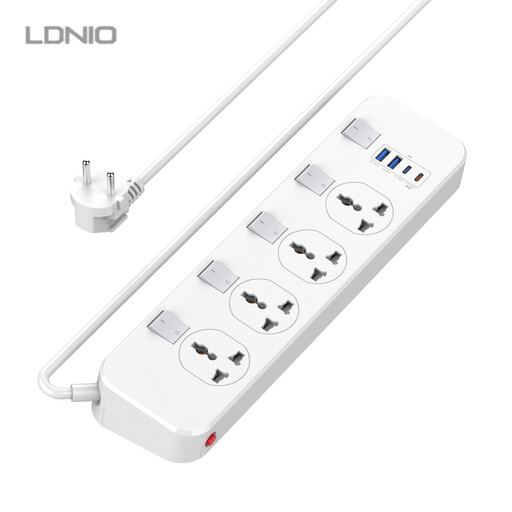
This version may suit a desk where you need both USB connections and mains sockets; check the plug and the charging connection required by your toothbrush accessory.
The product name lists four universal sockets, two USB-A ports and one USB-C port. The stated USB-C output is 20 W USB-C PD (5 V 3 A 20 W).
 No image available
A desk socket with USB-A and USB-C may suit a fixed set-up with several types of connection; check which port your toothbrush charger needs.
The product name lists USB-A and USB-C ports. This model attaches to the desktop with a clamp.
Not unless your model’s manual confirms that you can. Philips describes charging via a travel case, charging glass or charging pad, among other methods; Oral-B lists a magnetic charger for the iO8n. Check which component connects the handle to the power supply.
Follow the instructions for your exact model. On the support page consulted, Philips lists a 5 V USB adapter with IPX-4 for the models HX6600/12, HX6600/42 and HX6600/51 shown there; do not treat this as a general specification for all toothbrushes.
Mains adapters placed on the market in the Netherlands must meet the applicable European safety requirements and carry the required CE marking. The Dutch government’s Ondernemersplein explains this obligation. Check the information for the specific adapter; the CE marking alone does not prove that a particular charging connection is suitable for your toothbrush.
For the IKEA SJÖSS, IKEA recommends disconnecting the adapter from the power supply first and wiping it with a dry cloth. For other models, follow their own care instructions.