
Vandaag of morgen in huis

Kwaliteit gegarandeerd

Welkomstaanbiedingen ontgrendelen: GRATIS bezorging | Tot 80% korting | Gratis 30 dagen JoyPlus-proefperiode
Download de app
A high refresh rate sounds appealing, but a 240Hz gaming monitor isn’t automatically the right choice. For competitive gaming, the connection, response time, panel technology and picture settings matter too. If you focus on just one impressive figure, you could end up paying for features your PC can’t make use of.
The Titan Army C24A1H gaming monitor combines a 23.6-inch VA panel with Full HD, a curved 1500R screen, 240Hz and FreeSync support. This makes it particularly well suited to fast-paced PC games. Even so, it’s worth checking for a few common pitfalls before you place your order.
A 240Hz gaming monitor can display up to 240 refreshes per second. Your PC and game also need to deliver enough frames per second to make the most of it. If your system usually reaches, for example, 100 to 140 fps, you won’t be using some of the monitor’s capacity.
So check:
According to the product specifications, both HDMI 2.0 and DisplayPort 1.2 on the Titan Army C24A1H support a signal of up to 1920 × 1080 at 240Hz. You can use the supplied HDMI cable for this. A DisplayPort cable is not included.
The 1ms MPRT rating refers to a measurement method for motion clarity. It isn’t the same as a universal GtG response time, nor is it the same as the total input lag of your setup. Your graphics card, game, settings and connection also play a part.
When comparing monitors, look at the full details: MPRT or GtG, overdrive settings and how well the monitor works with your system in practice. The Titan Army C24A1H lists 1ms MPRT and has an overdrive option in its on-screen menu.
HDR10 support means a monitor can process an HDR10 signal. It doesn’t guarantee that every game or film will deliver a noticeable HDR effect. Factors such as brightness, contrast, local dimming and the content itself all matter.
The C24A1H has a stated brightness of 350 nits, a contrast ratio of 3000:1 and HDR10 support. These are verifiable product specifications, but the final picture depends on the source and settings. You can choose from options including Auto-HDR, HDR for games and HDR for films.
A 240Hz refresh rate can show movement more smoothly than 60Hz or 100Hz, provided your computer produces enough fps. FreeSync Compatible is designed to match the monitor’s refresh rate to the frame output of a compatible AMD graphics card. After installation, check in Windows and your driver settings that 240Hz and FreeSync are actually enabled.
According to the product specifications, the VA panel on this 24-inch gaming monitor has a contrast ratio of 3000:1 and horizontal and vertical viewing angles of 178 degrees. VA panels are often chosen for their contrast. Motion in fast-moving dark scenes can look different depending on your settings and the game, so use overdrive sparingly.
The 1500R curve bends the screen towards you. On a desk, at a viewing distance of about an arm’s length, this can create a more immersive picture. If you use your monitor for word processing or in a multi-screen setup, check that the curve suits your working position.
The Titan Army has:
The supplied stand doesn’t offer height adjustment. If you play or work for long periods, you may want to consider a VESA arm. Position the screen securely, keep the ventilation openings clear and use the supplied power adapter.
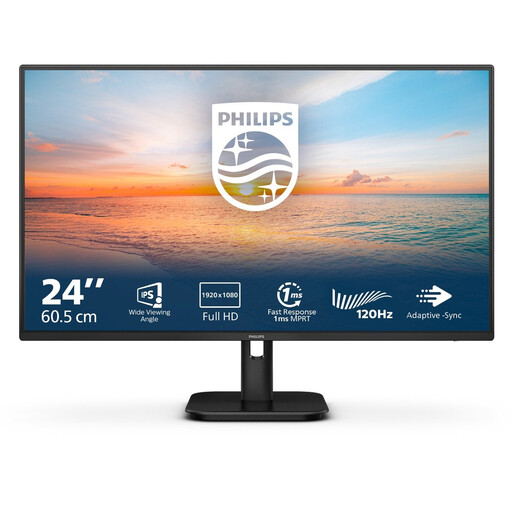
Why it suits this user: For everyday use, streaming and casual gaming, 100Hz is often more practical than 240Hz. This model also has built-in speakers.
You don’t pay for 240Hz if your computer is mainly used for office work and light gaming.
23.8-inch IPS, Full HD, 100Hz, 4ms response time and built-in speakers.

Why it suits this user: A good choice for players who want more than speed, with adjustability, extra brightness and support for multiple synchronisation technologies.
The specifications list 320Hz, G-SYNC Compatible, FreeSync Premium and HDMI 2.1. Just check that your PC can make use of this performance.
24.5-inch Fast IPS, 320Hz, 400 nits, height adjustment and VESA 100 × 100 mm.
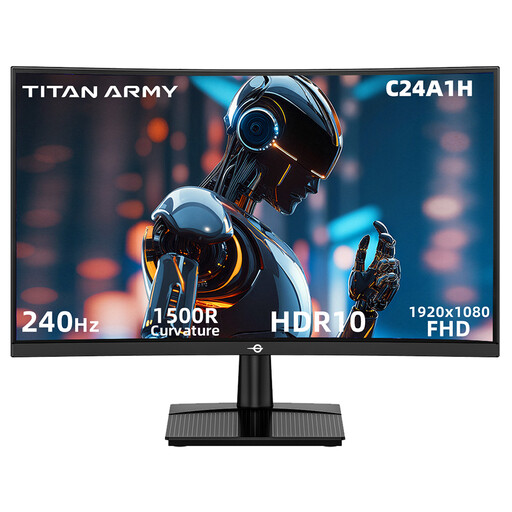
Why it suits this user: Designed for PC gamers who want a compact 24-inch setup with 240Hz, a VA panel, 1500R curve, HDMI and DisplayPort.
The stated 240Hz works over HDMI 2.0 or DP 1.2 at Full HD, making it clear which resolution and connection the claim applies to.
240Hz, 1ms MPRT, FreeSync Compatible, HDR10, 3000:1 contrast and VESA mounting.
We’ve put together a complete, up-to-date list of products that meet these strict selection criteria and current European safety regulations.
A monitor arm requires a VESA 100 × 100 mm mount that can support the weight of the screen. Have any wall mounting carried out in accordance with the manufacturer’s instructions.
The combination of Full HD, 240Hz, 1ms MPRT and FreeSync Compatible is well suited to fast-paced competitive games. Your experience will depend on your PC, fps, game settings and connection. For esports, it’s a good idea to turn off unnecessary picture enhancements if they cause extra lag or motion blur.
According to the stated product specifications, the HDMI 2.0 port on the Titan Army C24A1H supports 1920 × 1080 at 240Hz. Use a suitable cable, then check the settings in Windows and your graphics card driver after connecting.
The stated typical power consumption is 25 watts, with a maximum of 37 watts. The exact cost depends on how long you use it and your current electricity tariff. Power consumption in sleep mode is listed as below 0.5 watts. Switch the screen off completely when you won’t be using it for an extended period.
