What should you look for?
First, check that your chosen service and playback method work on the specific device. Wireless devices sold in the Netherlands must meet the applicable product and radio equipment requirements. The Dutch government’s Ondernemersplein website explains, among other things, the required CE marking and EU declaration of conformity. Check these for the specific item you’re buying.
| What to consider |
What to look for |
Who should prioritise this |
| Playing the recording you want |
Check whether the app is available for the specific model, or whether the service supports a casting method. |
If I use a particular theatre service, I want to know in advance whether that app or casting method will work. Around 36% of consumers put compatibility first. |
| Following the performance from the kitchen |
Check how you pause and resume playback, and whether the recording’s audio will work with your TV or connected speakers. |
If I move between the kitchen and table, I want to follow the dialogue and control playback easily. Around 29% of consumers particularly value being able to follow and control playback from the kitchen. |
| Connection by the TV |
Check whether there’s a network socket within reach; if not, test the Wi-Fi where you plan to put the device. |
With poor Wi-Fi, I want to know whether a network cable will reach before choosing a Wi-Fi stick. Around 21% of consumers say the connection is the deciding factor. |
| Compact set-up |
Check that you have a spare HDMI port and a power socket, and see what’s included in the box. Also check whether you’ll need to buy an HDMI cable separately. |
If I want to keep the area around my TV free of loose parts, I want to know what the set-up involves in advance. Around 14% of consumers particularly value a compact, straightforward set-up. |
Joybuy products
The Joybuy options below are projectors with built-in streaming features or connection options. They’re not the same as a separate streaming stick or box, so check whether the exact model supports your theatre service and playback method.
 No image available
XGIMI MoGo 4 Portable Projector, Full HD 1080p, Google TV, EA SPORTS FC 26 Game Code, Match Night EU Edition
A portable projector with Google TV for anyone looking for streaming and projection in one device. Check that this model supports the theatre service you want to use.
The product name lists Full HD 1080p, 450 ISO lumens, Harman Kardon audio and a battery with a stated run time of 2.5 hours. This version includes an EA SPORTS FC 26 Game Code.
View at Joybuy
 No image available
2026 Video Projector, Built-in Apps and Play Store, Wi-Fi 6, 180° Rotation
This projector lists built-in apps and the Play Store; check whether the specific theatre service and recording work on this model.
The product name lists Wi-Fi 6, Bluetooth and 180° rotation. The title also mentions automatic screen correction and a remote control.
View at Joybuy
 No image available
Rokid Station, Portable Android TV Streaming Device
A portable Android TV streaming device with a remote control for anyone who wants to use a streaming interface. Check that your service is supported and that the device connects to your screen.
The product description lists a 5000 mAh battery. The title mentions Android TV and a remote control.
View at Joybuy
 No image available
Magcubic HY350Max Smart Projector, Native 1080P, Android 14
A projector with Android 14 and preloaded apps, according to the product description. Check whether the app and theatre recording you want to use are available.
The product name lists native 1080P, Wi-Fi 6, Bluetooth 5.4 and 180° rotation. The title also mentions 8K support, which is not the same as the stated native resolution.
View at Joybuy
 No image available
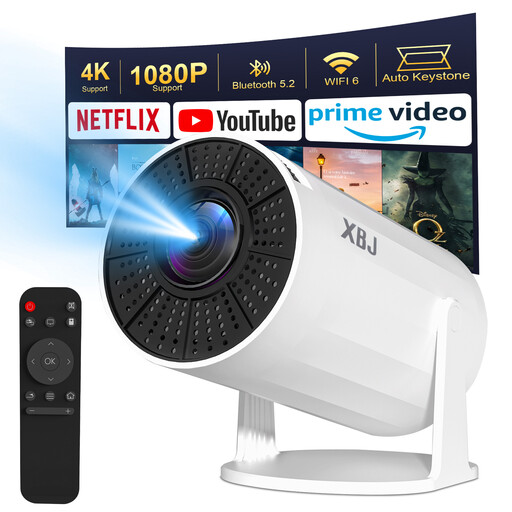
Lite Entertainment XBJ Portable White Projector, Android 11
This projector lists Android TV 11.0 and HDMI; check that it supports the service you want. HDMI also lets you connect a separate streaming stick.
The title lists Wi-Fi 6, Bluetooth 5.2, 200 ANSI and a projection size of 40–200 inches. According to the product description, this model has no battery and must be plugged into a mains socket; HDMI and USB cables aren’t included. The description says wireless streaming directly from a phone isn’t supported due to HDCP restrictions.
View at Joybuy
Frequently asked questions
Can I open National Theatre at Home on any smart TV?
Don’t assume that every built-in TV browser or casting feature is supported. National Theatre at Home has described apps for supported TV platforms and lists alternative playback methods; its specific guidance on smart TVs dates from 2021. Check the latest support information for your model.
What do I need to cast from a phone to Google TV?
According to Google, your phone and Google TV must be on the same Wi-Fi network, and the app you’re using must support casting. This doesn’t mean every theatre service allows casting.
Does a streaming stick always need a separate power supply?
Check what’s included with the version you choose. Xiaomi lists a power adapter and USB power cable with the TV Stick 4K (2nd Gen); this doesn’t automatically tell you what’s included with other models.
What should I check for the safety of a wireless streamer?
For electrical devices with Wi-Fi or Bluetooth, the Dutch government outlines the applicable product and radio equipment requirements, including CE marking and an EU declaration of conformity. Check these for the specific item on offer; a logo or product specification alone doesn’t confirm that the item complies.
Is the statutory guarantee in the Netherlands exactly two years?
No. The Dutch government says there’s no fixed statutory guarantee period in the Netherlands: what you can expect from a product depends, among other things, on the product and the circumstances. If there’s a problem, contact the seller.


