Who is this TV guide for?

Host with guests seated in different places

This host wants guests sitting to the side or further from the screen to be able to follow the performance. The Consumers’ Association points out that screen size, viewing distance and viewing angle all matter when watching with a group.

Fan of dark stage scenes

Look for visible detail in low-light scenes, and also consider the lighting during your gathering. The Consumers’ Association explains the differences between OLED and LCD for black levels and viewing in a bright room.

Viewer who wants to hear every word

This viewer prioritises spoken dialogue and singing, so assesses the sound separately from picture quality. The Consumers’ Association highlights the differences in sound quality between TVs.

What should you look for in a TV for theatre recordings?

OLED

A good fit when: dark stage scenes are important and distracting ambient light can be managed. The Consumers’ Association describes OLED as an option worth considering for its black levels.

Bear in mind: prolonged static images and lighting conditions; an older test doesn’t tell you how a current model performs.

Mini LED LCD

A good fit when: the room stays lit during the performance or light falls on the screen. The Consumers’ Association notes that LCD TVs can be bright in well-lit rooms.

Bear in mind: viewing angles and performance in dark scenes vary between TVs. Mini LED or local dimming zones alone don’t tell you what the picture will look like from the seats at the sides.

What to consider What to look for Who it matters more to
Clear view from every seat Measure the distance from the furthest seat and view the TV from a similar angle, under similar lighting. The Consumers’ Association lists viewing distance and viewing angle as factors to consider. When guests are spread out, I want to be able to see the stage from the side, too. Around 36% of consumers prioritise a good view for the whole group.
Dark stage scenes Compare dark and bright scenes under the lighting you use at home; don’t choose solely based on the OLED or Mini LED label. When subtle details in a dark performance matter to me, I compare black levels and reflections in my own lighting conditions. Around 29% of consumers prioritise picture quality in dark scenes.
Dialogue and singing Listen to spoken dialogue at your preferred volume and, if necessary, check the TV’s audio output and your sound system’s input. The Consumers’ Association describes differences in TV sound quality. When I watch a performance with a group, I want to be able to follow the dialogue and singing clearly. Around 21% of consumers put clear sound first.
Playing your own recording For the exact model, check which app, HDMI connection or USB file format you’ll need, and whether subtitles are supported. If my recording is on USB or plays through a particular app, I want to know in advance which playback method I’ll need. Around 14% of consumers prioritise ease of playback.

Pitfalls to avoid when choosing

  • Only viewing the demonstration picture from directly in front of the screen

    A viewing angle or reflection that’s barely noticeable straight on could make it harder for guests sitting to the side to watch.

    Assess the model you’re considering from the seats at the sides and under lighting similar to what you’ll use during your gathering.

  • Assuming 4K will automatically make your own theatre recording sharper

    The amount of picture detail depends on the resolution of the content you’re playing.

    Check the recording’s quality and how you’ll play it; don’t base your choice on the 4K logo alone.

  • Taking picture quality as proof of clear sound

    The Consumers’ Association describes major differences in sound quality between TVs. A small soundbar won’t automatically deliver the result you want.

    First, listen to dialogue at the volume you intend to use, then decide whether you need external audio. If you do, check the connections, too.

  • Ignoring OLED image retention or treating it as inevitable

    A 2022 Consumers’ Association test reported temporary image retention on older models after prolonged, partly unusual viewing conditions. This wasn’t a test of current models during normal theatre viewing.

    Avoid leaving a static image on screen for unnecessarily long periods, and don’t assume that an older test applies to a new TV.

Brands to compare

LG

The Dutch OLED C6 range is worth considering if dark scenes are a major priority.

  • LG specifies a 65-inch OLED screen and an α11 processor for the OLED65C68LA.
  • Those specifications don’t show how the TV handles reflections or viewing angles, or how clear the sound will be in your room.

Sony

The BRAVIA 8 II K-65XR8M2 is an OLED model to consider if your setup also includes an external player or sound system.

  • Sony lists four HDMI inputs and eARC/ARC for this model.
  • A listed USB codec doesn’t guarantee that every recording file, app or subtitle file will work.

Samsung

The Dutch 65-inch QN90F is a Mini LED LCD model to compare if the room will stay lit while you watch.

  • The product page identifies the TV as a Neo QLED Mini LED model.
  • Assess viewing angles, reflections and dark scenes for each TV; the product name alone doesn’t prove it has an advantage over OLED.

TCL

The 65C7K is a QD Mini LED alternative to explore if you’re considering a 65-inch LCD TV with local dimming.

  • TCL lists dimming zones, HDR brightness and a sound system among the product’s features.
  • Manufacturer specifications aren’t an independent measurement of viewing angles or proof of clear sound in your room.

Philips

According to Philips, the 65OLED811/12 combines an OLED panel with Ambilight, making it an option if lighting around the screen is part of your setup.

  • Philips describes the OLED and Ambilight features itself.
  • See how the lighting and sound work in your own viewing environment; these claims about the viewing experience haven’t been independently confirmed.

Joybuy TVs for different viewing setups

This Joybuy selection includes OLED and QD Mini LED TVs in a range of screen sizes. Compare the size with your seating layout and check that each model can play your chosen recording using your preferred playback method.

OLED77G68LW 77-inch OLED TV

OLED77G68LW 77-inch OLED TV

The 77-inch screen size may be worth considering if you also want to factor in the distance from the furthest seat.

OLED screen; 4K; Dolby Atmos; webOS.

View at Joybuy

LG OLED65C68LA 65-inch OLED 4K Smart TV

LG OLED65C68LA 65-inch OLED 4K Smart TV

A 65-inch OLED model to compare if both screen size and dark scenes matter to you.

65 inch; OLED; 4K; Dolby Vision; 40 W 2.2-channel system.

View at Joybuy
LG OLED55C68LA 55-inch OLED 4K Smart TV

LG OLED55C68LA 55-inch OLED 4K Smart TV

Compare this 55-inch OLED model with the available space and viewing distance from your seats.

55 inch; OLED; 4K; Dolby Vision; 40 W 2.2-channel system.

View at Joybuy

TCL T8D 85-inch 4K QD Mini LED Smart TV

TCL T8D 85-inch 4K QD Mini LED Smart TV

Check that the 85-inch screen fits your room and is comfortable to watch from the seats at the sides.

85 inch; 4K; QD Mini LED; Google TV; 144 Hz; HDMI 2.1; Onkyo 2.1 sound.

View at Joybuy
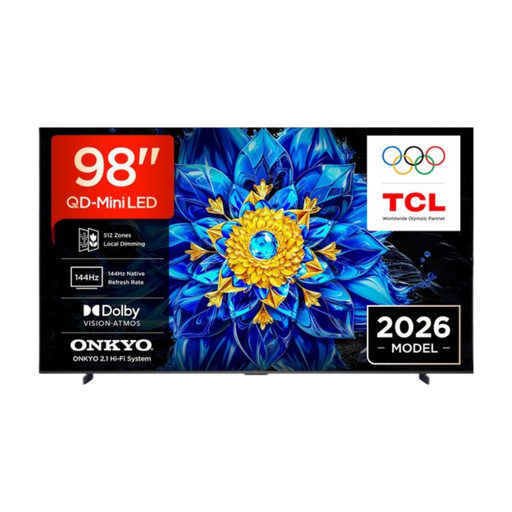
TCL T8D 98-inch 4K QD Mini LED Smart TV

TCL T8D 98-inch 4K QD Mini LED Smart TV

Measure the available space and viewing distance before comparing a TV of this size with your setup.

98 inch; 4K; QD Mini LED; Google TV; Dolby Atmos; HDMI connections.

View at Joybuy

Frequently asked questions

How do you choose a screen size for guests sitting further away?

Measure the distance from the furthest seat and check that the TV fits in your available space. The Consumers’ Association gives around 2.4 times the screen diagonal as a guide to comfortable viewing distance; also check the picture from the seats at the sides.

Can you play a theatre recording from USB with subtitles?

It depends on the exact TV model, codec, file and subtitles. Sony publishes USB codecs for the K-65XR8M2 and notes that subtitle support can vary by app and content, so check your recording using the playback method you intend to use.

Should you buy a soundbar straight away?

No. First, listen to dialogue at the volume you expect to use during your gathering. The Consumers’ Association describes differences between TVs and notes that, in its tests, larger soundbars generally sound good; if you use external audio, check that the connections are compatible, too.

How do you adjust the picture for an evening performance?

Assess and adjust the picture under the lighting you’ll use during your gathering. The Consumers’ Association recommends using your usual room lighting as a starting point; check a familiar scene to make sure both dark and bright parts of the stage remain visible.

Do you have a cooling-off period when buying a TV online?

According to ACM ConsuWijzer, when you buy a standard new TV online, you’re generally entitled to a statutory 14-day cooling-off period from delivery. Check which terms and exceptions apply to your order.
