For fragile, bound programme booklets, a contactless overhead scanner is the obvious choice. A flatbed is suitable only if a booklet can lie open without being forced. A document feeder is designed for suitable loose sheets, not intact booklets. Also check the scanning size and how clearly small text can be captured, and agree the studio’s rules before sharing scans.
Which approach is right for you?
Looking after fragile programme booklets
You want to digitise bound or historic material without forcing the binding. First, assess its condition: the National Archives emphasises that the physical condition of an item is an important consideration when digitising it.
Creating a searchable studio archive
You want to find names, performances and years later, so OCR, file formats and checking the pages all matter. Manufacturers describe OCR features for specific models, but you should check the scans themselves are legible.
A studio with lots of loose programmes
You also handle sturdy loose sheets and need a suitable feeding or scanning process for several users. An automatic feeder is intended only for originals that can pass safely through the machine.
What should you look for when choosing?
Start by checking the condition and binding of the programme booklets. Then choose a scanning method for the material your studio handles most often.
Contactless overhead scanner
Choose this option: if bound or fragile booklets cannot safely be placed against glass.
Bear in mind: the set-up and legibility of text near the spine; correction features vary by model and need to be checked.
Book-edge flatbed scanner
Choose this option: if the booklet can lie open without pressure and the page fits on the scanning surface.
Bear in mind: the page touches the glass, and the binding must allow the booklet to be positioned safely.
Standard A4 flatbed scanner
Choose this option: if you mainly scan loose pages or have booklets that can lie flat safely.
Bear in mind: the size of the open booklet and access to text close to the spine.
Scanner with automatic feeder
Choose this option: if your studio mainly handles sturdy loose sheets.
Bear in mind: this option is not suitable for intact bound booklets; assess fragile or unusual sheets separately.
| What to consider |
What to look for when buying |
Who should consider this? |
| Fragile binding and paper |
Assess the condition and opening angle of a representative booklet. Compare contactless scanning with a book-edge scanner without forcing the item open. |
If I want to preserve fragile booklets, safe handling matters more than speed; around 36% of consumers put this first. |
| Searchability and cataloguing |
Check whether the exact model supports searchable PDF files, and test small print, text near the spine and whether a sample scan captures every page. |
For an archive where I want to find names and performance dates, OCR and checking the pages are important; around 29% of consumers give these the highest priority. |
| Handling loose sheets |
Separate loose sheets from bound originals. Check the feeder capacity and duplex scanning only for material that can go through the feeder. |
If I regularly handle suitable loose programmes, I want to spend less time placing pages by hand; around 21% of consumers put this need first. |
| Workspace and shared use |
Measure the available space and the size of an open booklet. Check the connection and required software, and agree a shared routine for checking and storing scans. |
When several people use the same scanner and space is limited, I mainly want a practical set-up; around 14% of consumers say this is their main concern. |
Common buying mistakes
-
Choosing a document feeder for a collection made up mainly of bound booklets
A feeder is designed for suitable loose sheets and is no substitute for a method of scanning an intact booklet.
Count loose and bound originals separately before choosing a scanning method.
Bound items may require a second scanning method and extra manual work.
-
Assuming correction features or high resolution guarantee legible text near the spine
Features vary by model and do not, on their own, guarantee that small print near the spine will remain legible. The National Archives describes quality control as part of the digitisation process.
Make a test scan of a representative page with small print near the spine, then check both the image and the OCR.
An illegible scan may mean you have to scan it again and make corrections by hand.
-
Assuming scans can automatically be shared within the studio or online
The rules for making a private copy for personal use differ from those for digital copying and sharing by an organisation.
Decide in advance who will have access and on what basis the studio may copy and share the programme booklets. The Government of the Netherlands explains private copying and reprographic rights separately.
Arranging the right permission or an applicable licence may take extra time or cost more.
Brands to compare
CZUR
According to CZUR, the ET series is designed for contactless scanning of bound and loose originals. The ET24 Pro is one model to consider for booklets that cannot be placed against glass.
- CZUR lists curvature correction and OCR for the ET series.
- Check the features of the model variant you choose, the scanning area and legibility with a test scan. These are manufacturer specifications, not an independent accuracy assessment.
ScanSnap
The SV600 is a contactless overhead scanner that ScanSnap also describes as suitable for books and fragile documents.
- The manufacturer lists support for up to A3 and correction for curves near the binding.
- Scanning speed and resolution depend on the specified settings; test small print and text near the spine using your own material.
IRIS
According to IRIS, the IRIScan Desk 6 Pro combines overhead scanning of material up to A3 with output options including searchable PDF files.
- IRIS lists automatic page detection and curvature correction.
- Check how legible your theatre programme booklets are for yourself; descriptions of speed and quality are manufacturer claims.
Plustek
The OpticBook 4800 is a book flatbed scanner for bound material that can safely be positioned against a book edge.
- Plustek specifies a 2 mm book edge and output to searchable PDF files.
- The page touches the scanner, so whether this approach is suitable depends on the condition of the paper and binding.
Brother
The ADS-1800W is a compact sheet-fed scanner for loose sheets, not intact bound booklets.
- Brother specifies a 20-sheet automatic feeder, duplex scanning and a wireless connection.
- These features are intended for documents that are suitable for feeding through the scanner.
Epson
The Perfection V39II is an A4 flatbed scanner for loose pages and originals that can safely lie flat.
- Epson lists USB, a built-in stand and 4800 dpi.
- These specifications do not show that a fragile binding can safely be pressed flat.
Joybuy products for this purpose
This selection focuses on loose programme sheets and booklets that fit on a glass plate without being forced. Models with a sheet feeder are intended for suitable loose sheets.
 No image available
CZUR Shine 800 A3 Pro Document Camera
Designed for loose programme sheets when A3 scanning and OCR are important. Its foldable design and USB connection may suit a shared workspace.
The product description lists OCR, automatic cropping and compatibility with Windows and macOS. Glossy materials, such as shiny photographs and magazines, are excluded.
Joybuy
 No image available
Canon imageFORMULA DR-F120 Flatbed & ADF Scanner
The combination of a flatbed and feeder may suit a studio that scans both loose sheets and booklets that can safely lie on glass.
A4 flatbed, 600 × 600 dpi and a 50-sheet automatic document feeder; the description lists duplex scanning and output to editable PDF files. A bound booklet goes on the glass and should only be positioned this way if it can lie open safely.
Joybuy
 No image available
Epson WorkForce DS-1660W Flatbed Scanner
A flatbed option for loose pages and booklets that can lie on the scanning surface without being forced. As it uses a glass plate, this is not a contactless option.
A4 flatbed with 1200 × 1200 dpi and duplex scanning. The description lists USB 3.0 and a wireless connection.
Joybuy
 No image available
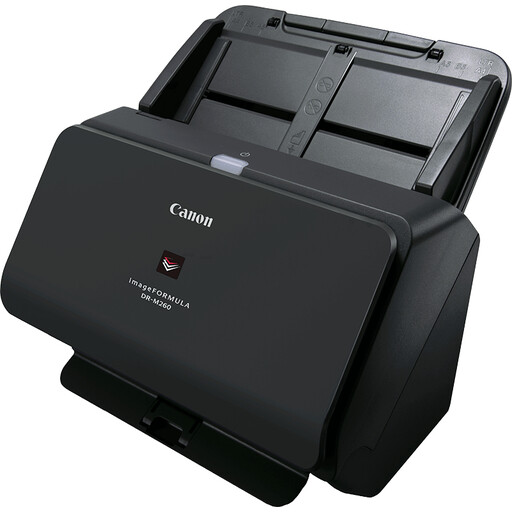
Canon imageFORMULA DR-M260 Sheet-Fed Scanner
For studios that handle suitable loose programme sheets; this sheet-fed scanner is not designed for intact bound booklets.
A4 and 600 × 600 dpi. The product description lists a scanning speed of up to 60 pages per minute and ultrasonic double-feed detection.
Joybuy
 No image available
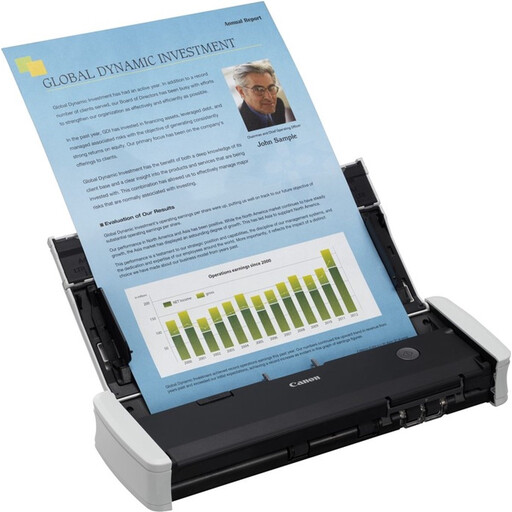
Canon imageFORMULA R10 Sheet-Fed Scanner
A feeder option for suitable loose programme sheets, not intact bound booklets. Its portable design may suit a studio where the scanner is used in different places.
The description lists duplex scanning, a 20-sheet feeder and USB power.
Joybuy
Frequently asked questions
How can you avoid missing pages and hard-to-find scans?
After scanning each booklet, check the page order, image quality and whether any pages have been skipped. Add details such as years or other keywords to make files easier to find, and test OCR separately on the small print in your own material.
Can the studio share scans of copyrighted programme booklets internally?
A private copy made solely for personal use must not be distributed or made public. Permission is required for digital copying and sharing by a business or institution; the Government of the Netherlands also describes a reprographic rights scheme for copies within an organisation. Check in advance whether the scheme covers your intended use and material; on its own, it does not give permission to share material publicly.
What if the material features identifiable people?
The Dutch Data Protection Authority considers images in which people can be identified to be personal data. An exception for strictly personal use does not automatically apply to business use or wider distribution, so assess the intended processing and access before the studio shares these scans.
Which warranty and returns terms should you check before buying?
Check who the seller is, which software and support are included with the exact model, and whether you are buying as a consumer or a business. The Government of the Netherlands explains statutory warranty rights and the usual 14-day cooling-off period for applicable consumer purchases made at a distance; do not assume these consumer rules automatically apply to a business purchase for your studio.


