What should you look for when choosing?
First, consider how much you move during the monologue. Then check the microphone placement and recording connection, as well as what your existing equipment requires.
| What to consider |
What to look for when buying |
Who is this important for? |
| Clarity in an echoey room |
Make a test recording from the intended speaking distance and check whether a stand or boom can keep the microphone close. |
If I’m speaking in an echoey rehearsal room, I want to hear my voice clearly without expecting the polar pattern alone to correct the room acoustics. Around 36% of consumers prioritise clarity. |
| Freedom of movement |
Perform a scene that involves walking and turning. With a lavalier, check the fastening and clothing noise, or assess how well a boom can follow your movement. |
When I perform around the space, I don’t want to keep adjusting my position in relation to a fixed microphone. Around 29% of consumers give freedom of movement top priority. |
| Quiet and loud passages |
Record both levels one after the other and check which features work with the connection and recording equipment you use. |
When whispering as well as speaking loudly, I want to be able to assess afterwards what the recording set-up captured. Around 21% of consumers pay particular attention to big differences between quiet and loud dialogue. |
| Connections and accessories |
Check the inputs on your computer, camera or recorder, and find out which cable, stand, power supply and monitoring options are needed for each version. |
If I want to record using equipment I already own, I want to know in advance whether it will connect to the microphone I choose. Around 14% of consumers prioritise a suitable, straightforward connection. |
Joybuy product picks
These product picks are suited to monologue recordings using a fixed USB set-up or a wearable microphone for greater freedom of movement.
 No image available
DJI Mic Mini 2S (2 TX + 1 RX + charging case)
A wearable set could suit you if you move around during your monologue and don’t want to stay beside a fixed microphone.
The product title lists two transmitters, one receiver and a charging case. Before use, check the connections and the conditions for the wireless version and location you’ve chosen.
View at Joybuy
 No image available
USB condenser microphone with cardioid polar pattern
This USB set-up could suit you if you want to record to a computer from a fixed position.
The product title lists a USB condenser microphone with a cardioid polar pattern. Check that the boom arm and other accessories suit your performance position.
View at Joybuy
 No image available
Moman MA6 Lavalier Microphone, 6 m
A wired lavalier could suit you if you want to wear the microphone while performing and can manage the cable route.
The product title lists a 6 m cable, an omnidirectional polar pattern and a 3.5 mm connection. Check that the connection is compatible with your recording equipment.
View at Joybuy
 No image available
Moman MB1C Clip-on Microphone for iPhone 18/17/16
A clip-on set could suit a monologue where you want to move around without holding a microphone.
The product title lists one transmitter, one receiver and a USB-C receiver, and mentions iPhone 18/17/16. Check that your recording device works with this connection and version.
View at Joybuy
 No image available
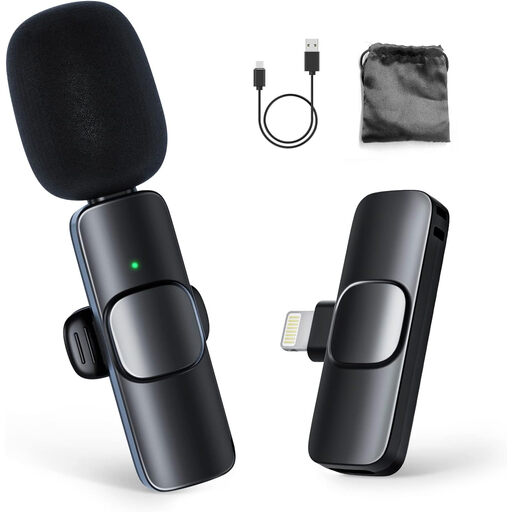
Moman CP1A Wireless Lavalier Microphone for iPhone (1TX&1RX)
A wireless lavalier could suit you if you move around during your monologue and want to wear the microphone.
The product title lists one transmitter and one receiver, and positions the set for iPhone. Check that the connection is compatible with your recording device.
View at Joybuy
Frequently asked questions
Can you place the microphone at the back of the rehearsal room to record the whole monologue?
That’s not a reliable way to capture clear speech in an echoey room. Test the microphone closer to the performer. Shure explains that distance affects the balance between direct and reflected speech, and a shotgun microphone doesn’t zoom in on sound.
What should you check before your first full take?
Record a short scene featuring movement, head turns, and quiet and loud lines. Listen back for clothing noise, room echo and changes in volume. Also check the power supply, connections and any recordings made on the recorder or transmitter.
Do you always need a licence for a wireless microphone in the Netherlands?
No, that doesn’t apply to every wireless microphone. The RDI publishes frequency bands that can be used without a licence, subject to certain conditions. Some bands do require a licence, and availability may vary by location. Check the frequency and transmission power of the exact system, along with the conditions at the place where you’ll be using it.
What if a microphone breaks too soon during normal use?
For a consumer purchase in the Netherlands, the product must meet what you could reasonably expect. ACM ConsuWijzer explains that the seller is responsible for providing an appropriate solution if a product breaks too soon during normal use; the solution will depend on the circumstances.
Can you publish a recorded monologue without further consideration?
Don’t assume that you can. Auteursrecht.nl explains that an actor may have neighbouring rights in their performance; the Dutch Data Protection Authority notes that a valid legal basis is needed to collect and use personal data when the GDPR applies. The consent or exception that applies will depend on the specific text, performance and publication.


