
Fans watching a particular match
First want to check which Dutch service or channel is showing the match, and whether it works on their TV or receiver at home. Ziggo and HBO Max list coverage for different tennis tournaments.


You don’t automatically need a separate streaming stick or box. If the app or channel showing the match already works on your TV or TV receiver, that may be all you need. If the app isn’t available, choose a stick if the Wi-Fi signal is good enough by your screen, or a box with Ethernet if you have a network connection there. A 4K player won’t automatically make a tennis broadcast 4K: the quality also depends on the broadcast and your screen.
First want to check which Dutch service or channel is showing the match, and whether it works on their TV or receiver at home. Ziggo and HBO Max list coverage for different tennis tournaments.
Want to rely less on the Wi-Fi signal by the screen when watching live, and check whether a device with Ethernet is suitable for the connections available.
Want to match their TV or projector’s picture and sound capabilities, and their audio setup, to the quality of the actual broadcast.
Choose this option: if the app or channel showing your match already works and the picture quality is good enough.
Bear in mind: the apps and capabilities of your current equipment, and the access required to watch the broadcast.
Choose this option: if the app you need is available, you have a spare HDMI port and the Wi-Fi signal by your screen is good enough.
Bear in mind: the Wi-Fi connection, the right app and any power requirements.
Choose this option: if you want a separate player and have a wired network connection by your screen.
Bear in mind: the space you’ll need and an HDMI cable; the cable is sold separately with the Google and Apple boxes mentioned here.
Choose this option: if the app supports casting and your phone or tablet and receiver are on the same Wi-Fi network.
Bear in mind: Ziggo states that casting or using AirPlay from Ziggo GO is limited to 720p, which may matter on a large screen.
| Concern | What to look for when buying | Who does this matter to? |
|---|---|---|
| Access to the match | Look up the match in the current listings, then check the app, account and access on your chosen platform. | If you want to watch a particular match, first find out where it’s being shown and whether your device can play that service. Around 36% of consumers prioritise access to the right match. |
| Connection during live tennis | Check the connection by your screen and whether Ethernet is actually available there. | If your Wi-Fi is unreliable, you’ll want to know whether a wired connection is possible where you watch. Around 29% of consumers give a suitable network connection top priority. |
| Picture and sound on a large screen | Check the quality of the specific stream, the HDMI connections and how it connects to your soundbar or receiver. | On a large screen, you’ll want the broadcast to suit your TV or projector and audio setup, without assuming the player will make the broadcast sharper. Around 21% of consumers prioritise picture and sound capabilities. |
| Extra purchase and running costs | Check whether your existing equipment is enough, and which cables and services you’ll need to watch the broadcast you’ve chosen. | If you want to avoid unnecessary spending, first check whether your current equipment can already play the match. Around 14% of consumers are mainly concerned with keeping extra costs down. |
A streaming device doesn’t give you access to a match on its own; tennis coverage varies by tournament and service.
Look up the specific match in the current listings, then check which subscription and viewing method you’ll need.
A player’s output formats aren’t the same as the picture and sound quality of the broadcast.
Check the specific stream and make sure it’s suited to your screen and audio setup.
Ziggo states that casting or using AirPlay from Ziggo GO is limited to 720p, which is worth bearing in mind with a large screen.
Compare the official casting option with the app on your TV or media player before buying any equipment.
Models with similar names can differ in generation and connections. The HDMI cable is sold separately with the Google and Apple boxes mentioned here.
Check the exact generation and model, connections and box contents before ordering.
The Google TV Streamer (4K) is a separate player for anyone looking for Google TV and an Ethernet connection.
The TV Stick 4K (2nd Gen) is a compact Google TV option for a screen with a reliable Wi-Fi connection.
Apple’s specifications for Apple TV 4K (4th generation) describe a box with Ethernet.
The LEAP NOVA-X is a compact Google TV stick for anyone considering a wireless player.
This selection includes projectors with streaming apps and a portable Android TV device. The latter is described as an accessory for Rokid AR glasses; check for each product that the app, connection and setup are right for your match and screen.
 No image available
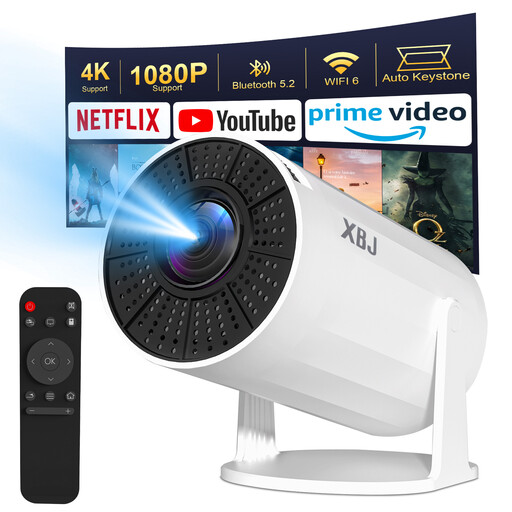
A smart projector for anyone who wants to use streaming apps on the projector; check that the app showing your match is available.
The product name lists Wi-Fi, Bluetooth, wireless projection, autofocus and 4K support for Netflix and Disney+.
 No image available
The title mentions built-in apps and the Play Store; check that the tennis service you need works on this model.
Listed features include Wi-Fi 6, Bluetooth, 50–100% digital zoom and 180° rotation.
 No image available
The product description presents this device as an accessory for Rokid Max and Air glasses; check this dependency before choosing it for a TV setup.
The product name describes a portable Android TV device.
 No image available
A projector with Google TV for anyone who wants to use streaming apps directly on the projector; check that the right app is available.
The product name lists Wi-Fi 6, Bluetooth, JBL sound, Dolby Audio, native 1080p and 4K support. This won’t automatically make a tennis stream 4K.
 No image available
For anyone who wants to use apps via the projector; the product description says that wireless streaming from a mobile phone isn’t supported due to HDCP restrictions.
The product name lists Wi-Fi 6, Bluetooth 5.2, Android 11, 1080P and 4K decoding. The description recommends a separate TV stick for streaming from a phone.
Ziggo lists Apple TV, Google TV, Android TV and Fire TV as platforms for watching Ziggo GO on a second TV. According to Ziggo, this TV app option only works with a Ziggo internet connection and access to Ziggo GO; also check whether your package includes the sports channel you want. This doesn’t confirm that every match is available.
Update the app and connect your phone or tablet and Chromecast or Apple TV to the same Wi-Fi network. Ziggo states that this casting or AirPlay option supports picture quality up to 720p.
No, not automatically: the resolution you see also depends on the content being streamed and your screen. Check the quality of the specific broadcast; suitable content and equipment are also needed for supported audio formats.
Check whether you need paid access to sport and whether the player comes with an HDMI cable. HBO Max states that its Sports add-on requires a separate base subscription. According to ACM ConsuWijzer, the statutory cooling-off period for online product purchases usually ends 14 days after delivery; the statutory guarantee is separate and covers products that meet what you could reasonably expect.
According to Auteursrecht.nl, you don’t need permission from the creators to show content strictly within your own household. Ziggo Sport says permission is required to show its broadcasts publicly. This relates to showing the broadcast, not to the subscription required to watch it.