
Switch tennis players who swing
If you play Nintendo Switch Sports, check which Joy-Con matches your Switch generation. Nintendo Netherlands states that Switch and Switch 2 Pro Controllers aren’t compatible with this game.


Start with your console and the specific tennis game. For tennis in Nintendo Switch Sports, Joy-Con or Joy-Con 2 is the way to go, while a standard gamepad is only suitable if the game supports it. Then consider how you play, your charging or cable setup, and how many controllers you already have. Motion sensors alone don’t prove that a game supports a controller.
If you play Nintendo Switch Sports, check which Joy-Con matches your Switch generation. Nintendo Netherlands states that Switch and Switch 2 Pro Controllers aren’t compatible with this game.
For a tennis game with button controls, a comfortable grip and a suitable charging or cable setup both matter. First, check that the controller works with both your console and the game.
Check how many controllers your chosen game mode requires, then count how many you already have. Nintendo says that Nintendo Switch 2 comes with two Joy-Con 2 controllers and two wrist straps.
| What to consider | What to check | Who is it important for? |
|---|---|---|
| Game and platform compatibility | Check your console model, the full game title, and which controller and play style it supports. | I want to make sure the tennis controls I need work on my console first. This is the top priority for around 33% of consumers who put compatibility first. |
| A secure grip during long sessions | First decide whether you’ll be swinging or using buttons. If you’re using wireless Joy-Con, check that you have the right wrist strap too. | When I play for a long time, I want to know that I can hold or move the controller comfortably. Around 27% of consumers put a secure grip first. |
| Power and interruptions | Check the charging options for the exact model. If you choose a wired controller, consider the cable and your playing setup. | I don’t want a flat battery or awkward cable to catch me out during a long match. Power and charging are the top priority for around 20% of consumers. |
| Playing together and what you’ll need | Check the game mode, count the controllers and wrist straps you already have, and check any online requirements separately. | When playing together, I want to know whether my game mode requires extra controllers. Around 20% of consumers put the number of controllers and other requirements first. |
A controller with motion sensors won’t automatically work with every game that uses motion controls. Nintendo rules out Pro Controllers for Nintendo Switch Sports; motion sensors on another model don’t change that game’s requirements.
Before buying, check controller support for the full game title and the right platform.
Nintendo says that Nintendo Switch 2 comes with a left and right Joy-Con 2 and two Joy-Con 2 wrist straps. So you may not need an extra set.
Count your controllers first, then check what your chosen local game mode requires.
PowerA states that the Enhanced Wired Controller for Nintendo Switch doesn’t support motion controls and isn’t suitable for games that only use Joy-Con.
Choose this model only for a game that supports it, and bear in mind that it’s intended for use in docked mode.
The Dutch government explains that there’s no fixed statutory warranty period in the Netherlands, and that the seller must offer a solution if a product is faulty. A manufacturer’s warranty is separate from this.
Keep your proof of purchase and contact the seller if your product is faulty.
Joy-Con and Joy-Con 2 are the relevant ranges for the supported swing controls in Nintendo Switch Sports. The right generation depends on your console.
DualSense is a gamepad option for compatible PS5 tennis games, including the PS5 edition of TopSpin 2K25.
The Ultimate 2C Bluetooth is a potential gamepad for supported Switch games. This Bluetooth model is different from the Ultimate 2C Wireless for Windows and Android.
The Enhanced Wired Controller for Nintendo Switch is a wired option for compatible Switch games with button controls in docked mode.
This selection includes gamepads for tennis games with button controls, as well as a pair of Joy-Con 2 for Nintendo Switch Sports on Switch 2. Check that each game supports your chosen controller and play style.
 No image available
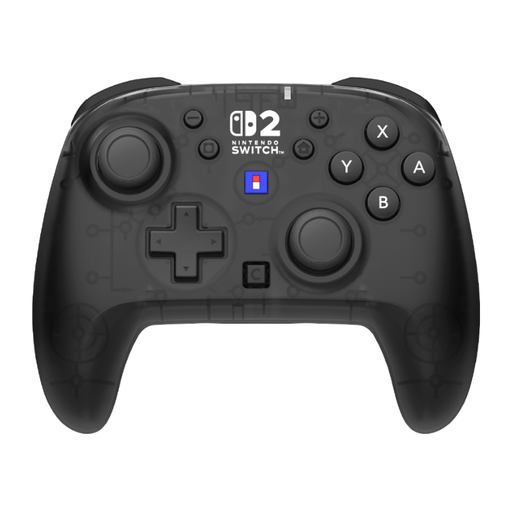
Worth considering for a supported Switch or Switch 2 game with button controls. Check support for the specific game.
The product listing mentions TMR sticks, two programmable rear buttons, USB-C charging and textured grips.
The listing states up to 40 hours of battery life and motion detection. This alone doesn’t prove that Nintendo Switch Sports supports it.
 No image available
Worth considering for a Switch or Switch 2 game that supports this model and your preferred controls.
The product listing mentions button mapping, programmable rear buttons and two profiles.
The listing mentions a gyroscope, accelerometer and up to 10 hours of battery life. These features don’t confirm that it works with a specific tennis game.
 No image available
Worth considering for a supported Switch 2 or Switch OLED game. Check whether the specific tennis game supports this controller.
The product title mentions TMR sticks, a C button and two programmable buttons.
The title states 40 hours of battery life. The product listing also mentions an included USB charging cable.
 No image available
Worth considering for a supported Nintendo Switch or Switch 2 game. Check game compatibility and your preferred play style.
The product listing mentions programmable buttons and wired, wireless and Bluetooth connections.
The listing mentions a 1500 mAh battery. This capacity alone doesn’t tell you how long the controller lasts on a single charge.
 No image available
According to Nintendo Netherlands, Joy-Con 2 is the option for supported motion controls in Nintendo Switch Sports on Nintendo Switch 2.
The product listing mentions Bluetooth, charging via the console or a charging grip, and included wrist straps.
The listing states up to 20 hours of play time per charge. Nintendo Switch 2 already comes with two Joy-Con 2 controllers and two wrist straps, so check first whether you need an extra pair.
No. Nintendo Netherlands states that neither the Nintendo Switch Pro Controller nor the Nintendo Switch 2 Pro Controller is compatible with Nintendo Switch Sports. The game also doesn’t support handheld mode.
When playing wirelessly, attach the wrist strap designed for your Joy-Con generation and hold the controller securely. Nintendo Netherlands says that Joy-Con 2 uses a different wrist strap from the original Joy-Con.
Nintendo Netherlands recommends updating your system software and controller firmware, reconnecting the controller and calibrating the motion controls, among other steps. Also check whether the game uses motion controls.
Nintendo says that you need an active Nintendo Switch Online membership to play Nintendo Switch Sports online. The Dutch PlayStation Store lists PlayStation Plus as a requirement for online play in the PS5 edition of TopSpin 2K25 shown there. Check the requirements for the specific game and mode.
The Dutch government says that the seller must offer a solution if a product is faulty. When you buy remotely from a business, you’ll often also have a 14-day cooling-off period. Whether this applies depends on the circumstances of the purchase.