
Players with a Switch tennis game
You want to play tennis using swinging motions, so first check which Joy-Con works with your game and Switch model. Nintendo UK lists the controllers supported by Nintendo Switch Sports.


First, choose a controller that works with your specific tennis game and console. For motion controls in Nintendo Switch Sports, you need a supported Joy-Con, while tennis games that use buttons require a gamepad suited to your platform. If you have few plug sockets, check whether you can charge the controller through the console, whether it uses AA batteries and which charging accessories you might need.
You want to play tennis using swinging motions, so first check which Joy-Con works with your game and Switch model. Nintendo UK lists the controllers supported by Nintendo Switch Sports.
You want to use an existing console connection or avoid needing a separate controller charger for every gaming session. Charging options vary by controller and accessory.
You play tennis using buttons on PS5, Xbox or PC and want to know which controller and connection will work with your game and platform.
Choose this option: if you play tennis using swinging motions on a compatible Switch.
Bear in mind: Nintendo says Switch and Switch 2 Pro Controllers are not compatible, and handheld mode is not supported.
Choose this option: if you play this game on Switch 2; Nintendo specifies Joy-Con 2 for racket controls.
Bear in mind: the game is for Switch 2, and Joy-Con 2 does not work with the original Switch.
Choose this option: if you play a PS5 game with traditional button controls; PlayStation lists DualSense support for the PS5 version of TIEBREAK.
Bear in mind: charging via the PS5 requires a USB connection, and this controller cannot replace a Joy-Con for Nintendo Switch Sports.
Choose this option: if your game supports an Xbox or Windows gamepad; Microsoft lists AA batteries as a power option for the Xbox Wireless Controller.
Bear in mind: AA batteries need replacing or recharging. If you’re considering another controller, such as an 8BitDo model, check that it supports your specific platform and game.
| What to consider | What should you check? | Who is this important for? |
|---|---|---|
| Controls and compatibility | Check the game title, console model and supported controller. Also consider whether you need motion controls or buttons. | I want to play tennis using motion controls and make sure the Joy-Con works with my game and console first. Around 36% of consumers prioritise suitable controls. |
| Power and charging | Check whether the console can charge the controller, whether a grip has a charging function, and which cable, batteries or charging accessories you need. | With few plug sockets, I want to know whether I can charge through my existing set-up or use batteries. Around 29% of consumers give power the highest priority. |
| Additional players | Check how many people can play in each game and mode, and how many controllers you’ll need. | I want to play with others on one system and know in advance how many compatible controllers I’ll need. Around 21% of consumers prioritise local multiplayer. |
| Gamepad for button controls | Check that the game supports the controller and that its wired or wireless connection works with your platform. | For a tennis game with button controls, I want a gamepad that works with my platform and game. Around 14% of consumers give platform and game compatibility the highest priority. |
Nintendo says Switch and Switch 2 Pro Controllers are not compatible with Nintendo Switch Sports. An unsupported controller cannot provide the intended tennis controls.
Check support for the exact game before choosing an alternative to Joy-Con.
Nintendo says the standard grip, HAC-011, does not charge. The rechargeable Joy-Con Charging Grip, HAC-012, is sold separately.
Check the grip’s model and decide in advance whether you want to charge the Joy-Con through the console or with a charging accessory.
Joy-Con 2 works with Switch 2, not the original Switch. Original Joy-Con can be used wirelessly with Switch 2, but cannot be attached to it for charging.
Check both the full controller name and your console model.
Wireless controllers may still need charging, batteries or a compatible charging accessory. Microsoft lists AA batteries and a compatible rechargeable battery pack as options for the Xbox Wireless Controller.
Check which power options are available for the exact model and whether any accessories you need are included with the controller.
Joy-Con and Joy-Con 2 are the relevant controller ranges for Nintendo tennis games with motion controls.
The Xbox Wireless Controller is a gamepad option for supported Xbox and Windows games.
DualSense is designed for supported PS5 games with traditional gamepad controls.
The Ultimate 2C Wireless is an option for certain tennis games with button controls on Windows or Android.
These controller options are suited to tennis games with motion controls or a standard gamepad. Before buying, check that the exact model works with your game and console, and that its charging method suits your set-up.
 No image available
An option to compare if you’re looking for a wireless gamepad; check that your specific tennis game supports this controller.
The product information lists Bluetooth, a rechargeable 400 mAh battery, up to 20 hours of use and play while charging. It also mentions a 6-axis gyroscope and support for Switch, Android, PS3 and iOS 13.
 No image available
This could suit you if you’re comparing gamepads with a charging dock for a supported game on PC or Switch; check game compatibility and what’s included in the bundle.
The product information lists an 860 mAh battery, a 6-axis gyroscope and Bluetooth, wired or wireless dongle connectivity. The product title says a charging dock is included in the bundle.
 No image available
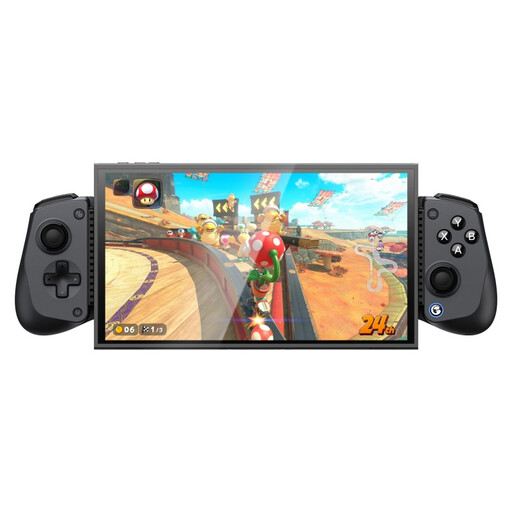
A phone controller to compare if your game and device are supported; check that your phone fits in the holder before buying.
The product information lists Bluetooth, USB-C, an 840 mAh battery and a 6-axis gyroscope. The title mentions Switch 2, Android, iOS and PC; for phone mounting, the product information specifies a compatible device length of 105–213 mm.
 No image available
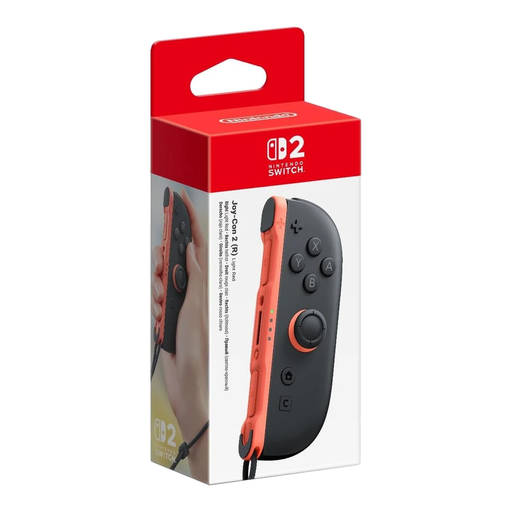
A single Joy-Con 2 right controller to compare for use with Switch 2; check that your game and mode support this controller.
The product information lists wireless use and a rechargeable 500 mAh battery. This SKU is one right controller, not a pair.
 No image available
A pair of Joy-Con 2 to compare for motion-controlled tennis in a supported Switch 2 game.
The product information lists two controllers, two wrist straps and charging via the Switch 2 console. Nintendo specifies Joy-Con 2 for the Switch 2 version of Switch Sports Resort.
No. Nintendo says that neither the Switch Pro Controller nor the Switch 2 Pro Controller is compatible with Nintendo Switch Sports. Choose a supported Joy-Con for this game.
No. According to Nintendo, the standard grip, HAC-011, does not charge; the separately available charging grip, HAC-012, does. Joy-Con can also be charged using a compatible Switch with power.
Not by attaching them to the Switch 2. Nintendo says original Joy-Con can be used wirelessly with Switch 2, but cannot be attached to it for charging. Check which charging option suits your controller and console.
Nintendo recommends always attaching the Joy-Con wrist straps when using the controllers wirelessly. Make sure you also have enough space to move around safely.
Check whether you also need the game, extra controllers, batteries or a separate charging grip. If you’re choosing a Joy-Con grip, make sure the specific model has a charging function.