Start with the exact game and console: Nintendo Switch Sports uses compatible Joy-Con configurations for motion controls, while Nintendo Switch Sports Resort is a separate game for Switch 2 that uses Joy-Con 2. For TopSpin 2K25, choose a controller that suits your PlayStation, Xbox or PC platform, and check whether you want to play locally or online. A controller with a motion sensor is not automatically a substitute for a Joy-Con required by a specific game.
Who is this choice for?
Player who wants to swing with the Switch
You play Nintendo Switch Sports on your TV and want to swing a Joy-Con to hit the ball. The required configuration for your sport and enough room to move matter more than extra gamepad buttons. Nintendo describes the Joy-Con controls for the game.
Switch 2 sports player
You want to play Nintendo Switch Sports Resort, or the original Nintendo Switch Sports on Switch 2. Check which game you have and which Joy-Con configuration is needed for your chosen sport; Nintendo distinguishes between the two games and their controls.
Tennis player who prefers buttons
For example, you play TopSpin 2K25 on PlayStation, Xbox or PC and want a gamepad that suits your platform and game mode. The platform information from PlayStation and Xbox, along with 2K’s game details, can help you narrow down your options.
What should you look for in a controller for tennis games?
Start with the exact game title and console. Then decide whether you want to swing using motion controls or need a standard gamepad with buttons.
Joy-Con motion controls
Choose this option: if you want to play Nintendo Switch Sports or Nintendo Switch Sports Resort using swinging motions.
Bear in mind: the supported Joy-Con configuration varies by game and sport; a Pro Controller is not compatible with Nintendo Switch Sports.
Standard gamepad
Choose this option: if you play a tennis game such as TopSpin 2K25 using buttons on a supported PlayStation, Xbox or PC platform.
Bear in mind: a standard gamepad is not a proven substitute for the Joy-Con controls in Nintendo’s sports games.
| What to consider |
What should you look for? |
Who is this important for? |
| Motion controls |
Check whether you need an original Joy-Con, which Switch you use and whether a wrist strap is included. |
If I want to swing my arm while playing Nintendo Switch Sports, I need to know which Joy-Con configuration my sport supports. Around 31% of consumers who put this game first prioritise motion controls. |
| Switch 2 sports game |
Check the full game title, console and number of controllers you need. |
If I’m playing Nintendo Switch Sports Resort or the original Switch Sports on Switch 2, I want to make sure I know which game and controls suit my setup. Around 31% of consumers who prioritise Switch 2 sports controls look for this information. |
| Tennis using buttons |
Compare the game’s supported platform and whether you want to play locally or online. |
If I’m playing TopSpin 2K25 on my console or PC, I want a gamepad that suits that platform. Around 23% of consumers who prioritise button-based tennis focus on this compatibility. |
| Extra controllers |
Check how many players the chosen mode supports and which controllers are already included with your console. |
If I want to play locally with others, I need to know how many compatible controllers we already have. Around 15% of consumers who prioritise local multiplayer focus on having extra controls available. |
Common buying mistakes
-
Assuming a gamepad with a gyroscope can replace a Joy-Con
Nintendo specifies particular Joy-Con configurations for Nintendo Switch Sports and rules out Pro Controllers. A sensor in another gamepad does not prove that it will work with the game.
Check support for your exact game and sport before choosing an alternative controller.
-
Confusing Nintendo Switch Sports with Nintendo Switch Sports Resort
Nintendo Switch Sports Resort is a separate game for Switch 2. The original Nintendo Switch Sports has its own compatibility requirements.
First check the full title, then confirm which console and Joy-Con configuration the game requires.
-
Buying extra controllers or a leg strap without checking the game mode
A Switch 2 comes with two Joy-Con 2 controllers and wrist straps. The restriction on Joy-Con 2 and the leg strap applies to using the leg strap, not automatically to tennis.
Count the controllers you already have and check which accessories your chosen sport mode requires.
-
Assuming the manufacturer’s warranty covers all your legal rights
The Dutch government explains that there is no fixed legal two-year warranty period in the Netherlands, and that the retailer is responsible for resolving product issues. A manufacturer’s warranty is in addition to your legal rights.
Keep your proof of purchase and contact the retailer if you have a problem.
Brands to consider
Nintendo
Joy-Con is the motion-control option for Nintendo Switch Sports; Joy-Con 2 is used with Nintendo Switch Sports Resort on Switch 2. Nintendo explains the compatibility requirements for each game.
- The right Joy-Con configuration lets you hit the ball with motion controls in supported games and sports.
- Switch and Switch 2 Pro Controllers do not work with Nintendo Switch Sports; check the requirements for your sport.
PlayStation
DualSense is the right controller option for the PS5 version of TopSpin 2K25.
- PlayStation Netherlands confirms controller vibration for the PS5 version of TopSpin 2K25.
- Adaptive triggers are a DualSense feature; no specific TopSpin tennis function has been confirmed for them.
Xbox
The Xbox Wireless Controller is designed for supported Xbox and Windows games.
- Microsoft lists support for Xbox consoles and Windows PCs.
- This platform support does not show that the controller can replace the motion controls in Nintendo games.
8BitDo
The Ultimate 2C Bluetooth Controller is an alternative for Switch games that support standard gamepad controls.
- 8BitDo lists motion sensors and Switch 2 compatibility with suitable firmware.
- Sensors and general compatibility do not confirm that the controller works with Nintendo Switch Sports or Nintendo Switch Sports Resort.
PowerA
The Enhanced Wired Controller is designed for supported Switch games with standard gamepad controls and a wired setup.
- PowerA lists a 3 m cable for use with a docked Switch.
- PowerA rules out motion controls and use with games that require Joy-Con controllers only.
Joybuy products for motion controls and gamepad tennis
This selection includes controllers for motion controls on Switch and standard gamepad controls on Switch, PC and Xbox. Check which controller works with each game. European requirements apply to wireless radio equipment, and compliant equipment should carry a CE marking, as explained by the Dutch Authority for Digital Infrastructure.
 No image available
Wireless game controller with dual vibration and gyro for Switch and PC
Could be suitable if your Switch or PC tennis game supports standard gamepad controls; a gyroscope does not automatically make it a substitute for a required Joy-Con.
The product details list Bluetooth 4.0, a 6-axis gyroscope, three vibration levels and a 600 mAh battery. They also specify a range of over 10 m and battery life of up to 10 hours.
View at Joybuy
 No image available
BEITONG KP70 Elite wireless game controller
Could be suitable if your tennis game supports standard gamepad controls on Switch, Switch 2 or PC; check compatibility with your exact game and mode.
The product details list wired, 2.4GHz wireless and Bluetooth connections, six programmable buttons and adjustable joystick damping. The model name mentions haptic triggers.
View at Joybuy
 No image available
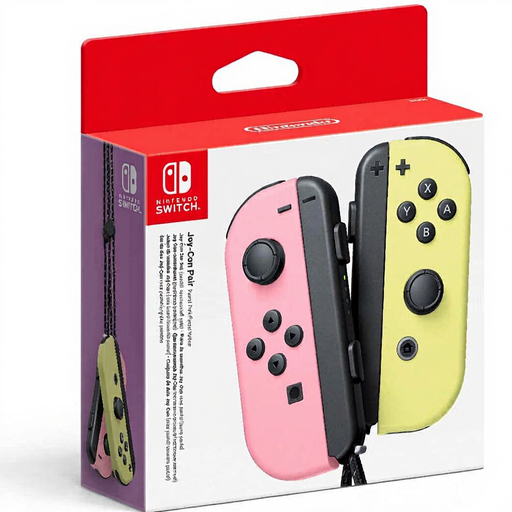
Nintendo Switch Joy-Con pair – Pastel Pink/Pastel Yellow
Could be suitable for motion controls in Nintendo Switch Sports when the chosen sport supports this Joy-Con configuration. Check the game requirements before ordering.
The product details list motion controls, HD Rumble and wrist straps. Nintendo says original Joy-Con controllers can also be paired wirelessly with Switch 2.
View at Joybuy
 No image available
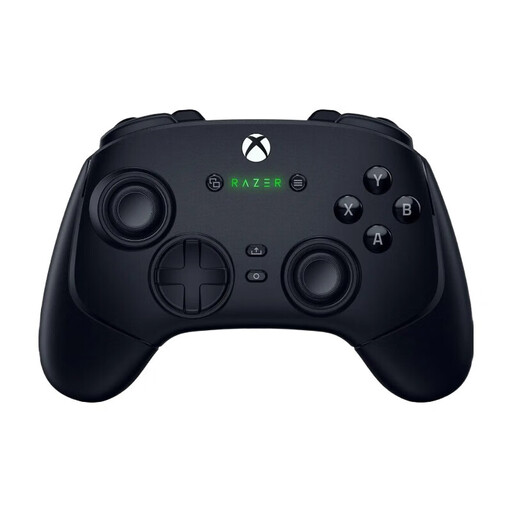
Wolverine V3 Pro – Black
Could be suitable for TopSpin 2K25 if you play the Xbox Series X or PC version and the connection you choose suits your setup.
The product details list Xbox Series X and PC, wireless use and wired use via USB-C. They also mention reprogrammable buttons and profiles.
View at Joybuy
 No image available
Nintendo Switch 2 Joy-Con 2 pair – Light Blue/Light Red
Could be suitable for motion controls in Nintendo Switch Sports Resort on Switch 2. First check whether your console already includes the Joy-Con 2 controllers you need.
The product details list two Joy-Con 2 controllers, two wrist straps, motion controls and HD Rumble 2. According to the description, they can be charged using the Switch 2 console or a separate charging grip.
View at Joybuy
Frequently asked questions
Can I play Nintendo Switch Sports with a Pro Controller?
No. Nintendo rules out both the Nintendo Switch Pro Controller and the Nintendo Switch 2 Pro Controller for Nintendo Switch Sports. Check which Joy-Con configuration your chosen sport supports.
Will Nintendo Switch Sports Resort work on my original Switch?
No. Nintendo lists Nintendo Switch Sports Resort as a game for Switch 2. It is a different title from Nintendo Switch Sports.
How do I get a motion controller ready to play on TV?
Pair the compatible controller with the console and attach the appropriate wrist strap. Nintendo recommends leaving plenty of room around you. To play in TV mode, place an original Switch in its dock; Switch Lite does not support TV mode.
Do I need an online subscription for a local TopSpin match?
No, not for the offline Exhibition mode described by 2K: you can play locally with up to three other players. According to the Dutch PlayStation game page, PS Plus is required to play online on PlayStation.
What rules apply to wireless controllers in the Netherlands?
European requirements apply to radio equipment sold in the Netherlands. The Dutch Authority for Digital Infrastructure states that compliant radio equipment carries a CE marking; this general requirement alone does not prove that a specific item complies.


